
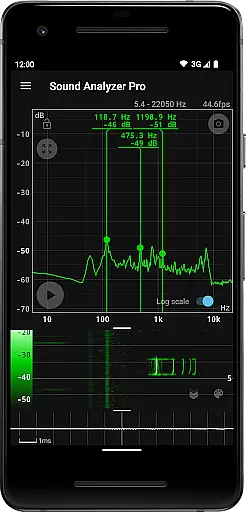
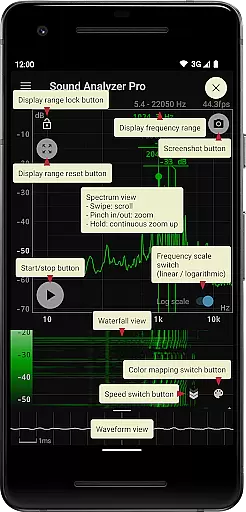
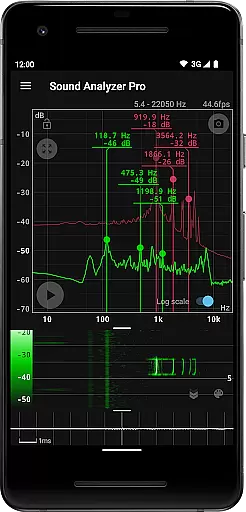
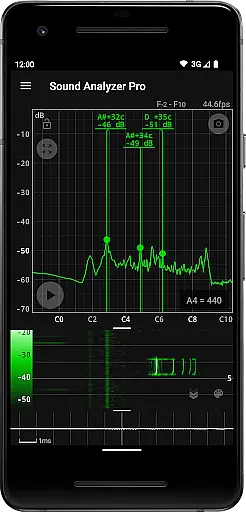
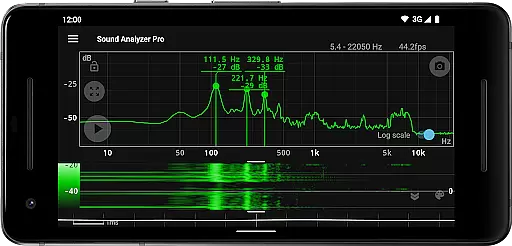
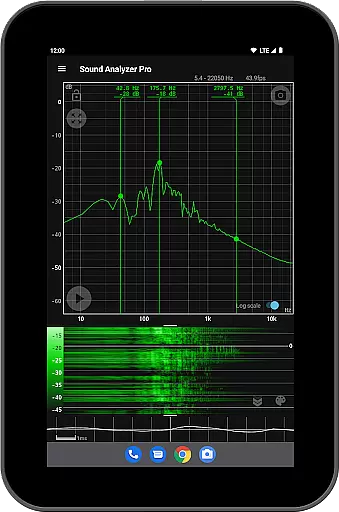
Sound Analyzer is a powerful audio analysis tool designed for both professionals and enthusiasts in the music and audio field. The app's core functionality lies in its ability to display real-time frequency (Hz) and amplitude (dB) spectra directly on your mobile device, eliminating the need for bulky external equipment. With high measurement accuracy, the error is typically within 0.1 Hz in low-noise environments.
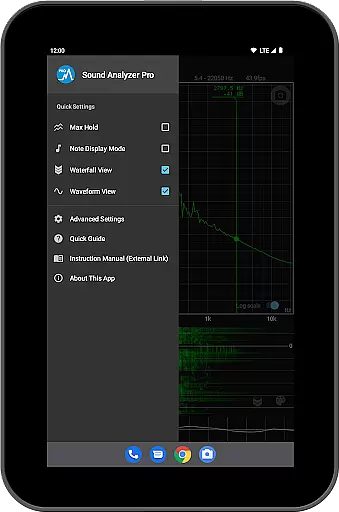
In addition to real-time spectrum analysis, Sound Analyzer offers advanced features such as waterfall views that track spectral changes over time, waveform views for visualizing sound waveforms, and a note display mode that translates frequencies into musical notes. These capabilities make it an ideal companion for tasks like tuning instruments, analyzing audio equipment performance, or conducting acoustic experiments.
This app is particularly useful for musicians, audio engineers, and researchers who require precise and portable audio analysis. By delivering professional-grade tools in a mobile format, Sound Analyzer empowers users to conduct detailed audio assessments anytime, anywhere, enhancing both creative and technical workflows.
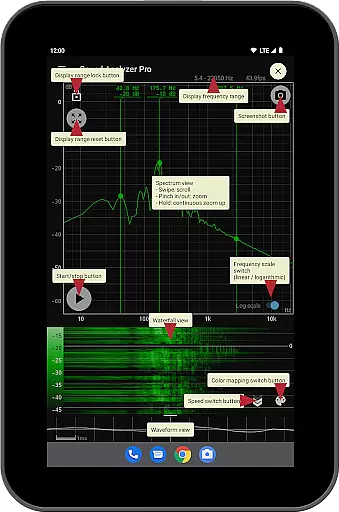
Sound Analyzer stands out with its comprehensive suite of audio analysis tools. One of its key features is the peak frequency display, which identifies and showcases prominent spectral components in real time, providing both frequency (Hz) and amplitude (dB) readings. This function is complemented by a highly intuitive touch-based interface that allows users to adjust display ranges effortlessly.
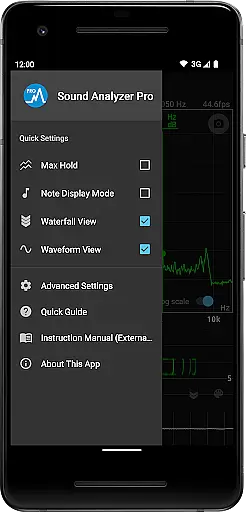
The app also supports multiple viewing modes, including a waterfall view that visualizes how spectra evolve over time and a waveform view that displays raw sound waveforms. Users can switch between logarithmic and linear frequency scales, activate the max hold function to capture transient peaks, and even enable a note display mode that translates frequencies into musical notes with error margins in cents. Additional conveniences include a screenshot function with timer support and an ad-free experience.
While Sound Analyzer performs exceptionally well within standard audio ranges, it also caters to high-performance devices by allowing frequency settings up to 96 kHz. However, users should note that most devices filter out data above 22 kHz, making higher settings suitable only for specialized hardware. Despite this limitation, the app remains a versatile and indispensable tool for anyone involved in audio analysis.
Sound Analyzer does not focus on providing a vast music library but rather emphasizes real-time audio signal analysis. This app allows users to analyze audio signals directly from their environment, displaying frequency and amplitude spectra in real time. The absence of pre-recorded music means there are no concerns regarding copyright authenticity, as the content is generated by the user's immediate surroundings.
The app supports high-frequency spectrum analysis up to 96 kHz, catering primarily to high-performance devices. While this feature doesn't contribute to a music library, it enhances the analytical capabilities for users interested in detailed audio examination. The ability to switch between logarithmic and linear scales further enriches the user experience, allowing for precise adjustments tailored to individual preferences.
Users benefit from the app's advanced functionalities without worrying about copyright issues, as all analyzed data is original and personal. The peak frequency display function ensures that prominent spectral components are highlighted, offering an insightful look into sound characteristics. With no advertisements disrupting the workflow, Sound Analyzer provides a seamless and professional-grade tool for audio enthusiasts.
Sound Analyzer excels in delivering high-quality audio analysis options, ensuring accurate measurements with minimal error margins. In relatively low-noise environments, the frequency measurement accuracy is exceptionally high, with errors typically within 0.1 Hz when using default settings. This precision makes the app suitable for both amateur and professional use, where exactness is paramount.
The app offers multiple views to enhance audio quality assessment, including waterfall and waveform displays. These features allow users to observe changes in spectra over time and visualize sound waveforms, providing comprehensive insights into audio properties. Additionally, the note display mode translates pitch into musical notes, aiding musicians and sound engineers in fine-tuning their work.
Despite its sophisticated capabilities, Sound Analyzer maintains ease of use through intuitive touch operations. Users can effortlessly adjust display ranges and toggle between different frequency axis scales. The inclusion of a max hold function and screenshot capability further empowers users to capture critical moments during analysis sessions, ensuring they never miss important details while working with complex audio signals.
High precision
Real-time analysis
No advertisements
Multiple display modes
User-friendly interface
Limited high-frequency use
Device compatibility issues
Complex for beginners
Requires quiet environment
Premium feature set

Pay Once, no monthly payment
 4.60
4.60
Simple & Intuitive Metronome
4.70
The ultimate media player for Android devices
3.90
Ultimate Sonos Controller
4.70
Smart piano keyboard, Classical to Pop, Real-time multiplayer connection!
4.20
Offline Music Player & MP3 Player.Powerful equalizer, Lyrics, Themes, Tag Editor
4.80
Simple mp3 and mp4 player with advanced features.
3.40
A complete sound package for the sound engineer or enthusiast
4.60
Versatile MP3 recorder with auto-backup to Dropbox and Google Drive
4.10
24,000 free audio books and no ads!
4.90
Tune in to the greatest hits on UK Radio | The home of Capital, Smooth & Heart.
4.90
Your song collections with lyrics and chords on Android smartphones and tablets.
4.80
Performance-Synthesizer & Multi-Track-Sequencer, polyphonic + multi timbral!
4.70
Unleash your creativity! Turn simple prompts into full fledged songs.
4.70
Equalizer, Bass Booster and Volume Booster (Eq & Bass) improve sound quality
4.30
Enjoy singing any song, no matter how high or low it is
4.30
Master Salsa Rhythm quickly and with a lot of fun!
4.30
USB audio recording and playback finally possible on Android 3.1 or higher!
3.90
Simply convert wav to mp3. Clear. Reliable. Safe.
4.3


User Reviews