
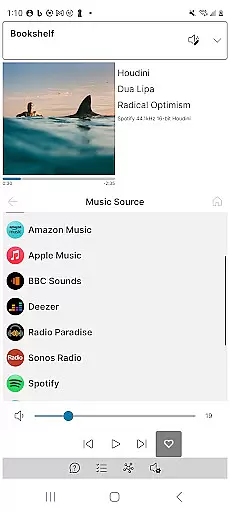
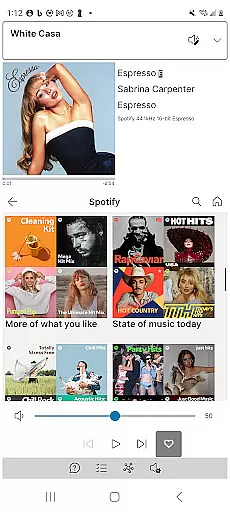
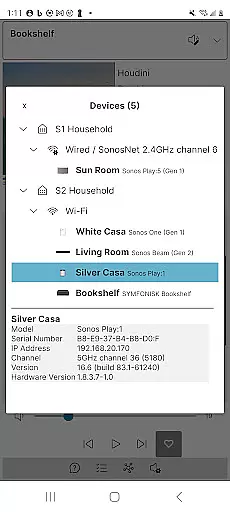
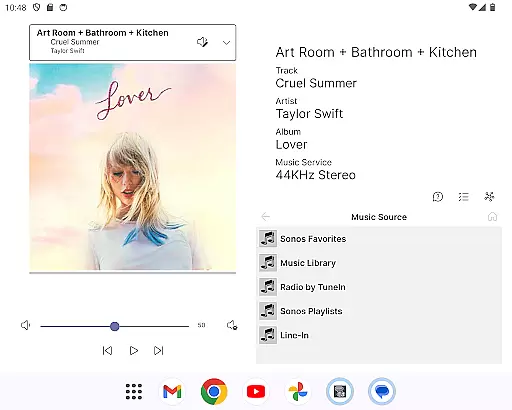
Phonos Ultimate is a powerful and reliable app designed to control your whole-home Sonos music system. It offers all the essential features you need for managing your Sonos devices, including support for over a hundred music services, local libraries, and custom station URLs. The app provides unique functionalities such as viewing device connections and track streaming data, which are not available in other apps.
This app stands out with its performance-oriented design that avoids using the Sonos cloud API, ensuring speed and reliability. It supports both S1 and S2 Sonos systems and works seamlessly across multiple systems simultaneously. Whether you're adjusting EQ settings or managing playlists, Phonos Ultimate delivers an intuitive and comprehensive experience for all your audio needs.
Phonos Ultimate boasts an extensive array of features tailored for Sonos users. You can see all your devices, rooms, groups, and music sources at a glance. The app allows you to manage volume controls for individual devices or entire groups, edit queues, save music queues as playlists, and even add direct streaming URLs as custom radio stations.
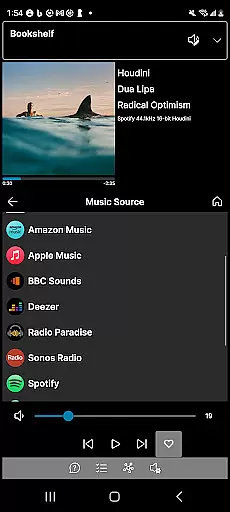
One standout feature is the Unique Devices View, which shows exactly how your devices are connected. Additionally, it displays detailed track streaming information like sample rate and bit depth if you're using the S2 system. With support for portrait, landscape, and dark modes, along with alpha-jump on large lists in Local Library, this app ensures ease of use and accessibility no matter your preference.
Phonos Ultimate offers an extensive music library that supports over a hundred music services, similar to what Sonos provides. This vast selection ensures users have access to a wide range of music genres and artists.
In addition to streaming services, the app allows for the integration of local libraries, line-in connections, and custom station URLs. This feature not only broadens the music sources but also guarantees that all content is legally accessible, respecting copyright laws.
The ability to save queues as Sonos Playlists and manage these playlists directly within the app enhances user experience by providing personalized music curation options.
Furthermore, Phonos Ultimate's commitment to not using the Sonos cloud API ensures faster access to music tracks while maintaining the integrity of copyright protections through direct streaming URLs.
One of the standout features of Phonos Ultimate is its support for high-quality audio playback. The app displays track streaming data, including sample rate and bit depth, which is crucial for audiophiles seeking the best sound experience.
Users can adjust EQ settings directly from the app, allowing for customized audio output tailored to individual preferences or room acoustics. This level of control ensures optimal audio performance across different environments.
By supporting both S1 and S2 Sonos systems simultaneously, Phonos Ultimate maintains consistent audio quality regardless of the system version, offering flexibility without compromising on sound fidelity.
Additionally, the appu2019s reliability and speed in controlling the whole-home Sonos music system contribute to uninterrupted, high-quality audio streaming throughout the home.
User-friendly interface
Comprehensive feature set
High reliability
Unique connection views
No ads or cloud dependency
Not endorsed by Sonos
Limited setup capabilities
Requires official app for initial setup
Some advanced features require S2
Android only

Pay Once, no monthly payment
 4.60
4.60
A synth that really lets you shape your sounds!
4.50
Listen to live FM radio stations, sports, music and news on global radios online
4.70
Walkout Song DJ is the most intuitive app to manage your sports music.
4.70
Advanced 10-Band Audio Graphic Equalizer Sound Booster Pro
4.30
AI Music Maker: Generate And Compose AI Tunes & AI Songs & AI Music & AI Melody!
4.60
Slow music down without changing pitch.
3.70
Responsive piano with great sounds, graphics, and songs
4.80
Get alarms that fit your lifestyle and wake up to the sounds you love.
4.80 4.70
4.70
Unleash your creativity! Turn simple prompts into full fledged songs.
4.70
Listen radio AM / FM Stations. Live AM / FM Radio App Station. Radio Com.
4.70
Manage your Sonos system directly from your home-screen!
4.40
Equalizer, Bass Booster and Volume Booster (Eq & Bass) improve sound quality
4.30
Learn and play 2M+ music tabs & chords on guitar, ukulele, bass, and more
4.30
Smart piano keyboard, Classical to Pop, Real-time multiplayer connection!
4.20
The official Sonos app
4.10
Permanently backup Now Playing. Maps, filters & listening stats.
4.00
Make music anywhere. Turn your device into an instrument.
4.3


User Reviews