
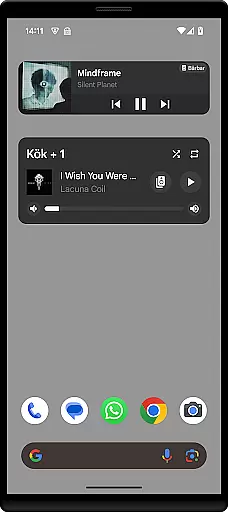
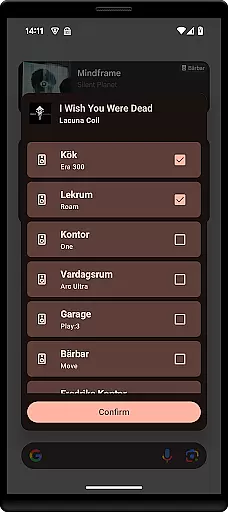
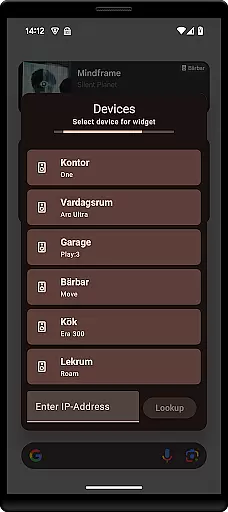
Sonos Widget is a powerful tool designed for music enthusiasts who want seamless control over their Sonos system directly from their smartphone's home screen. This app offers two distinct widget styles - Compact and Enhanced - allowing users to customize their experience based on available screen space and personal preference.
The widget provides essential features such as volume control, playback management (play, pause, next, previous), grouping of speakers, and support for playback modes like shuffle and repeat. With its intuitive interface, users can easily manage their entire Sonos ecosystem without needing to open the main Sonos app.
Whether you're hosting a party or simply enjoying music at home, Sonos Widget ensures that your audio experience remains smooth and uninterrupted. Its direct home-screen access saves time and enhances convenience, making it an ideal companion for any Sonos user looking to streamline their smart home audio management.
Sonos Widget stands out with its dual-widget offering, providing both Compact and Enhanced options to suit different user preferences and device configurations. The Compact widget delivers essential controls in a minimalistic layout, while the Enhanced version offers more detailed metadata and advanced functionality within a slightly larger footprint.
Key functionalities include precise volume adjustments, comprehensive playback controls (play, pause, next, previous), speaker grouping capabilities, and support for various playback modes such as shuffle and repeat. These features are presented in an intuitive interface that makes managing your Sonos system effortless.
Setup is straightforward; users simply need to select the Sonos Widget from their widget drawer and follow the on-screen instructions to connect to their existing Sonos setup. Once configured, the widget displays relevant metadata about currently playing tracks, enabling quick adjustments without interrupting the listening experience.
When it comes to managing your music experience, the Sonos Widget app offers a unique approach by allowing users to control their Sonos system directly from their home screen. While the app itself does not host a music library, its seamless integration with your existing Sonos setup ensures that all your music content is easily accessible. This includes popular streaming services and personal audio files, which are managed through the official Sonos app.
The widget's ability to display relevant metadata such as song titles, artists, and album art enhances the user's connection to their music library. By providing essential playback controls like play, pause, next, and previous, the Sonos Widget empowers users to manage their extensive music collections effortlessly. The inclusion of modes like Shuffle and Repeat further enriches the listening experience, catering to individual preferences.
Regarding copyright authenticity, the Sonos Widget respects the legal frameworks governing digital media by working within the established Sonos ecosystem. It relies on the official Sonos app for content acquisition, ensuring that all music played through the system is properly licensed and legally obtained. This adherence to copyright laws provides peace of mind for users who want to enjoy their music without concerns about legal issues.
Audio quality is paramount when enjoying music, and the Sonos Widget excels in delivering pristine sound through its intuitive interface. By integrating directly with your Sonos system, this app ensures that the audio output maintains the high standards set by Sonos devices. Users can expect clear, rich sound across all their favorite tracks, whether streaming from online services or playing local files.
The widget provides volume control functionality, enabling precise adjustments to suit different environments and moods. This feature allows listeners to fine-tune their audio experience, ensuring optimal sound quality at all times. Additionally, the grouping capability lets users synchronize multiple Sonos speakers throughout their home, creating a cohesive audio environment with consistent quality.
While the Sonos Widget doesn't introduce new audio formats or compression methods, it leverages the advanced audio processing capabilities of the underlying Sonos system. This means that users benefit from the same high-fidelity sound they've come to expect from their Sonos setup, now conveniently accessible from their home screen. The result is an enhanced listening experience that combines convenience with exceptional audio performance.
User-friendly interface
Customizable widget options
Comprehensive playback controls
Seamless integration with Sonos systems
Convenient home-screen access
Limited to Sonos devices
No official endorsement from Sonos
Requires separate Sonos setup
Basic design aesthetics
Dependent on network stability

Over 100 million tracks available for high quality streaming and download
 4.60
4.60
Performance-Synthesizer & Multi-Track-Sequencer, polyphonic + multi timbral!
4.70
Advanced 10-Band Audio Graphic Equalizer Sound Booster Pro
4.30
The ultimate media player for Android devices
3.90
Bass Booster & Volume Equalizer Pro improves your music and video sound quality
4.60
Help you quickly get started with Shokz headphones
4.40
Versatile MP3 recorder with auto-backup to Dropbox and Google Drive
4.10
The iconic iOS metronome app is now on Android.
3.70
Listen to offline music and sounds from all categories
4.70
Play your hearts out on TouchTunes jukeboxes & connect with fellow music lovers.
4.80
Make songs with AI! Any genre, custom lyric, song generator for music creation!
4.80
Most Advanced AI Song Generator and Music Creator. Rap, Pop, Rock, Gospel & more
4.70
AI Music Maker: Generate And Compose AI Tunes & AI Songs & AI Music & AI Melody!
4.60
A complete sound package for the sound engineer or enthusiast
4.60
A synth that really lets you shape your sounds!
4.50
A High-Precision Audio Spectrum Analysis App
4.20
A sleek, no-frills player designed for true music lovers.
4.20
Slow music down without changing pitch.
3.70
Remove ads permanently from Music Visualizer
4.4


User Reviews