
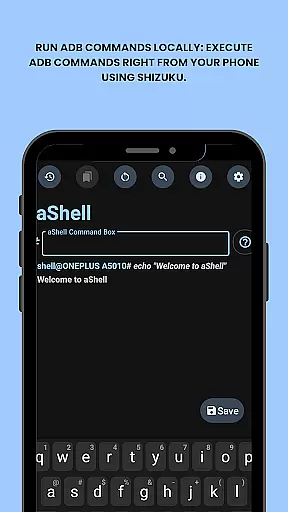
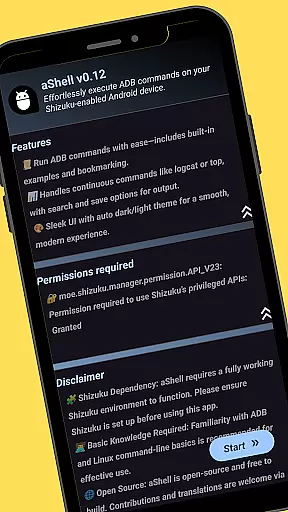
aShell is a specialized ADB shell tool designed for Android devices operating within a Shizuku environment. This lightweight, open-source application allows users to execute ADB commands directly from their mobile device, removing the necessity for a PC connection.
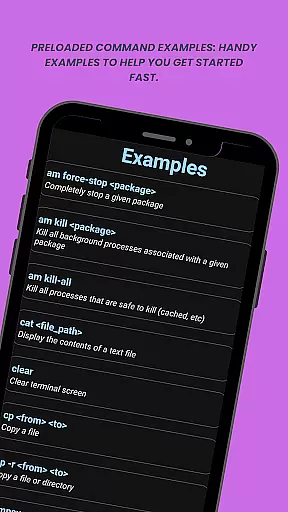
Key features include running local ADB commands through Shizuku, preloaded command examples for quick reference, and live command output support for continuous operations like logcat or top. Additionally, it offers search functionality within command outputs, saving outputs to text files, automatic dark/light mode adaptation, and bookmarking frequently used commands.
This app is particularly useful for developers and power users who require full control over their device's internals while on the go. With its comprehensive feature set, aShell enhances productivity and convenience in managing Android devices without traditional ADB setups.
aShell stands out with its unique capability to run ADB commands locally on an Android device via Shizuku, making it indispensable for advanced users. The app provides preloaded examples of common ADB commands, which helps new users quickly familiarize themselves with essential operations.
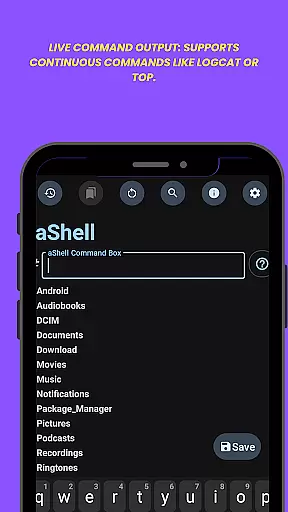
One significant advantage is the live command output support, allowing real-time monitoring of processes such as logcat or top. Users can also search within these outputs for specific information and save results to .txt files for future reference or sharing. Furthermore, aShell supports both dark and light modes, adapting seamlessly to system themes, and includes a feature to bookmark frequently used commands for easy access.
These features collectively ensure that aShell not only meets but exceeds the needs of developers and power users seeking efficient ways to interact with their device's internal systems directly from their smartphones.
aShell is designed to provide accurate and effective execution of ADB commands directly on Android devices. This eliminates the need for a PC, offering developers and power users full control over their device's internals.
The app leverages a Shizuku environment to run ADB commands locally, ensuring precision in every operation. With preloaded command examples and live command output support, users can execute continuous commands like logcat or top without hassle.
Users benefit from reliable functionality that supports complex operations such as searching within command output and saving results to a file. These features enhance productivity by allowing quick access to necessary information.
By focusing on core task accuracy, aShell ensures that each command is executed with the highest level of precision, making it an indispensable tool for those familiar with ADB/Linux command-line operations.
The interface of aShell is crafted to be simple and intuitive, enhancing user experience by providing a seamless platform for executing ADB commands. Its design eliminates unnecessary complexity, making it accessible even for users with basic ADB knowledge.
With dark/light mode support, the app adapts to the system theme, ensuring visual comfort at all times. The inclusion of handy command examples helps users get started quickly, reducing the learning curve associated with command-line operations.
Key features like bookmarking frequently used commands and exporting outputs to .txt files are integrated intuitively within the interface. This allows users to manage their tasks efficiently without navigating through complicated menus.
Overall, aShell's straightforward design ensures that users can focus on their tasks without being hindered by a steep learning curve, thus improving overall usability and satisfaction.
User-friendly interface
Live command output
Dark/light mode support
Bookmarkable commands
Open-source project
Requires Shizuku
Limited to ADB-savvy users
No standalone functionality
Dependent on external tools
Not suitable for beginners

Learn the vast amount of system information about device and monitor it's state
 4.70
4.70
Family Locator, Share location, StayConnect with your family in real time
3.90
Quickly & easily calculate the spacing of handrail balusters
4.20
An open-source APK explorer for Android!
4.10
Planner and Tracker for Stardew Valley
4.60
Quickly check the frequency of the Earth
4.30
Fast Video Downloader, Movie Downloader, Torrent Downloader & Adblock Browser
4.70
Remote Play with FSR upscaling, low latency & full controller support
4.80
Protect your device with antivirus, storage cleanup, and system monitoring
4.70
Navigate with Ease and Style
4.90
Powerful collection of electronics tools and reference.A must for any enthusiast
4.90
Easily install aab(Android App Bundle) files on your Android device with our app
4.80
Bedrock Together: Join any bedrock server on Xbox/PS
4.80
App to pay for FUTO Keyboard
4.60 4.50
4.50
Head tracking for PC sim games such as MSFS 2024 or Elite:Dangerous. No headset!
4.50
1-Click close all background apps on Android TV
3.90
Amateur Radio app for APRS: Track friends, exchange messages, get tactical info.
3.90
card-reader app
2.20


User Reviews