
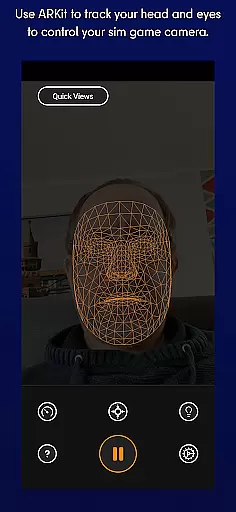
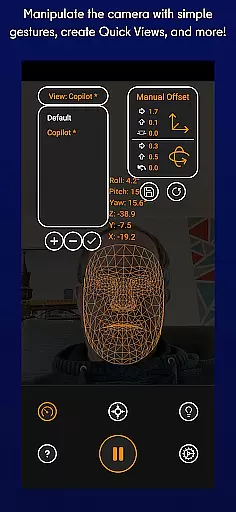
SmoothTrack is an innovative tool that leverages AR capabilities to provide 3D head tracking for sim game camera control. It supports any device compatible with Google AR Services and works seamlessly with games supporting TrackIR. The app allows users to intuitively control their gaming perspective through slight head movements, enhancing immersion in flight and driving simulators.
The application's unique feature is its ability to magnify in-game movements, enabling precise control without the need for additional equipment. Whether you're flying a plane in Microsoft Flight Simulator or maneuvering a truck in Euro Truck Simulator 2, SmoothTrack offers an immersive experience by translating your head motions into dynamic in-game camera angles.
With both dark and bright modes available, SmoothTrack caters to different lighting conditions while conserving battery life on OLED screens. This makes it not only functional but also considerate of user device maintenance.
SmoothTrack stands out with its use of AR technology for 3D head tracking, eliminating the need for extra hardware like headsets. By simply setting up your device to capture facial movements, gamers can enjoy an interactive experience where slight head tilts translate into expansive in-game views.
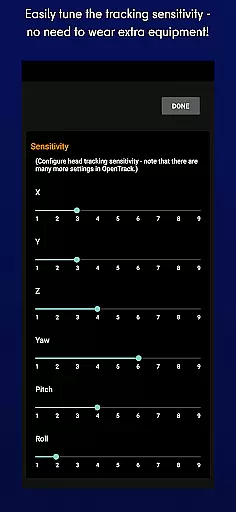
This app supports multiple simulation games including Microsoft FSX, Elite: Dangerous, IL2: Sturmovik, and more. Its compatibility extends across FreeTrack or TrackIR protocols, ensuring broad usability among popular titles. Additionally, features such as adjustable sensitivity settings allow customization of how head movements correspond to in-game actions.
For user convenience, SmoothTrack provides both Discord and email support channels. These resources help troubleshoot issues quickly and gather community feedback for future improvements, making sure every gamer gets the most out of this advanced tool.
SmoothTrack offers an innovative solution for gamers by providing precise 3D head tracking to control sim game cameras. This is achieved through the AR capabilities of your device, ensuring that even the slightest head movements are accurately captured and translated into in-game camera perspectives.
The app supports any game compatible with TrackIR, making it versatile for flight simulators like Microsoft Flight Simulator, combat games such as Elite: Dangerous, and many others. The precision of SmoothTrack allows users to intuitively explore virtual environments just by moving their heads, enhancing immersion without the need for additional hardware.
Gamers benefit from magnified in-game movements corresponding to slight real-world motions, allowing them to peek around corners or inspect cockpits with ease. This seamless interaction significantly improves gameplay experience by offering a natural way to navigate complex scenes.
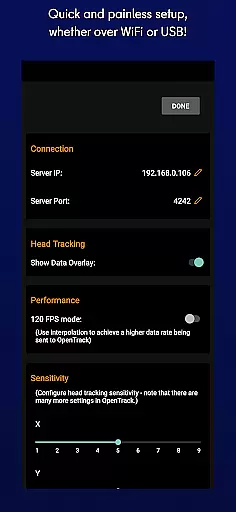
SmoothTrack excels in delivering an intuitive user interface that requires no extra equipment. By simply setting up your device to see your face, you can start controlling your game's perspective effortlessly. The straightforward setup process ensures that users can quickly begin enjoying their gaming sessions without hassle.
In addition to its easy setup, SmoothTrack includes features like dark mode to conserve battery life and protect OLED screens, alongside bright mode for optimal visibility in darker environments. These thoughtful additions demonstrate the appu2019s commitment to user comfort and convenience during extended play sessions.
With dedicated support available via Discord and email, SmoothTrack ensures that any issues or feature requests are promptly addressed. This level of customer service enhances the overall user experience, making it not only functional but also reliable and user-friendly.
Intuitive head tracking
No extra equipment needed
Wide game compatibility
Battery-saving modes
Responsive customer support
Requires Google AR services
Limited to compatible devices
May cause motion sickness
Dependent on stable internet
Learning curve for new users

 4.10
4.10
Just one-tap to easy translate in any language after calls within seconds.
4.20
1-Click close all background apps on Android TV
3.90
An easy-to-use calculator designed to save time calculating and bending conduit
4.30
VESC Tool can monitor and configure VESC-compatible devices over BLE and Wifi
4.20
Signal Strength, Mobile, Wifi, Speed Test, Bad Signals, Cellular, 5G, LTE, 4G
4.20
The Ultimate Bluetooth Keyboard & Mouse. Securely control your PC, Mac, and more
4.50
Quickly check the frequency of the Earth
4.30
Pro Emulator is an easy to use game console emulator for a range of consoles.
4.40
Excellent scientific calculator with symbolic algebra, integrals, derivatives
4.80
Unit and currency converter with easy and simple UI.
4.80
Fast Video Downloader, Movie Downloader, Torrent Downloader & Adblock Browser
4.70
HD Video player and downloader for all formats, fast & smooth 4K video playback.
4.60
Keep track of your Palia friendships, tasks, and inventory with Palia Notebook
4.60
Use your phone as a webcam on your computer over WiFi or USB.
4.40
Universal TV remote control all TVs, Roku, LG, Samsung, Fire, Vizio, Sony, TCL.
4.40
Clean up large files and similar photos, fast and easy to use
4.40
Automate everything from settings to photos, SMS to speech. ADC2 prize winner.
4.10
Family Locator, Share location, StayConnect with your family in real time
3.90


User Reviews