
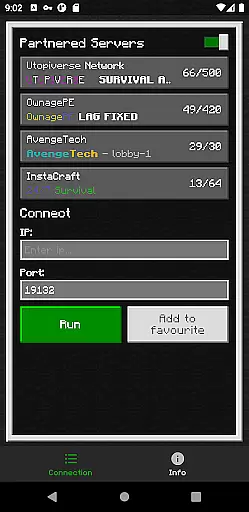
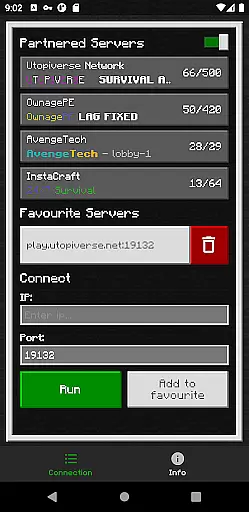
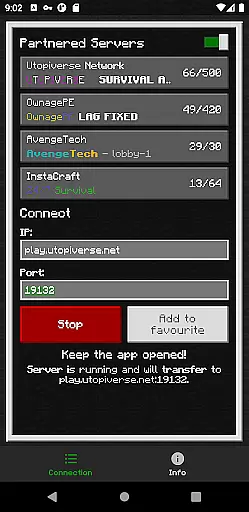
BedrockTogether (Pro) is an essential tool for Minecraft Bedrock Edition players who want to connect their Xbox or PlayStation consoles to custom servers without the need for complex DNS rerouting. This ad-free version offers a seamless experience by allowing any Bedrock Edition server to appear as a LAN server on supported gaming clients.
The app simplifies the connection process, requiring users only to input the desired server IP and port, then press 'Run'. Once connected via the game's "Friends" tab under the LAN option, users can enjoy uninterrupted gameplay. It's important to note that Realms and Nintendo Switch compatibility are not currently supported.
This application is particularly useful for players seeking a straightforward way to join multiplayer servers directly from their consoles, enhancing the social aspect of Minecraft while maintaining ease of use.
BedrockTogether (Pro) stands out with its ability to make any Bedrock Edition server visible as a LAN server on Xbox and PlayStation platforms. The app eliminates the need for DNS rerouting, making server connections simpler and more accessible for users.
Key features include an intuitive interface where users can easily enter server details and initiate connections with a single click. Additionally, the app ensures a smooth user experience by operating in the background, allowing gamers to close it once connected.
While providing these robust capabilities, BedrockTogether maintains a focus on security and privacy, ensuring that all connections remain within the local network. Users should be aware that Nintendo Switch support and Minecraft Realms integration are not available at this time.
BedrockTogether (Pro) delivers exceptional core functionality by enabling Bedrock Edition servers to appear as LAN servers on Xbox or PlayStation clients. This seamless connection eliminates the need for DNS rerouting, making server access straightforward and efficient.
The app allows users to input their desired server IP and port, then simply click the 'Run' button to facilitate a connection. By focusing on accurate IP handling and reliable network interaction, it ensures that users can effortlessly connect to multiplayer sessions via the 'Friends' tab in Minecraft Bedrock Edition.
This precision in executing its primary task makes BedrockTogether (Pro) an essential tool for gamers seeking hassle-free multiplayer experiences without the technical complexities typically associated with server connections.
With a clean and user-friendly interface, BedrockTogether (Pro) ensures that even novice users can navigate its features with ease. The design prioritizes simplicity, presenting users with an uncluttered screen where they can enter server details and initiate connections with minimal effort.
Clear instructions guide users through the connection process: input the server IP and port, click 'Run', and then proceed to the game's 'Friends' tab to connect via LAN. Such intuitive structuring significantly lowers the learning curve, allowing users to focus more on their gaming experience rather than troubleshooting connectivity issues.
This commitment to an intuitive user experience underscores BedrockTogether (Pro)'s dedication to providing a streamlined and frustration-free interface for all its users.
Easy server connection
No DNS rerouting needed
Seamless user experience
Background operation
Secure local network play
No Nintendo Switch support
Realms not compatible
Limited to Bedrock Edition
Requires same LAN
Third-party app risks

Quickly switch to an encrypted DNS server on Android TV
 4.50
4.50
Remote for Roku, Fire TV, Samsung TV, LG TV, Android TV, Chromecast and VIZIO TV
4.20
ADB support Android 4.X-Android 13(Support wireless pair mode).No root required!
4.70
An easy-to-use calculator designed to save time calculating and bending conduit
4.30
Best leveling tool for your Android device. Hang paintings like a pro.
4.90
View detailed information about your Nissan Leaf the dealer never shows you.
4.10
WiFi Signal Strength Meter help you detect WiFi Signal Strength in real time.
4.80
Support Fossify apps with a warm thank you!
5.00
The Ultimate Flex Drivers Utility App - Convenient Tapping & Block Filters
4.70
The one-and-only remote control for PC, Mac, and Linux
4.70
Protect your device with antivirus, storage cleanup, and system monitoring
4.70
Use your phone as a webcam on your computer over WiFi or USB.
4.40
Forza Tuning Calculator App for Forza Horizon 5, Motorsport and Earlier Titles
4.40
Signal Strength, Mobile, Wifi, Speed Test, Bad Signals, Cellular, 5G, LTE, 4G
4.20
Family Locator, Share location, StayConnect with your family in real time
3.90
Create your own live wallpaper or check out thousands already made presets
3.90
Unleash gamepad precision for ultimate mobile gaming dominance.
3.90
A powerful, easy-to-use flight computer on your phone or tablet!
3.80
Fun lie-detection pranks for friends and parties.
3.80


User Reviews