
Leaf Spy Pro is a specialized diagnostic tool designed for Nissan Leaf electric vehicle owners. This application enables users to monitor crucial battery information and other vehicle data through an Android device with Bluetooth, paired with a supported ELM327 OBDII Bluetooth adapter. With the introduction of version 0.39.97, Leaf Spy Pro now supports advanced Bluetooth 4.x LE adapters like LELink, offering seamless connectivity without pairing and reduced power consumption.
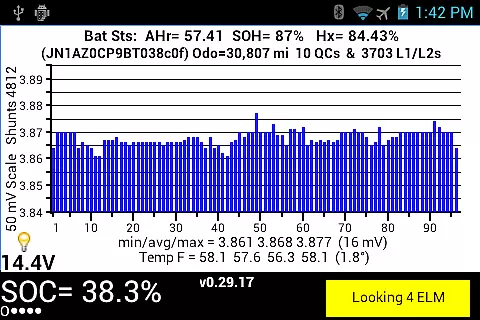
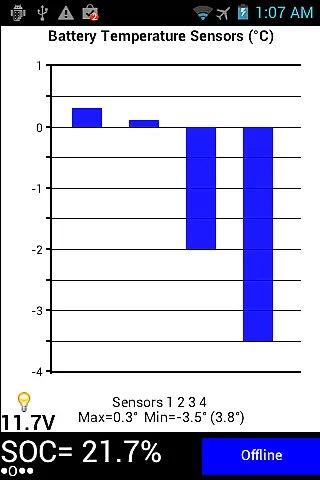
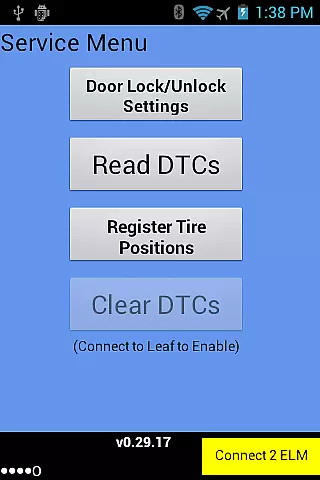
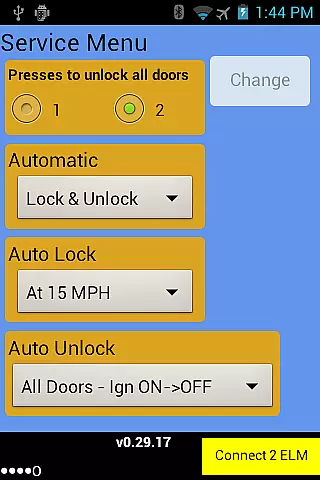
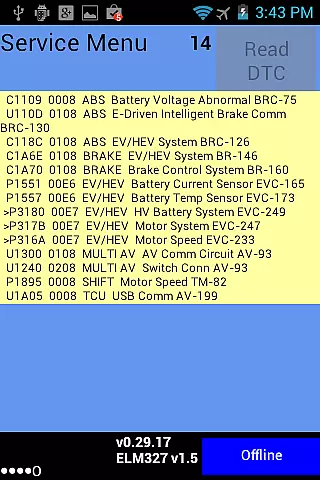
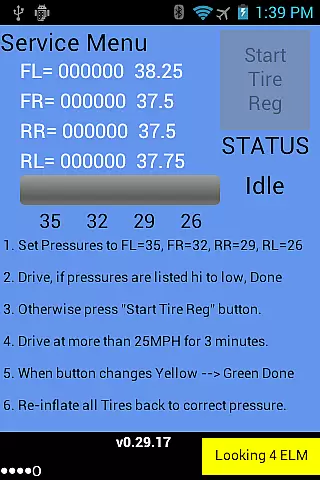
The app provides detailed insights into battery health, including voltage readings of each cell pair, temperature sensors, battery capacity in AHr, and more. It also displays essential vehicle information such as VIN, odometer readings, charge cycles, and energy usage metrics. The Pro version further enhances functionality by allowing users to perform dealer-level functions such as adjusting door lock settings, reading diagnostic trouble codes, managing tire positions, and controlling VSP sounds on compatible models.
Whether you're a tech-savvy EV owner or a professional technician, Leaf Spy Pro offers valuable tools to maintain and optimize your Nissan Leaf's performance while avoiding unnecessary dealer visits.
Leaf Spy Pro stands out with its comprehensive monitoring capabilities tailored specifically for Nissan Leaf vehicles. The app displays detailed battery diagnostics, including individual cell voltages, temperature readings from multiple sensors, and battery capacity metrics that degrade over time. Users can access critical vehicle statistics like VIN, odometer, charge cycle counts, and energy efficiency ratings.
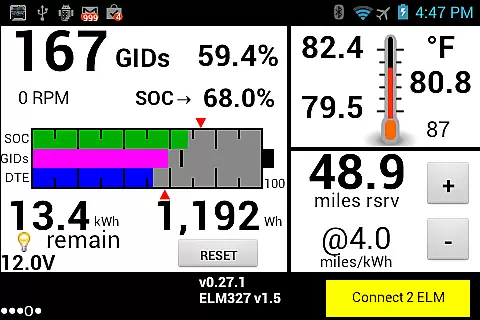
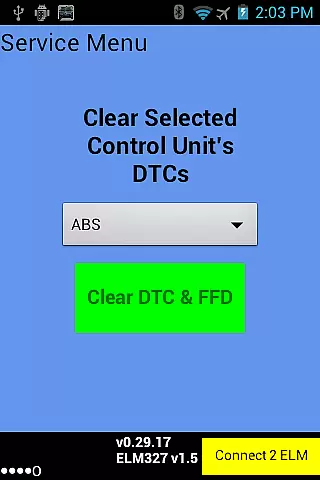
One of the standout features is the graphic display of State of Charge (SOC), GIDs, and Distance to Empty (DTE), which helps drivers plan their trips effectively. Additionally, the Pro version allows users to perform advanced functions typically requiring dealership intervention. These include changing automatic door lock settings, reading and resetting Diagnostic Trouble Codes (DTCs), registering tire positions after rotations, and controlling Vehicle Sound for Pedestrians (VSP) on select models.
For those who need detailed logs, Leaf Spy Pro includes a logging function that records most displayed data along with optional GPS location into a CSV file, making it easy to analyze trends over time using tools like Excel. This combination of real-time monitoring and advanced diagnostic tools makes Leaf Spy Pro an indispensable companion for any Nissan Leaf owner.
Leaf Spy Pro exemplifies core function accuracy by providing precise monitoring of a Nissan Leaf's battery and vehicle information. This includes detailed data such as the voltage of each of the 96 cell pairs, battery temperature readings, and the car's state of charge in GIDs and kWh.
The app effectively utilizes an ELM327 OBDII Bluetooth adapter to access this information, ensuring that the data displayed is both reliable and real-time. With features like a resettable energy usage meter and graphic displays for SOC, GIDs, and DTE, users can trust the accuracy of their vehicle diagnostics.
For owners looking to avoid unnecessary trips to the dealer, Leaf Spy Pro offers functionalities such as changing automatic door lock settings and reading Diagnostic Trouble Codes (DTC). These capabilities ensure that the app not only monitors but also maintains the vehicle's optimal performance.
Ultimately, the effectiveness of Leaf Spy Pro lies in its ability to empower electric vehicle owners with actionable insights into their car's health and efficiency, enhancing both daily driving experience and long-term maintenance planning.
Despite the technical nature of the data it provides, Leaf Spy Pro maintains an interface that balances depth with user-friendliness. The app presents complex vehicle metrics through clear graphic displays, histograms, and highlighted indicators when certain thresholds are reached or surpassed.
Users can easily navigate through various categories of information thanks to a well-organized layout that categorizes data into sections like battery status, tire pressure, and diagnostic trouble codes. This logical arrangement ensures that even those new to EVs can understand their car's vitals without feeling overwhelmed.
Additional tools such as logging functions and GPS location recording further demonstrate how Leaf Spy Pro combines advanced functionality with straightforward usability. By allowing data export to CSV files for analysis in Excel, it caters to both casual users and those needing detailed records for professional purposes.
In essence, Leaf Spy Pro transforms what could be an intimidating array of statistics into an intuitive dashboard that enhances the user's connection with their vehicle while simplifying sophisticated data management tasks.
User-friendly interface
Comprehensive battery diagnostics
Advanced dealer-level functions
Supports Bluetooth 4.x LE
Detailed logging capabilities
Requires compatible adapter
Limited to Nissan Leaf
Some features model-specific
Additional hardware cost
Complex for beginners

A powerful, easy-to-use flight computer on your phone or tablet!
 3.80
3.80
HD Camera captures every special moment.
4.60
Extremely fast, secure, and protects your privacy
4.80
A recovery soft,it features photo recovery, video recovery, file recovery.
3.40
Clean the junk files on your device
3.40
Smart and comfortable browsing experience.
3.80
The one-and-only remote control for PC, Mac, and Linux
4.70
Powerful collection of electronics tools and reference.A must for any enthusiast
4.90
fast and easy mp3 music downloader
4.80
The ultimate tool for network analysis, wifi scanning and problem detection.
4.90
Quickly switch to an encrypted DNS server on Android TV
4.50
Use your phone as a webcam on your computer over WiFi or USB.
4.40
An easy-to-use calculator designed to save time calculating and bending conduit
4.30
App that Recover your pictures, videos or files after you delete them.
4.20
Signal Strength, Mobile, Wifi, Speed Test, Bad Signals, Cellular, 5G, LTE, 4G
4.20 4.10
4.10
An open-source APK explorer for Android!
4.10
Create your own live wallpaper or check out thousands already made presets
3.90
Unlock your Essential Key. Create custom shortcuts to your favorite apps!
4.2


User Reviews