
The Everything Key is a powerful utility app designed to unlock the hidden potential of your device's hardware button. With this tool, you can remap your phone's special button to perform custom actions, significantly boosting your productivity.
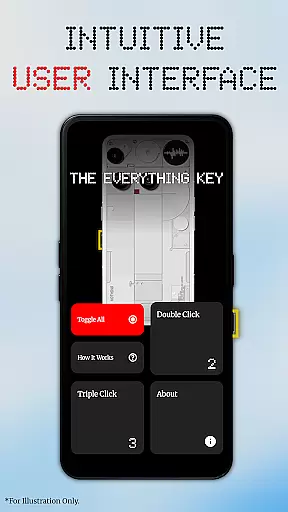
Through an intuitive interface inspired by minimalist design principles, the app allows you to assign specific functions to double or triple presses. Whether launching your camera, favorite messaging app, or most-used utility, The Everything Key puts control at your fingertips without requiring root access.
This app is particularly useful for users of specific Nothing Technology devices, offering a personalized experience that integrates seamlessly with your device’s aesthetic and functionality.
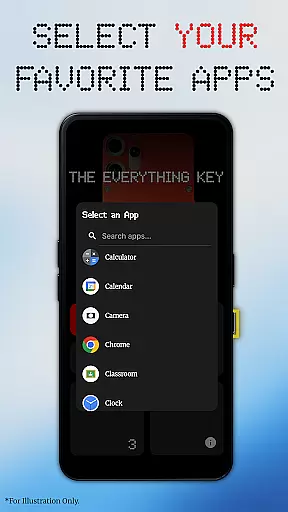
The Everything Key stands out with its powerful remapping capabilities. You can assign different apps to both double-press and triple-press actions, providing quick access to essential functions.
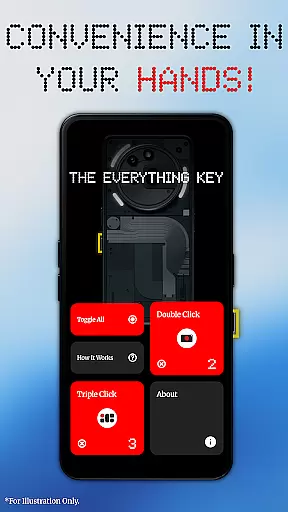
The app features an advanced control system where each mapped card can be easily enabled or disabled. The 'Toggle All' feature allows you to activate or deactivate all mappings instantly, while the 'X' icon helps permanently un-map apps you no longer need.
Privacy and ease of use are prioritized in The Everything Key. It uses Android's Accessibility Service solely to detect hardware key presses without accessing any personal information. This ensures a secure and trustworthy user experience, making it an ideal choice for privacy-conscious individuals.
The Everything Key app excels in providing accurate and effective core functionality by enabling users to remap their device's special hardware button. This feature allows for the assignment of specific actions, such as launching apps through double or triple presses, which ensures that each press is registered correctly and triggers the intended application without fail.
Through its intuitive interface, users can easily manage and view active mappings, ensuring that the assigned functions are always up-to-date and relevant to their needs. The app's ability to toggle actions on and off provides an additional layer of control, allowing for quick adjustments without the need for complex configurations.
By utilizing standard Android features, The Everything Key eliminates the need for root access or complicated setup procedures, making it accessible to a wide range of users. This approach not only simplifies the user experience but also enhances the reliability of the remapping function, as it operates within the supported framework of the operating system.
Ultimately, the effectiveness of The Everything Key lies in its capacity to transform a limited hardware feature into a versatile tool that boosts productivity. Users benefit from having instant access to their most-used applications, streamlining their interaction with the device and enhancing overall efficiency.
The Everything Key offers a clean and minimalist user interface that aligns with modern design aesthetics, ensuring that users can navigate and utilize its features with ease. The intuitive layout allows for quick identification of mapped applications and their respective actions, promoting an efficient and hassle-free user experience.
Upon first launch, the app assists users in personalizing the interface by selecting their device model and color, which results in a visually integrated background. This attention to detail not only enhances the aesthetic appeal but also reinforces the connection between the software and the hardware it controls.
Advanced control options are presented in a straightforward manner, with clear visual indicators such as the 'X' icon for un-mapping apps and the 'Toggle All' feature for managing multiple mappings simultaneously. These elements contribute to the overall simplicity of the interface, allowing users to make changes without confusion or unnecessary steps.
By focusing on simplicity and intuitiveness, The Everything Key ensures that users of all technical backgrounds can take full advantage of their device's capabilities. The app's commitment to a user-friendly design ultimately translates into a more personalized and empowering experience, where technology works seamlessly to support individual preferences and workflows.
Intuitive UI
No root required
Advanced control options
Privacy-focused design
Device-specific optimization
Limited device compatibility
Requires accessibility permissions
No direct Nothing affiliation
Potential learning curve
Specific use case

A convenient photo, video, and file recovery tool.
 4.00
4.00
Head tracking for PC sim games such as MSFS 2024 or Elite:Dangerous. No headset!
4.50
Use your phone as a webcam on your computer over WiFi or USB.
4.40
Best leveling tool for your Android device. Hang paintings like a pro.
4.90
Monitor car performance in real time and troubleshoot malfunctions.
4.80
Mirror your screen to Chromecast and Android TV - Super fast and simple
4.60
Making emulation easy for everyone!
4.30
Mobile Security with Scam Protection | Malware & Virus Cleaner | Safe Browser
4.70
Screen recorder with audio to record high-quality videos and take screenshots.
4.40
Connect wirelessly to your computer to watch movies, browse the web, play games
5.00
The ultimate tool for network analysis, wifi scanning and problem detection.
4.90
Navigate with Ease and Style
4.90
WiFi Signal Strength Meter help you detect WiFi Signal Strength in real time.
4.80
Small and simple app to Verify Root Access and BusyBox Install!
4.70
Just swipe the edge to do something!
4.40
PC precision for mobile gaming: dominate with keyboard and mouse!
4.30
pdf merge, word to pdf, jpg to pdf, edit pdf, convert to pdf and much more!
4.20
View detailed information about your Nissan Leaf the dealer never shows you.
4.10
Detect hidden spy camera with advanced scanning {{ Premium version }}
4.00


User Reviews