
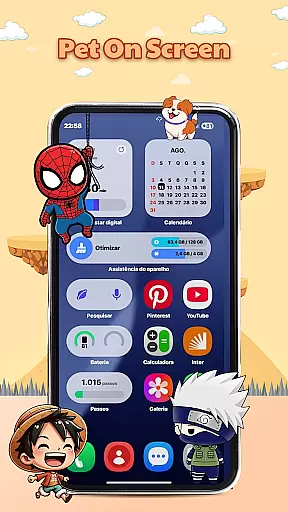
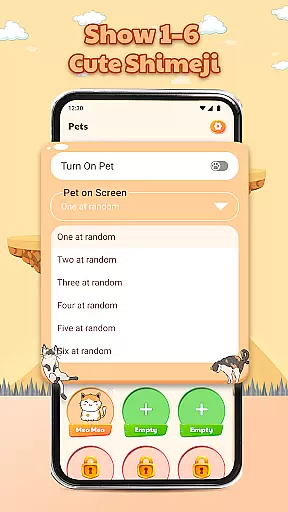
Pet On Screen - Shimeji Kawaii is a delightful personalization app that brings your phone to life with adorable animated characters. These cute, anime-style pets walk, climb, and interact on your screen, creating a lively and fun experience.
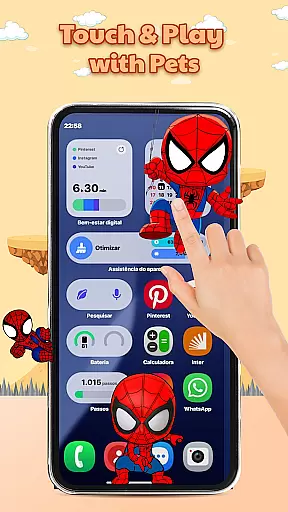
With a wide variety of charming characters to choose from, you can customize your device to match your unique style. The app offers playful interactions, allowing you to tap and hold the characters to see their funny reactions. Whether you're looking for a relaxing companion or a small dose of joy, this app delivers both personality and charm to your everyday digital experience.
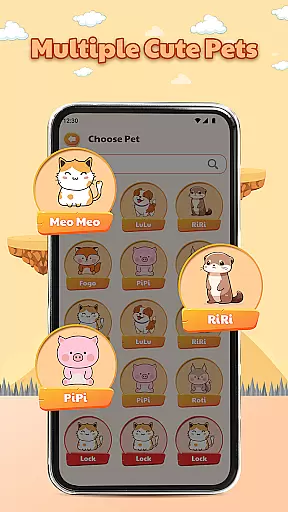
This app stands out with its collection of live mini characters that move naturally across your screen. Each character has unique animations, making your device feel truly alive. The app includes an impressive selection of cute pets in various styles such as anime, cartoon, and chibi.
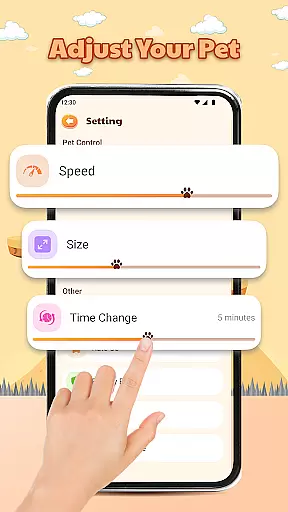
One of the key highlights is the advanced customization options. You can easily adjust the size, movement speed, and other settings to personalize the experience to your preference. These interactive pets not only enhance your screen's aesthetics but also provide a fun and stress-relieving element every time you use your device.
The playful interactions add another layer of engagement. By simply tapping or holding the characters, you can enjoy their charming and humorous responses, making your screen experience more dynamic and enjoyable.
Customization is at the heart of Pet On Screen - Shimeji Kawaii, allowing users to tailor their experience with a range of adorable characters. This app offers an extensive selection of customization options that cater to individual preferences and styles.
The app provides a variety of cute pets in anime-style, ensuring that every user can find a character that resonates with their personal taste. With different charming styles such as Cute, Anime, Cartoon, and Chibi, there's a broad spectrum of aesthetics to choose from.
Moreover, Pet On Screen goes beyond just visual selection by letting users adjust character size and movement speed. These features ensure that the chosen pet not only looks good but also moves in a way that feels natural on your deviceu2019s screen.
This level of personalization enhances user engagement by making each interaction unique. Users will enjoy a lively and fun experience every time they use their device, thanks to these comprehensive customization capabilities.
Pet On Screen - Shimeji Kawaii excels in theme compatibility, seamlessly integrating with various themes to maintain visual consistency across devices. The app ensures that its delightful characters complement any chosen theme without disrupting the user interface's harmony.
Whether you prefer minimalist designs or vibrant colorful themes, this app adapts effortlessly. Its animated buddies are designed to blend into different backgrounds while retaining their distinct cuteness and charm.
In addition to aesthetic integration, the app supports functional compatibility. This means that regardless of the theme applied, interactive elements like tap and hold reactions remain smooth and responsive.
By prioritizing theme compatibility, Pet On Screen guarantees an uninterrupted user experience where both form and function coexist beautifully. Enjoy a cohesive look and feel as your virtual companions interact playfully within your personalized digital space.
Cute animated characters
Wide variety of styles
Easy customization options
Interactive and engaging
Stress-relieving companion
May drain battery faster
Limited free options
Some features locked behind paywall
Can be distracting for some users
Occasional performance lags

Ultra realistic high quality analog watch face for Wear OS.
 4.60
4.60
Ultimate Gallery Lock App - Hide Pictures, Videos and Lock Apps Instantly!
4.60
100+ Stylish Fonts, Emojis, Symbols keyboard for Instagram & TikTok!
4.80
Vibrant Adaptive Icons with Material You and Enhanced Monet Colors.
4.50
Design your screen with unique, vibrant clocks
3.80
Choose your keyboard with RGB colors effect, themes, fonts, emojis.
4.60
One 8 icons glass color version
4.80
Handcrafted pixel art icons, widgets & wallpapers
4.60
Struggling to find apps? Use this app to locate and open any app on your phone!
2.20
Enjoy a variety of amazing live wallpapers and colorful EDGE lighting borders!
4.80
Glass style colourful icons with a One UI look and feel
4.60
Romantic Kiss Stickers App. Start romantic messaging now!
4.30
Unique Fonts, typefaces and stylish text. Fonts for Instagram, Whatsapp & others
4.20
Organize and manage your photos and videos effortlessly with Photo Gallery
4.20
More than 3000+ themes and 9000+ wallpapers for everybody!
4.10
Emoji Maker app - Design custom emojis and effortlessly blend them with Mixer
3.80
Adorable pets roam and play right on your phone screen!
3.30
Turn your lock screen into fun with smile live wallpapers & animated wallpapers!
2.50
Modern Glass Icon Pack with glossy icons, clean minimal theme & aesthetic style
4.2


User Reviews