
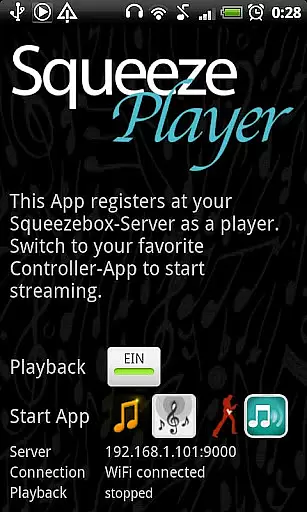
SqueezePlayer is a powerful music streaming application that transforms your Android device into a virtual Squeezebox, enabling you to stream all your Logitech Squeezebox content directly. Whether you're at home, in the car, or on the go, this app ensures your music is always with you.
The app supports various music formats including FLAC, MP3, WAV, and PCM, allowing for high-quality playback. It works seamlessly with the Logitech Media Server (formerly Squeezebox Server) to deliver your local music library, internet radio stations, and songs from popular music services like Last.FM, Deezer, and WiMP directly to your mobile device.
SqueezePlayer offers an impressive array of features designed to enhance your music streaming experience. The app streams music via WiFi or mobile connection, providing flexibility and convenience. It supports native decoding of multiple audio formats, ensuring optimal sound quality.
For users who require remote access, SqueezePlayer allows streaming over 3G by configuring your router's port settings and setting up a DynDNS service. While it doesn't function as a controller for other Squeezebox devices, it integrates well with control apps like OrangeSqueeze and SqueezeCommander, offering a seamless user experience.
Additionally, SqueezePlayer provides direct links to compatible control apps from its main screen, making it easy to manage playback across multiple devices. This integration ensures that your mobile device appears alongside other players when SqueezePlayer is active.
When it comes to streaming music, having a vast and diverse library is essential. SqueezePlayer excels in this area by allowing users to stream their entire Logitech Squeezebox content directly to their Android devices. This includes local music files, internet radio stations, and songs from various apps like Last.FM, Deezer, or WiMP.
The app supports popular music formats such as FLAC, MP3, WAV, and PCM natively, ensuring high-quality playback without the need for additional conversion. Moreover, the Squeezebox Server can transcode other file types like Ogg and mp4 to FLAC or MP3 on the fly, expanding the range of playable content.
While some services like Rhapsody, Napster, and Pandora are not currently supported due to licensing issues, Spotify can be accessed with the help of a plugin. This ensures that users have access to a wide array of music options while maintaining compliance with copyright laws.
Audio quality is paramount for an immersive listening experience, and SqueezePlayer delivers on this front. The app supports high-fidelity audio formats like FLAC, MP3, WAV, and PCM, which are decoded directly on the Android device. This native decoding ensures minimal loss of quality during playback.
For those with more specific audio preferences, the Squeezebox Server offers advanced settings under Advanced->File Types. Here, users can configure the server to transcode unsupported file types to FLAC or MP3, ensuring compatibility without compromising on sound quality.
It's worth noting that while the integrated server of the Squeezebox Touch may not offer the same level of transcoding capabilities as a full-fledged server, it still provides robust support for natively supported formats. This flexibility allows users to enjoy their music collection with confidence, knowing they're experiencing the best possible audio quality.
User-friendly interface
High-quality audio streaming
Wide format compatibility
Remote access capabilities
Seamless third-party app integration
Requires separate server setup
Limited standalone functionality
No built-in music controls
Dependent on network configuration
Potential licensing restrictions

Remove ads permanently from Music Visualizer
 4.2
4.2
Listen to live FM radio stations, sports, music and news on global radios online
4.70
Visualize the guitar fretboard, master scales & play through changes like a pro!
4.50
Bass Booster Pro takes auto-equalizing to the next level!
4.30
Bass Booster & Volume Equalizer Pro improves your music and video sound quality
4.60
24,000 free audio books and no ads!
4.90
Turn your Android phone into a professional audio analyser with up to 120 bands.
4.00
Master Salsa Rhythm quickly and with a lot of fun!
4.30
MilkDrop for Android TV
3.00
Tune in to the greatest hits on UK Radio | The home of Capital, Smooth & Heart.
4.90
Music, News & Sports Radio Tuner App. Tune in Live FM & AM Radio Stations.
4.80
Walkout Song DJ is the most intuitive app to manage your sports music.
4.70
Super Sound Editor, Song Maker & Mixer, Vocal Remover, Voice Recorder & Changer!
4.60
Learn the notes on the guitar fretboard fast with this easy and fun app
4.60
A synth that really lets you shape your sounds!
4.50
DJ Music Mixer - DJ Remix: remix songs, make beat music & record mix of DJ.
4.40
Equalizer, Bass Booster and Volume Booster (Eq & Bass) improve sound quality
4.30
Turn your phone into a musical instrument from the future!
3.90
Make music anywhere. Turn your device into an instrument.
4.3


User Reviews