
AutoPad is a powerful tool designed for musicians and audio professionals who need seamless ambient pad loops in their performances and recordings. This app provides an intuitive platform to create tasteful soundscapes that can be triggered instantly and played for as long as needed.
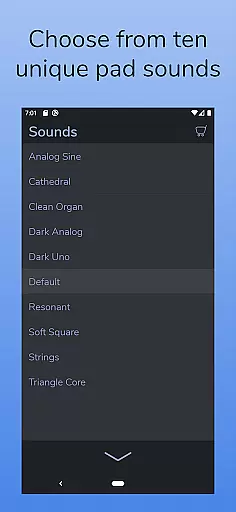
The app comes with 10 expertly crafted pad sounds, each offering a unique atmosphere across all 12 musical keys. AutoPad also supports additional sound packs and custom file imports, allowing users to expand their sound library. With features like natural crossfades, MIDI compatibility, and a built-in metronome, AutoPad ensures your band stays in sync without the need for extra equipment.
Whether you're performing live or recording in the studio, AutoPad's easy-to-use interface and professional-grade features make it an essential addition to any musician's toolkit.
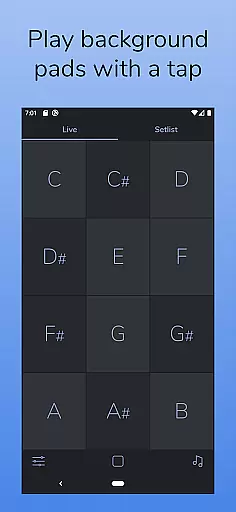
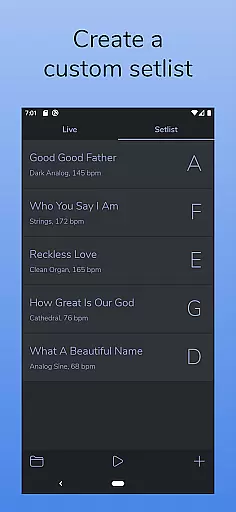
AutoPad offers two distinct modes tailored to different performance needs. LIVE mode gives instant access to all twelve musical keys, making it perfect for spontaneous performances. SETLIST mode allows musicians to prepare a customized list of songs, ensuring smooth transitions during planned sets.
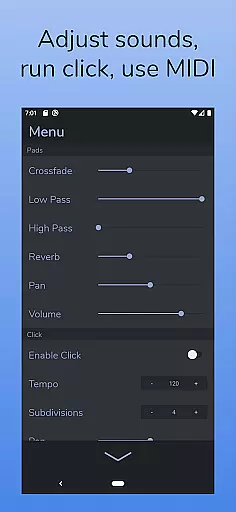
The app includes advanced audio controls such as crossfade time, dual filters, reverb amount, pan, and volume adjustments. These features provide complete control over the soundscape, enabling users to fine-tune their audio environment. Additionally, AutoPad's dark color scheme enhances visibility on stage and reduces eye strain during long sessions.
For enhanced flexibility, AutoPad supports MIDI controllers, allowing users to trigger pads with external keyboards. Although the Android version has some limitations, such as only supporting WAV files and lacking virtual MIDI, these features ensure that AutoPad remains a versatile and reliable tool for creating rich ambient soundscapes.
AutoPad offers a diverse music library with 10 carefully designed pad sounds included as part of the base application. These sounds provide unique atmospheres across all 12 musical keys, ensuring that users have ample variety for their compositions.
In addition to the default library, AutoPad allows musicians to expand their sound collection through in-app purchases of additional sound packs. This flexibility ensures that the music library can grow with the artist's needs and preferences.
While the Android version currently supports only WAV file imports, this feature enables users to incorporate personal pad files, further enhancing the authenticity and customization of their music library.
All sounds are crafted to complement live performances, providing subtle structure without overpowering lead instruments or vocals. This careful design maintains copyright authenticity while offering creative freedom.
AutoPad delivers exceptional audio quality through its meticulously crafted pad sounds. Each sound is designed to offer a tasteful soundscape that can be played continuously, making it ideal for both live performances and studio recordings.
The application features a menu that provides users with control over various audio parameters including crossfade time, two filters, reverb amount, pan, and volume. These options allow for precise adjustments to achieve the desired audio output.
With natural crossfades between keys handled automatically, AutoPad ensures smooth transitions and maintains high-quality audio playback throughout performances. The built-in metronome further enhances timing accuracy during live sessions.
Although the Android version has certain limitations regarding virtual MIDI or Bluetooth MIDI support, the overall audio experience remains robust and reliable, catering to musicians who demand professional-grade sound quality.
User-friendly interface
High-quality preset sounds
Customizable sound library
Built-in metronome
MIDI compatibility
Limited file format support
No virtual MIDI on Android
Basic sound editing tools
Subscription fees for packs
Learning curve for beginners

The Skullcandy App Experience
 3.20
3.20
10-Band Audio Equalizer, Sound / Bass Booster for Spotify Users & Music Players
4.40
A synth that really lets you shape your sounds!
4.50
Listen radio AM / FM Stations. Live AM / FM Radio App Station. Radio Com.
4.70
Smart piano keyboard, Classical to Pop, Real-time multiplayer connection!
4.20
Offline Music Player & MP3 Player.Powerful equalizer, Lyrics, Themes, Tag Editor
4.80
Slow music down without changing pitch.
3.70
Offline Tunes, Unlimited Vibes
3.90
Melody Beat: Great for travel, workouts, offline vibes, play your tunes anytime.
4.10
Voice recorder - Audio recorder. Best recorder for recording
4.90
Tune in to the greatest hits on UK Radio | The home of Capital, Smooth & Heart.
4.90
AI Music Maker: Generate And Compose AI Tunes & AI Songs & AI Music & AI Melody!
4.60
Help you quickly get started with Shokz headphones
4.40
Ringtone Maker is free app create ringtone from music files or your recording.
4.40
Bass Booster Pro takes auto-equalizing to the next level!
4.30
Next generation modular control surface
4.10
Versatile MP3 recorder with auto-backup to Dropbox and Google Drive
4.10
The Cubase remote control app
3.60
Simply convert wav to mp3. Clear. Reliable. Safe.
4.2


User Reviews