
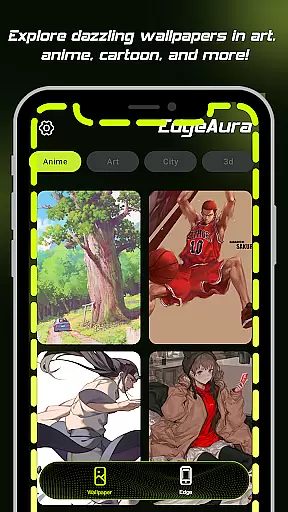
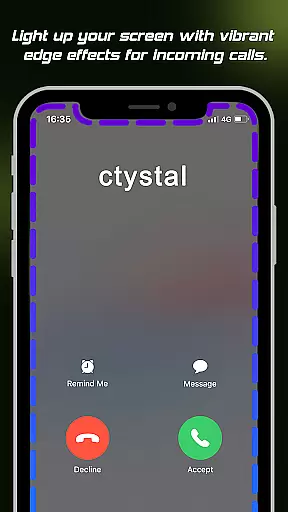
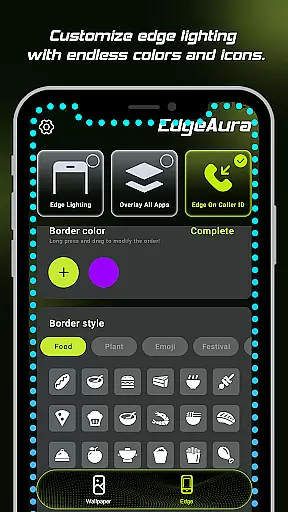
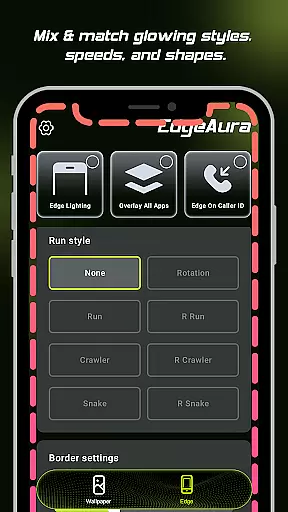
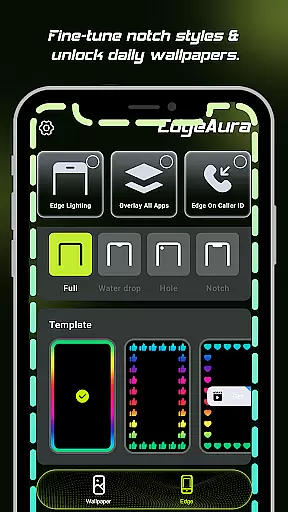
EdgeAura is a personalization app that enhances your device's visual appeal with stunning edge glow effects and live wallpapers. The app allows users to customize their screen edges with vibrant, floating light overlays that react to activities like incoming calls. This creates a dynamic and immersive experience that works seamlessly over other applications.
The app offers extensive customization options for the edge glow, including color, width, and intensity settings. Additionally, it provides a regularly updated library of high-quality live wallpapers. EdgeAura requires Accessibility Service permission solely to enable its core features without compromising user privacy or security.
This app is ideal for users who want to personalize their device with unique visual effects while maintaining full functionality. It transforms an ordinary phone into a visually striking gadget through innovative design and practical utility.
EdgeAura stands out with its Dynamic Edge Glow feature, allowing users to create a customizable aura of light around their screen edges. Users can adjust the color, width, and intensity of the glow to match their personal style and wallpaper, ensuring a unique look for every device.
The Floating Overlay Effect ensures that the glow remains visible over other apps without interfering with normal usage. This creates a continuous visual experience that enhances the overall aesthetics of the device. Additionally, the Incoming Call Alert feature lights up the screen edges during calls, offering a modern notification method.
EdgeAura also boasts an Extensive Live Wallpaper Collection, providing users with a wide variety of animated wallpapers. These are regularly updated, allowing users to refresh both home and lock screens instantly. The app prioritizes user privacy by using Accessibility Service permissions responsibly, focusing solely on delivering its innovative visual features.
EdgeAura offers a wide array of customization options that allow users to tailor their device's visual experience according to their preferences. The app provides dynamic edge glow effects which can be personalized in terms of color, width, and intensity, ensuring that each user can create a unique look that complements their style and wallpaper.
The level of personalization extends to the live wallpapers, where users have access to an extensive collection of high-quality, animated wallpapers. This library is regularly updated, offering fresh content that keeps the device's home and lock screens vibrant and engaging. With these features, EdgeAura ensures that personal style is not only maintained but constantly refreshed.
Moreover, the floating overlay effect is designed to work seamlessly over other applications without disrupting the normal use of the phone. This means that users can enjoy a consistent and immersive visual experience throughout their day-to-day activities, making every interaction with their device a delightful one.
By providing such diverse customization options, EdgeAura empowers users to express their individuality and truly make their devices a reflection of their personality. Whether it's through subtle changes or bold statements, the app delivers a deeply personalized experience that stands out in the Personalisation category.
Theme compatibility is at the heart of EdgeAura's design philosophy, ensuring that its stunning visual effects harmonize with the overall aesthetics of any Android device. The app's edge glow effects are crafted to elegantly outline the screen's edges without clashing with existing themes or wallpapers, delivering a cohesive look that enhances the deviceu2019s appearance.
Users will find that EdgeAura's glowing auras are versatile enough to complement both light and dark themes, adapting smoothly as they switch between different modes. This adaptability guarantees that no matter what theme is active, the visual enhancements provided by EdgeAura remain consistently impressive and unobtrusive.
In addition to aesthetic harmony, EdgeAura also maintains functional consistency across various themes. Its incoming call alert feature lights up the screen edges in a chosen color, serving as a modern notification system that works uniformly regardless of the current theme settings. This ensures that users receive important alerts in a visually appealing manner at all times.
With its commitment to theme compatibility, EdgeAura proves itself as an indispensable tool for users seeking to enhance their device's visual appeal while preserving the integrity of their chosen themes. By blending functionality with style, EdgeAura sets a new standard for personalization apps on Android devices.
Unique edge glow effects
Customizable light settings
Wide selection of live wallpapers
Privacy-focused design
Seamless overlay integration
Requires accessibility service
Potential battery drain
Limited to Android devices
May not work with all apps
Interface could be complex

A Colorful and Minimal icon pack in an Outline Style - Over 13,600 icons!
 4.70
4.70
Capture moments that pass like a storm, second by second.
4.0
Ultra realistic high quality analog watch face for Wear OS.
4.60
A launcher for Samsung Good Lock and Good Guardians modules without ads
4.70
Over 28,000 high quality icons to bring color & homogeneity to your phone.
4.60
Aesthetic Widgets, HD Wallpapers, Themes in Mico Widget for Home and Lock Screen
4.50 4.50
4.50
Icons made of colorful linear lines
4.60
Handcrafted pixel art icons, widgets & wallpapers
4.60
Stylish Pink Cute Hippo keyboard with 10000+ customized keyboard themes!
4.60
Zip lock screen with magic wallpaper to decorate your phone with fun zipper lock
4.60
Beautiful realistic hybrid watch face with numerous customization options.
4.50
Try creating your own keyboard with "Keyboard theme for android" app now!
4.50
200+ Material Inspired Widgets
4.50
Art & Emoji Keyboard with Cool Fonts, Cute Themes and Custom Designs.
4.40
Transform your device in a game console
4.40
Realistic animated snow on your wrist, with 10 images landscapes to choose from
4.00
HappyLighting is a Bluetooth lamp control software.
3.40
Adorable pets roam and play right on your phone screen!
3.30


User Reviews