
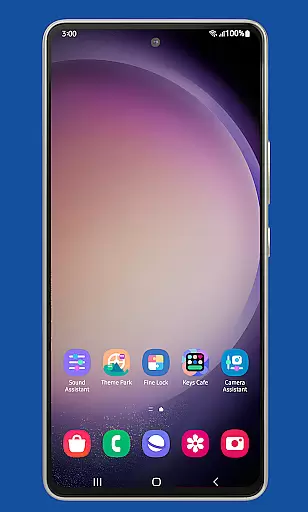
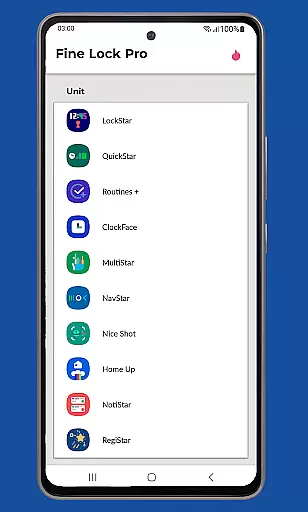
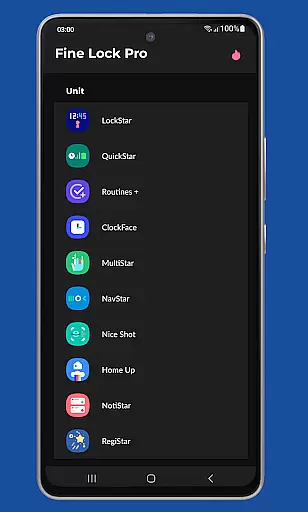
Fine Lock is a specialized launcher designed exclusively for Samsung devices running official One UI, enabling users to access and utilize Good Lock and Galaxy Labs modules. This app bridges the gap for users in regions where these customization tools are not readily available through the Galaxy Store.
With Fine Lock, users can enjoy advanced customization features on their Samsung devices, even if they are outside supported markets. The app provides essential functionalities like module shortcuts, update checks, and dynamic wallpapers, making it an indispensable tool for Samsung power users seeking enhanced control over their device's interface and performance.
Fine Lock offers a range of powerful features tailored for Samsung device owners. The app acts as a gateway to Good Lock and Galaxy Labs modules, allowing users to install and manage these customization tools effortlessly. Key features include creating shortcuts for module apps on the home screen and background checks for updates to ensure modules are always current.
Additional PRO features enhance the user experience further. Users can hide uninstalled modules for a cleaner interface and enable dynamic wallpapers that adapt to the device's Dark or Night mode settings. These features collectively provide a seamless way to personalize and optimize the Android experience on compatible Samsung devices.
Fine Lock offers a unique approach to personalizing Samsung devices by acting as a launcher for Good Lock and Galaxy Labs modules. These modules provide a wide array of customization options, allowing users to tailor their Android experience on Samsung devices running official Oreo and One UI.
With Fine Lock, users can access features such as module app shortcuts on the home screen and dynamic wallpapers that adapt to the device's Dark/Night modes. This requires Android 9 or later and scheduled Dark/Night mode settings, enhancing the visual experience based on user preferences and system settings.
The app is specifically designed for Samsung devices with official Samsung's Android 8 and Android 9+ with One UI, ensuring that these customization features are compatible and function correctly within the intended ecosystem.
By providing these advanced customization options, Fine Lock empowers users to create a personalized and optimized interface that caters to their individual needs and aesthetic preferences, thus enriching their overall device interaction.
Theme compatibility is at the heart of Fine Lock's functionality, ensuring that all visual customizations are seamlessly integrated into the user's Samsung device. As a solution tailored for Samsungu2019s One UI, it maintains high standards of theme coherence across the system.
Users of Fine Lock can enjoy themes that are not only visually appealing but also consistent with the design language of Samsungu2019s software environment. This includes support for dynamic wallpapers that change according to the deviceu2019s Dark/Night mode, offering a cohesive look and feel.
It is important to note that Fine Lock does not support devices running AOSP OS builds like LineageOS, focusing its compatibility on official Samsung firmware to maintain the integrity of theme applications and avoid potential system conflicts.
By concentrating on theme compatibility within the Samsung ecosystem, Fine Lock ensures that users experience a harmonized and uninterrupted visual presentation, reinforcing the importance of a seamless thematic experience across their device.
Exclusive Samsung support
Dynamic wallpaper feature
Background update checks
Customizable home screen
Trusted APK sources
Limited to Samsung devices
No direct module downloads
PRO features require purchase
Potential compatibility issues
Market region restrictions

A retro cartoon style watch face and a punch right in the face of the copyright
 4.60
4.60
Wear Os Watch Face - Seasonal - Animated Snow Effect - 9 Animals
4.20
Personalize your phone with stunning HD and 4K wallpapers!
4.70
Ultimate widget creator. Design custom widgets for a truly unique home screen!
3.90 4.50
4.50
Customize your home screen with stunning themes, blur, widgets & icons.
4.60
Transform your device in a game console
4.40
set a new experience for the Android mobile phone
4.20
Amazing letter fonts in your messages and social statuses
4.70
Enjoy a variety of amazing live wallpapers and colorful EDGE lighting borders!
4.80
Vertically oriented rectangular icons
4.70
Bring adorable pets to life on your screen. Playful, interactive and full of fun
4.60
Over 28,000 high quality icons to bring color & homogeneity to your phone.
4.60
Want to make your phone more special than ever?
4.60
Icons made of colorful linear lines
4.60
Color phone with cool effects for call screen, flash alert & ringtones music
4.50
Yandex Browser — stylish and secure, with voice search and data compression
4.40
Unique Fonts, typefaces and stylish text. Fonts for Instagram, Whatsapp & others
4.20
Your go to Weather App & Home Screen. Get your weather at a swipe of a finger!
3.80


User Reviews