
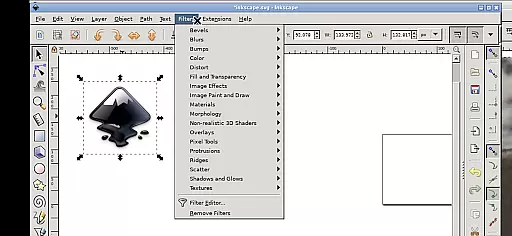
Inky is a feature-rich vector graphics editor that brings the full functionality of Inkscape to your Android device. This app allows users to create and edit vector images in Scalable Vector Graphics (SVG) format, with support for importing and exporting other file types. It offers professional-grade tools for rendering primitive shapes, text manipulation, and raster image tracing.
The application supports advanced editing capabilities such as transformations, transparency adjustments, and gradient fills. Its intuitive touch-based interface enables precise control through tap, pinch, and slide gestures. Whether you're a designer working on detailed illustrations or someone who needs to make quick edits, Inky provides a versatile platform for all vector graphic needs.
Inky stands out with its comprehensive set of design tools tailored for mobile use. The app maintains all core features of desktop Inkscape, including shape creation, text editing, and gradient management. Users can manipulate objects through transformations like rotation, scaling, and skewing, all optimized for touchscreen interaction.
One of the key innovations is its seamless integration with Android's file system. Through direct access to directories like Documents and Pictures, users can work on files without cumbersome import/export processes. The app also supports external keyboards and styli, making it suitable for both tablets and smartphones. These features, combined with its open-source nature, make Inky a powerful tool for designers on the go.
Inky offers a comprehensive suite of creative tools that cater to both professional designers and hobbyists. The app provides full-featured vector graphics editing capabilities, allowing users to create intricate designs with shapes such as rectangles, ellipses, polygons, arcs, spirals, stars, and even 3D boxes.
Users can fill these shapes with solid colors, patterns, or gradients and adjust the transparency for unique visual effects. Inky also supports text manipulation, enabling designers to integrate typography seamlessly into their artwork.
One of the standout features is the ability to import, embed, and trace raster graphics, transforming ordinary photos into stunning vector images. This flexibility ensures that artists are only limited by their imagination.
The manipulation tools within Inky allow for precise transformations including moving, rotating, scaling, and skewing objects. These robust features ensure that every design need is met with accuracy and ease.
Inky excels in providing canvas and format flexibility, ensuring that users can work on projects of varying sizes and complexities without limitations. The app supports Scalable Vector Graphics (SVG) as its primary format, which is ideal for creating high-quality vector images that maintain clarity at any scale.
Beyond SVG, Inky allows for the import and export of various other file formats, making it versatile for different project requirements. Whether you're designing for web, print, or multimedia, Inky's adaptable canvas settings have got you covered.
Artists will appreciate the seamless integration with Android's file system, where useful links in the home directory provide easy access to Documents, Pictures, and more. This eliminates the cumbersome process of importing or exporting files manually.
Additionally, Inky's interface is optimized for tablets and stylus use but remains functional on smaller phone screens. With pinch-to-zoom, pan, scroll, and tap-based interactions, users can manipulate their canvas intuitively, enhancing both productivity and creative freedom.
User-friendly interface
Full-featured vector editor
Seamless file access
Touchscreen optimized
Open-source software
Steep learning curve
Performance may vary
Limited right-click options
Requires restart for scaling
No native Android UI

Floor Plan Creator lets you create, edit and share floor plans.
 4.00
4.00
Apply cartoon, caricature, and portrait effects to make your photos stand out!
3.60
Text to Image, Image to Video & AI Chat
4.20
Unleash your drawing and painting potential
4.50
Turn your drawings into flipbook-style animations with simple creative tools
4.60
Share the joy of painting with ibis Paint! Drawing anime and manga art.
4.50
Beauty Camera - Selfie Camera is the ultimate beauty camera and selfie app
4.30
Just trace a projected picture on paper and color! Draw & Paint with AR drawing
4.40
How to draw anime step by step for beginner easily by AR drawing sketch & paint.
3.60
Create stunning art with AI.
4.80
Learn how to draw with step-by-step tutorials, fun lessons & multiplayer drawing
4.70
Convert image to JPG PNG HEIC PDF, support almost all kinds of image formats
4.70
Digital, Abstract, Classic - all types of color wheels in one app!
4.60
Photo editor for art, avatars, filters & fun transformations.
4.60
Sketch, trace and master AR drawing with awesome anime art!
3.30
Draw anime easily with AR guidance, sketch templates & trace tools!
3.10
Art of Combination Wear OS Watch faces (for Wear OS 5+ devices)
3.00
Premium version of Shimeji-ee app with no ads & no limit active shimeji
4.4
Art of Combination Wear OS Watch faces
4.2


User Reviews