
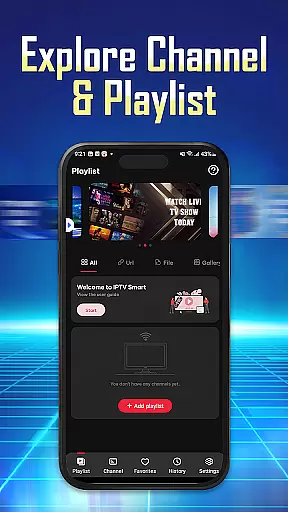
IPTV Player - Smarters Watch TV is a versatile media player designed for seamless streaming of live TV channels, sports events, and an extensive library of movies. This application allows users to enjoy high-definition content anytime, anywhere, making it ideal for those seeking an all-in-one entertainment solution.
With its user-friendly interface, IPTV Player supports M3U and M3U8 playlists, enabling effortless channel management and quick access to preferred content. Whether you're using a phone, tablet, or Android TV, this app ensures a personalized and flexible viewing experience tailored to meet diverse streaming needs.
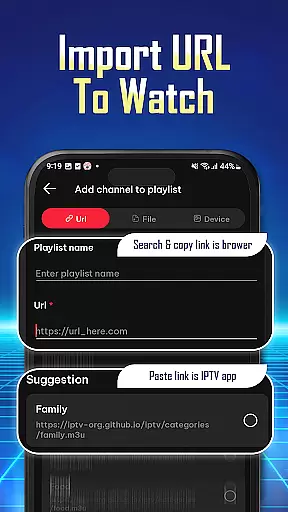
IPTV Player offers a robust set of features that enhance the streaming experience. Users can import playlists easily via URL or file, stream content in high-definition, and even watch on multiple devices simultaneously with a single IPTV account. The app's integrated player ensures uninterrupted viewing, providing a reliable platform for enjoying your favorite shows.
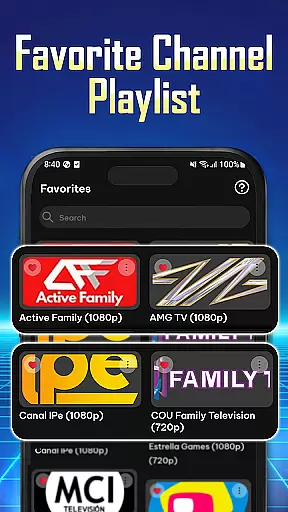
Additionally, IPTV Player allows users to organize their preferred channels and movies for quick access. Its wide compatibility with various devices, including phones, tablets, and Android TV, makes it a flexible choice for different users. With options to review playback history and save favorites, the app delivers a personalized and efficient navigation experience.
Video format compatibility is a crucial feature for any video player application, ensuring that users can enjoy content in various formats without technical hindrances. IPTV Player - Smarters Watch TV excels in this area by supporting both M3U and M3U8 playlist formats, which are commonly used for streaming live TV channels and on-demand content.
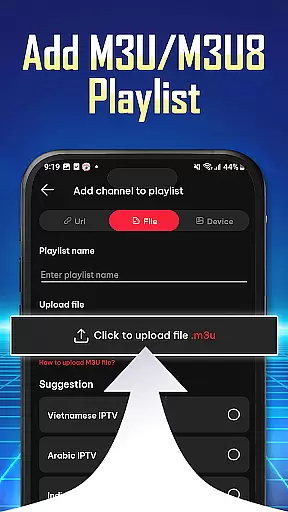
The app's ability to handle these formats allows users to import playlists easily using a Playlist URL or by adding M3U/M3U8 files directly. This flexibility ensures that regardless of the source or type of content, users can stream their favorite shows, live sports, and movies seamlessly.
For users, this means an uninterrupted entertainment experience with high-definition quality streams accessible anytime, anywhere. The wide compatibility with different video formats also extends to multiple devices including phones, tablets, and Android TV, making it versatile for diverse viewing preferences.
Ultimately, the robust video format compatibility of IPTV Player enhances user satisfaction by providing a reliable and adaptable platform for all their streaming needs.
While IPTV Player - Smarters Watch TV focuses primarily on streaming capabilities, AI-powered editing features could enhance the overall user experience by offering advanced functionalities such as automated content tagging, scene detection, and personalized recommendations based on viewing habits.
Although not explicitly detailed in its description, potential integration of AI technologies might enable users to organize preferred channels, shows, and movies more efficiently. For instance, AI algorithms could analyze user interactions to suggest relevant content or optimize channel organization for quicker access.
This technological advancement would provide a more tailored experience where viewers can effortlessly find and save their favorite programs. Additionally, seamless navigation through AI enhancements would ensure that users spend less time searching and more time enjoying their selected media.
Incorporating AI-powered editing features into IPTV Player could significantly elevate its utility beyond basic playback functions, positioning it as a comprehensive solution for modern digital entertainment needs.
User-friendly interface
Supports HD streaming
Compatible with multiple devices
Easy playlist management
Seamless multi-device streaming
No pre-installed channels
Requires manual playlist setup
Limited offline functionality
Dependent on internet speed
Ads in free version

The smartest M3U IPTV Player your playlists have ever seen.
 4.2
4.2
HD Video player all format, HD Videos, Cast & Subtitle. No annoying ads.
4.60
You can play SWF format file!
2.50
Support 1000+ Video Format, Subtitle Download, mp3 & Background Play, Cast On TV
4.60
1)AirPlay/DLNA Mirroring/Streaming, up to 4 connections; 2)Samba/NAS/DMS Player.
4.00
Video Downloader, Multiple Resolution Options, Video Player
4.50
Manage your IPTV live channels and VOD playlists (no playlist included)
3.80
Web Browser for LG TV to stream webvideos, online movies and livestreams in HD
4.20
Capture the moment and Cut
3.40
#1 Torrent App on Android ** No Ads Ever + Battery Saver **
4.80
AI Video Editor with Music, Filter, Slideshow, Effect, Merge & Trim Video.
4.80
Download Hub, easy and private way to download and enjoy your videos offline
4.80
All in one HD video downloader & player for multiple formats with full privacy
4.70
Photo and Music Video Creator into Stunning Videos—Effortlessly
4.40
IPTV-Smarters Player Pro M3U - Watch Live Stream TV Channels with Chromecast
4.00
Fast private browser with secure, seamless access & supported video downloads!
4.00
Cast to Smart TV, Fire TV. Cast video, photo - Fast & Stable!
3.90
Save photos and videos from social apps in one tap.
3.60
This app is an emulator of some specific IPTV boxes
3.50


User Reviews