




XPlay Browser is a cutting-edge mobile application designed for users seeking a fast, private, and video-focused browsing experience. This browser stands out with its lightweight design, ensuring smooth performance even on older devices. It offers quick page loading, a clean user interface, and seamless navigation, making everyday browsing comfortable and efficient.
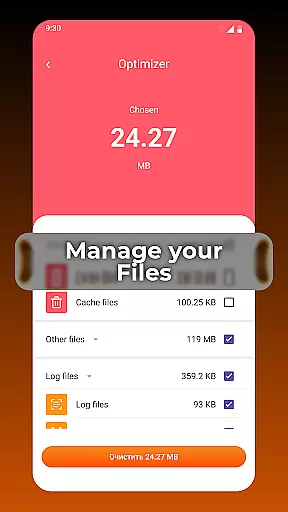
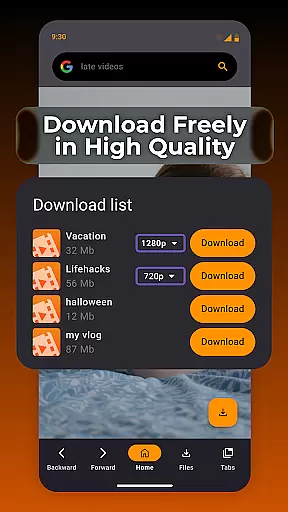
One of the standout features of XPlay Browser is its Private Browsing Mode, which ensures your privacy by not storing any history and using only essential permissions. Additionally, it allows users to download videos from supported websites directly within the app, eliminating the need for third-party applications. With smart file management tools, users can keep their device storage organized, enhancing overall efficiency.
Whether you're looking to browse securely, save videos for offline viewing, or manage files effectively, XPlay Browser provides a comprehensive solution. Its battery-efficient design ensures that your device remains responsive without excessive power consumption, offering a modern and convenient web experience.
XPlay Browser boasts an array of innovative features tailored to enhance your browsing experience. First and foremost, its Fast & Smooth Browsing capability ensures that pages load quickly, providing a seamless experience even on less powerful devices. The browser's clean UI and instant navigation contribute to a comfortable and efficient browsing flow.
Privacy is a top priority with XPlay Browser's Private Browsing Mode. This feature ensures that no history is stored, and only essential permissions are used, making it ideal for confidential sessions. Furthermore, the Easy Video Downloads functionality allows users to save videos from supported websites directly within the app, enabling offline access without the need for additional software.
Smart File Management is another key feature, helping users maintain an organized device storage. The built-in tools review, sort, and manage files, highlighting unnecessary items to keep your phone efficient. Lastly, XPlay Browser's lightweight and battery-efficient design ensures it runs smoothly without draining your device's battery, providing a superior user experience.
Video format compatibility is a crucial feature for any video player, ensuring that users can enjoy content in various formats without technical barriers. XPlay Browser excels in this area by supporting an extensive range of video formats, making it versatile and user-friendly.
The browser's advanced decoding capabilities allow it to handle both common and less widespread video formats. Whether you're streaming online or playing locally stored files, XPlay Browser ensures smooth playback without the need for additional plugins or converters.
For users, this means unparalleled flexibility in consuming video content. You can download videos from supported websites and watch them offline in their original quality and format. This eliminates the frustration of format incompatibility and enhances the overall user experience.
Moreover, XPlay Browser's commitment to compatibility extends beyond just video formats. It also supports a variety of audio and subtitle file types, enriching the multimedia experience. This comprehensive support makes XPlay Browser a reliable choice for users who demand high-quality, flexible media playback.
AI-powered editing features are revolutionizing how users interact with and modify video content. XPlay Browser incorporates intelligent tools that simplify video editing tasks, making them accessible even to non-professionals.
One standout feature is the browser's smart video enhancement tool. Using AI algorithms, it automatically adjusts video parameters such as brightness, contrast, and color balance to optimize visual quality. This ensures that every video you watch or download looks its best without manual adjustments.
In addition to visual enhancements, XPlay Browser offers AI-driven editing functions like automatic cropping, resizing, and format conversion. These features save time and effort, allowing users to quickly prepare videos for sharing on different platforms or devices.
The integration of AI-powered editing within a browser environment demonstrates XPlay Browser's innovative approach to user convenience. By combining fast browsing, privacy protection, and advanced video tools, it creates a comprehensive solution for modern digital consumption needs.
Fast page loading
Private browsing
Video downloads
File management
Battery efficient
Limited video sites
No sync feature
Basic UI
Few extensions
Ads present

You can play SWF format file!
 2.50
2.50
Powerful, professional, versatile teleprompter. Developed by an active film crew
4.00
?100% FREE! Download & save videos? safely in this app. All formats supported.
4.60
KineMaster, Your Ultimate Video Editor!
4.40
Create photo video with music & template. AI video maker for stunning slideshow.
4.60
Powerful HD video player with support for all formats & subtitles.
4.4
Capture images & record videos for USB Camera, Webcam, Microscopes, Endoscopes
3.80
Fast & Private HD Video Downloader with Built-in Proxy Browser and Video Player.
4.50
VLC for Android is the best open source video and music player, fast and easy!
4.10
Video Trimmer, Video to MP3 Converter. Extract music from video, Easy & Fast.
4.80
Tik & Story Saver-Download ALL social media videos, photos & reels no watermark.
4.80
GENRAL PRO - General Pro is the best video player that fully supports all formats.
4.70
All in one HD video downloader & player for multiple formats with full privacy
4.70
Watch a large amount of high-definition short drama content
4.60
Support 1000+ Video Format, Subtitle Download, mp3 & Background Play, Cast On TV
4.60
Browser + Remote for Roku to stream webvideos, online movies and livestreams
4.60
Add date and time watermark to photos and videos
4.50
Photo and Music Video Creator into Stunning Videos—Effortlessly
4.40
Cast to Smart TV, Fire TV. Cast video, photo - Fast & Stable!
3.90


User Reviews