
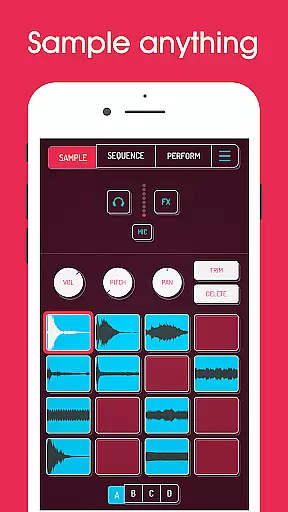
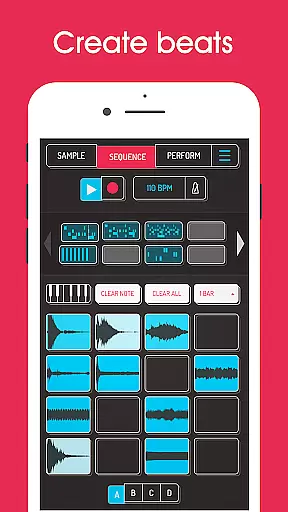
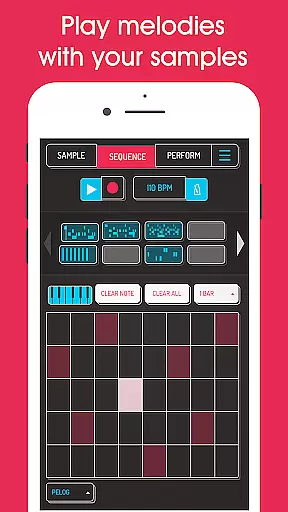
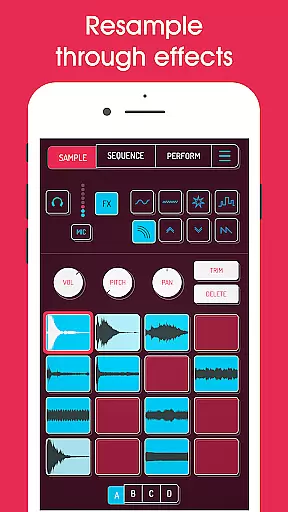
Koala Sampler is a pocket-sized music production tool that allows users to record sounds through their phone's mic or import custom samples. Designed for both amateur beatmakers and professional musicians, this app provides an intuitive interface for creating tracks quickly and efficiently.
The app features a high-resolution sequencer, 16 built-in effects, and advanced options like AI-powered sample separation and MIDI control. With its focus on instant music creation, Koala Sampler keeps users in the creative flow by avoiding complex menus and tedious editing processes.
Whether you're transforming your voice with effects or crafting intricate beats, Koala Sampler offers endless sonic possibilities. Its resampling capability and professional WAV export make it a versatile tool for music production on the go.
Koala Sampler stands out with its comprehensive set of features tailored for music creators. The app supports up to 64 different samples, which can be recorded directly via the phone's mic or imported from external sources. Each sample can be customized with adjustable attack, release, and tone settings.
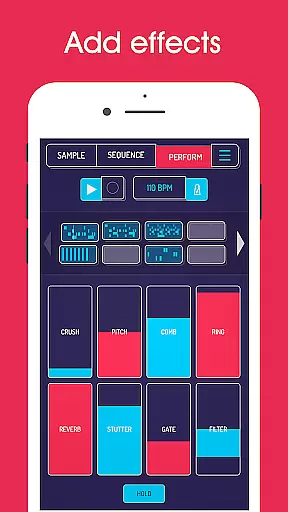
One of the key highlights is the ability to apply 16 unique built-in effects, ranging from reverb to bit-crusher, allowing users to experiment with various sound textures. Additionally, the app includes AI technology that separates samples into individual instruments such as drums, bass, and vocals, enhancing creative flexibility.
Advanced functionalities include a piano roll editor, pro-quality timestretch, and auto-chop options available through in-app purchases. These tools cater to more experienced users who require precise control over their compositions while maintaining ease of use.
Koala Sampler offers a versatile music library that allows users to record up to 64 different samples using their phone's microphone. This extensive capability ensures a rich and diverse collection of sounds, which can be further expanded by importing personal samples.
The app provides 16 superb built-in effects for transforming voices or any other sound, enhancing the authenticity and creativity of the music produced. These features are complemented by AI technology that separates samples into individual instruments such as drums, bass, vocals, and others, ensuring high-quality and original content creation.
With the option to export loops or entire tracks as professional-quality WAV files, Koala Sampler supports musicians in distributing their work while maintaining copyright integrity. The ability to copy/paste or merge sequences through simple drag actions adds another layer of convenience and efficiency.
Overall, Koala Sampler not only delivers an impressive music library size but also emphasizes the importance of copyright authenticity, empowering users to create unique and protected musical pieces.
One of the standout features of Koala Sampler is its commitment to delivering exceptional audio quality options. Users can adjust attack, release, and tone settings on each sample, providing precise control over the sound output and enabling the production of polished and professional tracks.
The app includes 8 built-in microphone effects such as More Bass, More Treble, Fuzz, Robot, Reverb, Octave up, Octave down, and Synthesizer. These effects ensure that regardless of the source material, users can achieve the desired audio quality and style.
In addition to the microphone effects, Koala Sampler boasts 16 DJ Mix FX including Bit-crusher, Pitch-shift, Comb filter, Ring modulator, and more. These tools offer advanced audio manipulation capabilities, allowing users to experiment with and enhance their tracks' sonic properties.
For those seeking even more sophisticated audio handling, the SAMURAI In-App Purchase unlocks pro-quality Timestretch with four modes: Modern, Retro, Beats, and Re-pitch. This feature, along with the Piano roll editor and Auto-chop functions, solidifies Koala Sampler's position as a top-tier tool for achieving outstanding audio quality.
User-friendly interface
Extensive effect library
AI-powered sample separation
Professional WAV export
MIDI compatibility
Limited free features
Occasional audio glitches
High learning curve
In-app purchases required
Microphone input issues

Time Guru will strengthen your internal sense of musical time via random muting.
 4.30
4.30
The Skullcandy App Experience
3.20
Performance-Synthesizer & Multi-Track-Sequencer, polyphonic + multi timbral!
4.70
JBL PartyBox APP works with 110/310/710/120/320/520/Encore/Encore 2/Encore Ess 2
4.80
Save hundreds of dollars for a physical strobe tuner and instead use this app.
4.50
Advanced 10-Band Audio Graphic Equalizer Sound Booster Pro
4.30
USB audio recording and playback finally possible on Android 3.1 or higher!
3.90
The best music and audio player, with beautiful UI, music search and equalizer.
4.60
Sing, record, and create music together — enhanced by smart voice tools.
4.00
24,000 free audio books and no ads!
4.90
Play your hearts out on TouchTunes jukeboxes & connect with fellow music lovers.
4.80 4.70
4.70
Most Advanced AI Song Generator and Music Creator. Rap, Pop, Rock, Gospel & more
4.70
Record, Mix & Master with all n-Track effects, 64-bit audio and Stem Separation.
4.70
SqueezePlayer turns your Android phone or tablet into a SqueezeBox on its own!
4.60
Help you quickly get started with Shokz headphones
4.40
Ringtone Maker is free app create ringtone from music files or your recording.
4.40
The original SP-1200 experience on your iPad
4.20
The Minimalistic Premium Music Player. Handmade with passion for music
2.20


User Reviews