
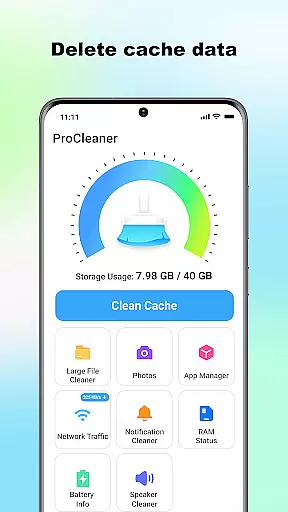
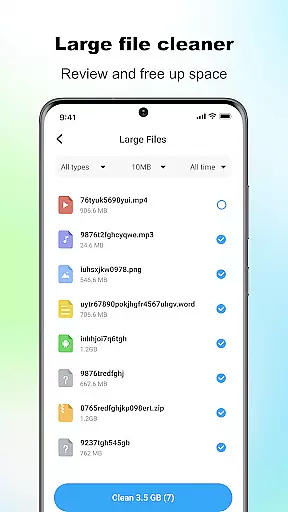
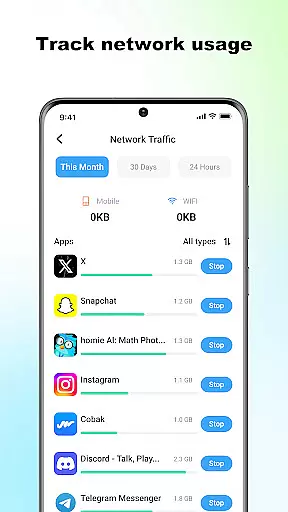
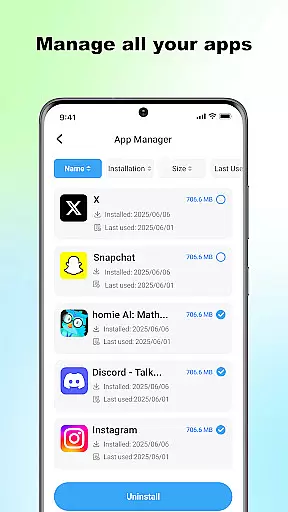
ProCleaner is a comprehensive device optimization tool designed to help users efficiently manage their smartphone storage. The app's core functionality revolves around scanning and cleaning various types of unnecessary files, including cache, residual, and junk files that accumulate over time.
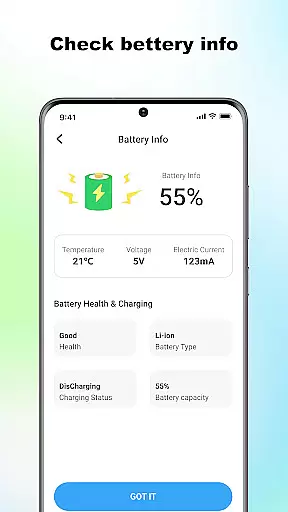
Beyond basic cleaning capabilities, ProCleaner offers advanced features for managing large files and uninstalling multiple applications simultaneously. Users can also monitor network speed and check battery status, providing a complete solution for device maintenance and performance optimization.
This application is particularly useful for individuals who frequently encounter storage issues or want to maintain optimal device performance. By providing both basic and advanced tools for file management and system monitoring, ProCleaner delivers significant value to users looking to keep their devices running smoothly.
ProCleaner distinguishes itself through its comprehensive suite of optimization tools. The app's signature feature is its intelligent scanning system, which can detect various types of unnecessary files across the device's storage. This includes temporary cache files, leftover installation packages, and other junk files that consume valuable space.
The application's large file manager allows users to identify and remove space-consuming files easily. Its batch uninstallation feature enables efficient removal of multiple applications at once. Additionally, the integrated network speed monitor and battery status checker provide real-time information about device performance and resource usage.
What sets ProCleaner apart is its commitment to user privacy and security. All operations are performed locally on the device, with no personal data being collected or transmitted. The app requires only necessary permissions for storage access and app management, ensuring users maintain full control over their personal information while optimizing their device's performance.
ProCleaner excels in delivering accurate and effective core functions that enhance device performance. The app meticulously scans and cleans cache files, ensuring no unnecessary data occupies your storage space. It also removes residual and junk files left behind by uninstalled apps or system operations, freeing up valuable memory.
In addition to file cleaning, ProCleaner offers a robust feature for managing large files. Users can easily identify and remove sizable files that contribute to storage clutter. The app further enables the uninstallation of multiple applications simultaneously, streamlining the process of decluttering your device. With network speed monitoring and battery status checks, ProCleaner ensures users have a comprehensive toolkit for maintaining optimal device health.
The tangible benefits for users include improved device speed, increased storage capacity, and enhanced overall performance. By focusing on these critical aspects, ProCleaner empowers users to take full control of their device's storage management efficiently and effectively.
A standout feature of ProCleaner is its commitment to interface simplicity and intuitiveness. The app employs a clean, user-friendly design that makes navigation effortless. Each core function is easily accessible from the main dashboard, allowing users to initiate scans, manage files, and monitor device metrics without any learning curve.
ProCleaner's intuitive layout ensures that even those unfamiliar with technical jargon can operate the app with ease. Clear labels and straightforward instructions guide users through each step, from scanning for junk files to uninstalling multiple apps. This approach significantly reduces the time required to perform essential maintenance tasks.
Ultimately, ProCleaner's streamlined interface enhances user experience by making device management accessible to everyone. Its simplicity does not compromise functionality but rather complements it, providing a seamless blend of powerful tools within an easy-to-use environment.
User-friendly interface
Comprehensive cleaning tools
Local data processing
Batch uninstallation feature
Real-time system monitoring
Limited advanced features
No cloud backup option
Basic UI design
Occasional scan delays
Ads in free version

 4.50
4.50
Fluid navigation gestures for all of us!
4.30
Use your phone as a webcam on your computer over WiFi or USB.
4.40
App to pay for FUTO Keyboard
4.60
Smart and comfortable browsing experience.
3.80
PC precision for mobile gaming: dominate with keyboard and mouse!
4.30
Bedrock Together: Join any bedrock server on Xbox/PS
4.80
Automate everything from settings to photos, SMS to speech. ADC2 prize winner.
4.10
Mobile Security with Scam Protection | Malware & Virus Cleaner | Safe Browser
4.70
Change your GPS location instantly. Simulate routes anywhere in the world.
4.90
Fast Video Downloader, Movie Downloader, Torrent Downloader & Adblock Browser
4.70
Planner and Tracker for Stardew Valley
4.60
eXtended Permission Manager - a small app to manage permissions and AppOps
4.50
With videos, electrical calculators, and built-in ebook, Ugly’s has your answer.
4.50
Clean up large files and similar photos, fast and easy to use
4.40
Remote for Roku, Fire TV, Samsung TV, LG TV, Android TV, Chromecast and VIZIO TV
4.20
Detect hidden spy camera with advanced scanning {{ Premium version }}
4.00
Fun lie-detection pranks for friends and parties.
3.80
A recovery soft,it features photo recovery, video recovery, file recovery.
3.40


User Reviews