
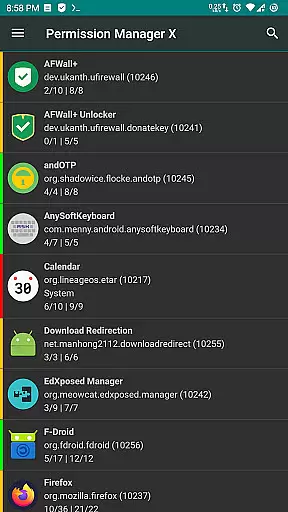
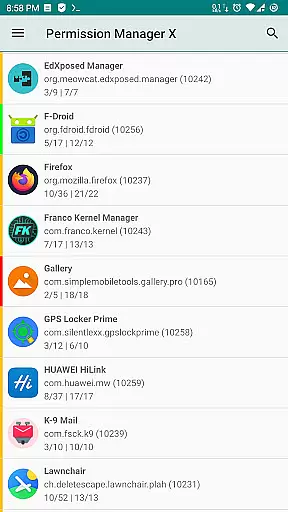
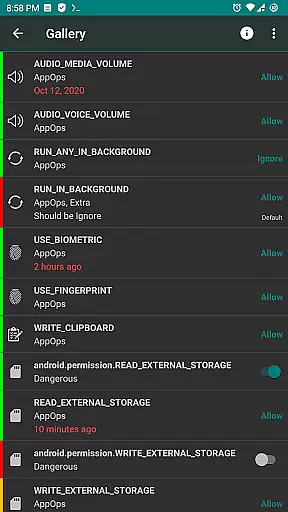
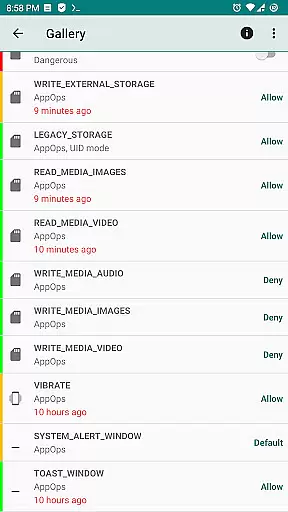
Permission Manager X is a powerful tool designed to provide users with extensive control over app permissions on their Android devices. With this application, you can view, grant, or revoke both manifest and AppOps permissions for each installed app from a single screen. This allows for fine-grained access control, ensuring that apps only have the permissions they truly need.
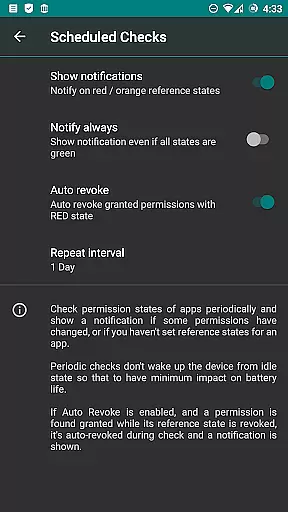
Beyond basic permission management, the app offers advanced features such as setting reference values for changeable permissions, scheduled checks for unwanted permission states, and even an auto-revoke function for permissions marked with red states. These capabilities make it easier than ever to maintain your privacy and optimize device performance.
Whether you're reinstalling apps, changing devices, or upgrading your ROM, Permission Manager X simplifies the process of reviewing and managing permissions. Its intuitive interface includes colored bars for quick visual assessment, and the ability to back up and restore permission settings ensures you never lose your configurations.
One of the standout features of Permission Manager X is its comprehensive approach to permission management. The app allows you to manage both manifest permissions—such as storage and camera access—and AppOps permissions, which offer more granular control over app behaviors like background execution and clipboard access. This dual-layered control provides a robust framework for maintaining privacy and optimizing performance.
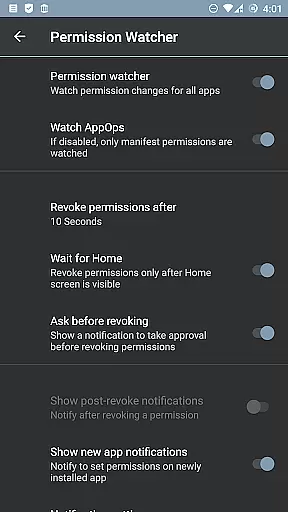
In addition to basic permission management, Permission Manager X offers several premium features. These include the ability to sort apps and permissions by various parameters, schedule checks for unwanted permission states, and use the Permission Watcher function to quickly remove unnecessary permissions. The app also supports multi-user profiles and work profiles, making it ideal for both personal and professional use.
For those concerned about privacy, the app's ability to control which apps run in the background, access location data, send SMS messages, and more is invaluable. Permission Manager X respects user privacy by not collecting any data, and its open-source nature ensures transparency. Whether you're a casual user or a power user, this app provides the tools you need to take full control of your device's security and performance.
Permission Manager X offers a comprehensive suite of tools for managing app permissions on Android devices. The core functionality revolves around granting, revoking, and monitoring both manifest permissions and AppOps permissions. This dual control allows users to fine-tune access rights with precision, ensuring that installed apps operate within desired limits.
The application provides robust mechanisms for setting reference states for each permission. These reference states serve as benchmarks that can be quickly backed up and restored, making it easier to maintain consistent permission settings across reinstalls or device changes. Additionally, the visual indicators help users quickly identify potential privacy risks and rectify them efficiently.
For advanced users, Permission Manager X includes paid features such as scheduled checks and auto-revoke capabilities. These functionalities enhance the app's effectiveness by automating routine tasks and providing timely alerts for any deviations from set standards. Overall, the app ensures that users retain full control over their privacy without compromising usability.
Despite its powerful capabilities, Permission Manager X maintains an intuitive and user-friendly interface. All essential functions are accessible from a single screen, allowing users to view, grant, or revoke permissions effortlessly. This streamlined approach reduces the learning curve and makes the app suitable for both novice and experienced users.
The design incorporates helpful visual cues, such as colored bars, which provide at-a-glance insights into permission statuses. These indicators simplify the process of reviewing numerous apps and permissions, enabling users to focus on areas that require attention. Furthermore, detailed descriptions and search suggestions enhance navigation and understanding of complex permission structures.
Additional features like theming options and batch operations contribute to a personalized and efficient user experience. By offering these customization choices, Permission Manager X caters to individual preferences while maintaining operational simplicity. Users can perform intricate tasks, such as managing multi-user profiles or executing batch operations, without feeling overwhelmed by the interface complexity.
User-friendly interface
Comprehensive permission control
Advanced scheduling options
Respects user privacy
Open-source and free
Requires rooted device
Limited functionality without ADB
Paid features can be costly
Not compatible with all ROMs
Steep learning curve

Use your phone as a webcam on your computer over WiFi or USB.
 4.40
4.40
Unleash gamepad precision for ultimate mobile gaming dominance.
3.90
Monitor car performance in real time and troubleshoot malfunctions.
4.80
WiFi Signal Strength Meter help you detect WiFi Signal Strength in real time.
4.80
A simple app to back up and restore SMS & MMS messages and call logs.
4.10
Fun lie-detection pranks for friends and parties.
3.80
Clean up large files and similar photos, fast and easy to use
4.40
Clean up your phone, find files, play media, and share files offline
4.50
The ideal app to be the digital eye of your family
3.40
Best leveling tool for your Android device. Hang paintings like a pro.
4.90
Extremely fast, secure, and protects your privacy
4.80
Small and simple app to Verify Root Access and BusyBox Install!
4.70
FV File Manager Pro, Fast and powerful file manager for Android
4.60
Planner and Tracker for Stardew Valley
4.60
Complete kernel toolbox with features to manage and tweak your rooted device
4.30
PC precision for mobile gaming: dominate with keyboard and mouse!
4.30
Remote for Roku, Fire TV, Samsung TV, LG TV, Android TV, Chromecast and VIZIO TV
4.20
Effortlessly run ADB commands directly on your device without a PC.
4.20
Introducing Smart Printer, your ultimate destination for printing solutions!
4.00


User Reviews