
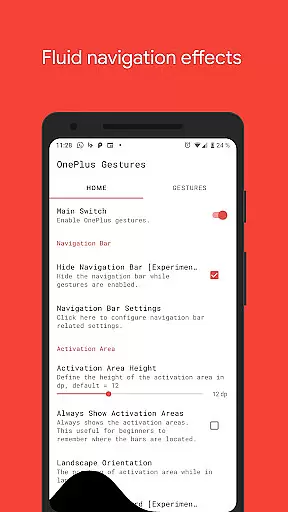
Vivid Navigation Gestures is a powerful tool that revolutionizes the way you interact with your Android device. This app allows users to control their devices through intuitive gestures instead of traditional button presses, offering a more modern and fluid user experience.
With features like beautiful visual effects during gesture execution and multiple gesture triggers across the screen, it provides an immersive navigation experience. The app supports various actions such as launching Google Assistant, going back, returning to home, opening notifications, and even taking screenshots, making it a versatile tool for enhancing productivity and ease of use.
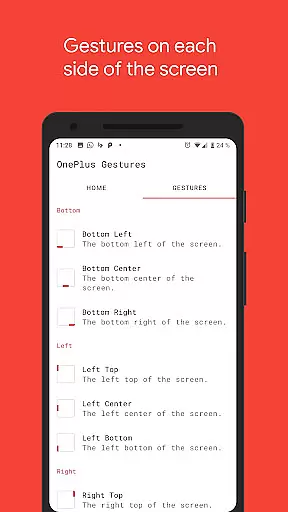
The app boasts an impressive array of features designed to enhance user interaction. It includes fluid effects during gesture operations, providing a visually pleasing experience. Users can trigger gestures from multiple points on the screen, including bottom left, center, right, and various positions along the sides.
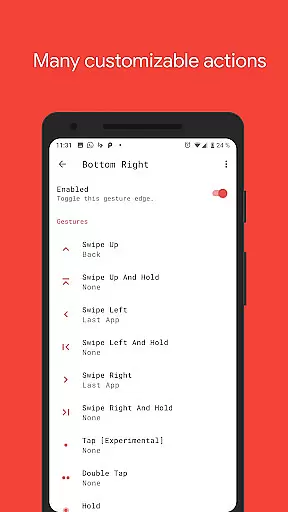
Vivid Navigation Gestures supports a wide range of gestures such as swipe up, swipe left, double tap, and hold, each capable of performing specific actions like launching apps, controlling media playback, toggling settings, and more. Additionally, the ability to hide the stock navigation bar offers a cleaner, full-screen experience, although this feature requires ADB or root access.
Gestures are at the heart of Vivid Navigation Gestures, and their accuracy is paramount for seamless device control. This app allows users to replace traditional button presses with intuitive gestures, ensuring precision in every swipe and tap.
With multiple gesture triggers spread across different screen areas, each action is accurately mapped to deliver the desired outcome. Whether it's launching Google Assistant or toggling auto-rotation, the app executes these commands effectively without delay.
The inclusion of fluid effects during gesture performance not only enhances aesthetic appeal but also provides real-time feedback, affirming that a gesture has been recognized and processed correctly by the system.
By utilizing accessibility services responsibly, this tool guarantees reliable execution of essential navigation functions like back, home, or quick settingsu2014making device interaction smoother than ever before.
Vivid Navigation Gestures excels in offering an interface that simplifies navigation while maintaining intuitiveness. Users can easily adapt to controlling their devices through swipes and taps rather than relying on physical buttons.
The app presents a variety of available actions which are straightforwardly assigned to specific gestures. With options ranging from opening notifications to taking screenshots, the user-friendly design ensures even complex tasks become second nature over time.
Moreover, hiding the stock navigation bar streamlines the visual space, presenting an uncluttered screen that lets users focus on content rather than controlsu2014a testament to its minimalist yet powerful approach.
Overall, whether you're performing simple operations such as going back or executing more involved tasks like toggling split-screen mode, Vivid Navigation Gestures keeps interactions effortless and engaging.
Intuitive gesture controls
Beautiful fluid effects
Wide range of customizable actions
Enhances productivity
Supports multiple trigger points
ADB or root required for some features
Potential learning curve for new users
Limited to Android platform
Some actions may require additional setup
Accessibility service permissions needed

1-Click close all background apps on Android TV
 3.90
3.90
HD Video player and downloader for all formats, fast & smooth 4K video playback.
4.60
Effortlessly run ADB commands directly on your device without a PC.
4.20
Monitor car performance in real time and troubleshoot malfunctions.
4.80
Planner and Tracker for Stardew Valley
4.60
A simple app to back up and restore SMS & MMS messages and call logs.
4.10
Introducing Smart Printer, your ultimate destination for printing solutions!
4.00
Fast VPN USA for any country. Super secure VPN for calls, streaming, games, TV.
4.40
Your personal health butler
3.60
Excellent scientific calculator with symbolic algebra, integrals, derivatives
4.80
The one-and-only remote control for PC, Mac, and Linux
4.70
NFC Tools can read and write NFC tags.
4.70
Keep track of your Palia friendships, tasks, and inventory with Palia Notebook
4.60
Game Booster, GFX Tool is now compatible with newer game update
4.50
Mirror your screen to Fire TV - Super fast and simple
4.40
An easy-to-use calculator designed to save time calculating and bending conduit
4.30
Signal Strength, Mobile, Wifi, Speed Test, Bad Signals, Cellular, 5G, LTE, 4G
4.20
Automate everything from settings to photos, SMS to speech. ADC2 prize winner.
4.10
A recovery soft,it features photo recovery, video recovery, file recovery.
3.40


User Reviews