
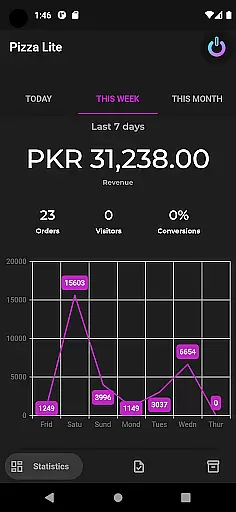
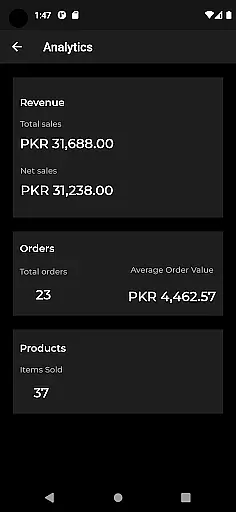

Zelle Clients is a business application designed to streamline digital marketing, web development, and app management processes. The app serves as a comprehensive business supporter, offering tools for social media tracking, SEO insights, and website management.
With Zelle Clients, users can efficiently monitor their social media performance, gain valuable SEO data for strategic planning, and receive expert technical support for website-related issues. This makes it an ideal solution for businesses seeking an all-in-one platform to enhance their digital presence and operational efficiency.
The app provides a robust set of features tailored for digital marketers and businesses. It includes advanced social media tracking capabilities, allowing users to monitor engagement metrics and optimize their online strategies accordingly.
In addition to social media tools, Zelle Clients offers detailed SEO analytics that help businesses make informed decisions about their marketing activities. The app also features dedicated support from web developers and SEO experts, ensuring users can resolve any technical challenges they encounter.
These functionalities work together to create a seamless experience for businesses looking to strengthen their digital footprint while receiving continuous support and guidance.
In today's fast-paced business environment, the ability to collaborate effectively is crucial. Zelle Clients understands this need and offers robust collaborative work features that enable teams to work together seamlessly. The app provides real-time sharing capabilities, allowing team members to instantly exchange information, updates, and feedback.
One of the standout aspects of Zelle Clients is its permission management system. This feature ensures that sensitive data remains secure while still being accessible to authorized personnel. By setting specific access levels, businesses can maintain control over their information, reducing the risk of unauthorized access or data breaches.
The benefits for users are significant. With these collaborative tools, teams can increase productivity by streamlining communication processes. Project timelines can be shortened as team members no longer need to wait for email responses or scheduled meetings to share important updates. This immediacy in collaboration translates directly into faster decision-making and implementation.
Moreover, the app's collaborative features foster a more cohesive work environment. Regardless of geographical locations, team members can feel connected and engaged with the project at hand. This sense of unity can lead to improved morale and job satisfaction, ultimately benefiting the organization as a whole through enhanced performance and reduced turnover rates.
Effective task management is at the core of successful business operations, and Zelle Clients excels in this area. The application provides comprehensive tools for tracking tasks, scheduling activities, and managing progress across various projects. Users can easily create detailed task lists, set deadlines, and assign responsibilities to team members, ensuring that nothing falls through the cracks.
The scheduling functionality within Zelle Clients goes beyond simple calendar entries. It allows for complex planning scenarios, including recurring tasks, milestone tracking, and resource allocation. Managers can visualize project timelines, identify potential bottlenecks, and adjust schedules accordingly to maintain optimal workflow efficiency.
Progress management features offer valuable insights into team performance and project status. Through intuitive dashboards and reporting tools, users can monitor completion rates, track time investments, and evaluate overall productivity. These metrics help management make informed decisions about resource distribution and project prioritization.
For businesses, these task management capabilities translate into tangible benefits. Projects are completed more efficiently, budgets are better controlled, and client expectations are consistently met or exceeded. The ability to maintain clear oversight of multiple concurrent projects gives organizations a competitive edge in delivering high-quality results on time, every time.
User-friendly interface
Comprehensive SEO tools
Dedicated expert support
Advanced social media tracking
Efficient project management
Limited customization options
Higher subscription cost
Occasional performance lags
Steep learning curve
Restricted third-party integrations

GoTo Mobile is a simple & secure calling, messaging & meetings solution
 4.80
4.80
Completed Course Lectures on how to use IBM Maximo in Maintenance issues
4.1
The All-in-One File Manager for Phone, TV, Watch, Cars, XR / VR, Chromebook
4.10
Manage work life on the go
4.50
Employee Management Made Easy
4.80
Delivery Track App - Tracking with Fedex, USPS, UPS, DHL. Monitor your Orders.
3.20
From Gone to Back Again — In Just a Few Taps
4.50
Collaborate seamlessly with Google Chat, part of Google Workspace
4.50
Make money as a delivery driver with DoorDash and work when you want as a Dasher
4.30
Use Generative Summary to understand your rental or insurance docs in seconds.
4.70
Find the right fit, faster.
4.70
AI-powered document scanner with auto enhance for perfect PDFs.
4.60
Ship, Track, Find a Location or Get a Quote with UPS. Anytime. Anywhere.
4.60
The revolutionary flexible staffing platform
4.40
Measure distances, surfaces and draw plans in seconds with CamToPlan!
4.40
One marketplace. Hundreds of services. Unlimited possibilities. All on Fiverr.
4.40
Work happy with AI Companion
4.10
On the go? Take FedEx with you.
4.00
Get your benefits on-the-go.
3.80


User Reviews