


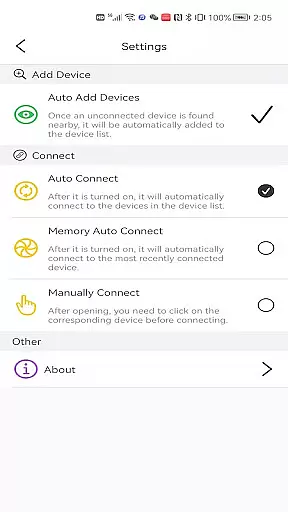
LotusLamp X is a premium lighting control application designed for users who demand precise and versatile control over their RGB lighting systems. This app allows seamless management of various lighting products including RGB strips, bulbs, and in-vehicle RGB lights.
The core functionality includes adjusting RGB colors, brightness levels, dynamic modes, and rhythm styles. Users can enjoy three distinct rhythm control methods: playing local music files, using the smartphone's microphone, or the built-in MIC on the lighting device itself.
Ideal for both home and automotive environments, LotusLamp X transforms any space into a personalized light show, making it perfect for enhancing ambiance during entertainment or creating custom lighting scenes.
LotusLamp X stands out with its comprehensive feature set tailored for lighting enthusiasts. The app provides granular control over RGB parameters, enabling users to fine-tune color combinations and brightness settings with precision.
One of the key innovations is the triple rhythm mode functionality. Users can synchronize lights with music either through local audio files, real-time sound capture via phone microphone, or direct device MIC input. This creates dynamic lighting effects that respond to different audio sources.
Additional features include pre-set dynamic modes, customizable rhythm patterns, and intuitive user interface elements that make complex lighting setups accessible even to novice users. These capabilities ensure users can create unique lighting experiences tailored to their specific needs.
LotusLamp X offers a wide array of customization options that allow users to tailor their lighting experience according to personal preferences. With the ability to control RGB strips, bulbs, and in-vehicle RGB lights, this app puts the power of personalization in your hands.
The app provides extensive control over lights' RGB color, brightness, dynamic modes, and rhythm styles. This means you can adjust the ambiance of any space with precision, choosing from millions of colors and multiple dynamic lighting effects to match your mood or activity.
Users benefit from three distinct rhythm control methods, including playing local music files, picking up sound via the phone's microphone, or using an external MIC on the device itself. These features ensure that whether you're hosting a party or enjoying a quiet evening, LotusLamp X can adapt to provide the perfect lighting synchronization.
Theme compatibility is a crucial aspect of the LotusLamp X app, ensuring that all customizable lighting options work seamlessly across different devices and settings. The app supports various themes which are designed to enhance user experience by providing visually cohesive environments.
Whether controlling RGBIC strips for a vibrant home theater setup or adjusting bulbs for a cozy bedroom atmosphere, LotusLamp X maintains consistent performance and appearance. This compatibility extends to in-vehicle RGB lights as well, allowing for a unified aesthetic no matter where you are.
By focusing on theme compatibility, LotusLamp X guarantees that every lighting scenario not only looks great but also functions reliably. Users can trust that their personalized settings will be accurately reflected, creating immersive experiences tailored to individual tastes and needs.
Comprehensive RGB control
Multiple rhythm options
User-friendly interface
Wide device compatibility
Customizable presets
Premium version cost
Device-specific support
Learning curve present
Occasional connectivity issues
Limited free features

Only for Wear OS devices!
 4.90
4.90
More than 3000+ themes and 9000+ wallpapers for everybody!
4.10
Want to make your phone more special than ever?
4.60
100+ Stylish Fonts, Emojis, Symbols keyboard for Instagram & TikTok!
4.80
Customize your home screen with stunning themes, blur, widgets & icons.
4.60
Adorable pets roam and play right on your phone screen!
3.30
200+ Material Inspired Widgets
4.50
400+ Beautifully crafted widgets inspired by NOTHING.
4.70
Your home screen, just the way you like it.
4.30
Sparkle your screen with Glitter Wallpapers For Girls and Cute Backgrounds!
4.80
Gun Chase - Let the chase begin.
4.80
Stunningly Different look with Line Icons and Neon Colors
4.60
Unique Android Launcher
4.60
Color phone with cool effects for call screen, flash alert & ringtones music
4.50
Art & Emoji Keyboard with Cool Fonts, Cute Themes and Custom Designs.
4.40
Transform your device in a game console
4.40
Launcher OS™ Pro without ads help make your phone simple and pretty
4.30
Interactive Miniature Painting Catalogue
3.30
Modern Glass Icon Pack with glossy icons, clean minimal theme & aesthetic style
4.2


User Reviews