


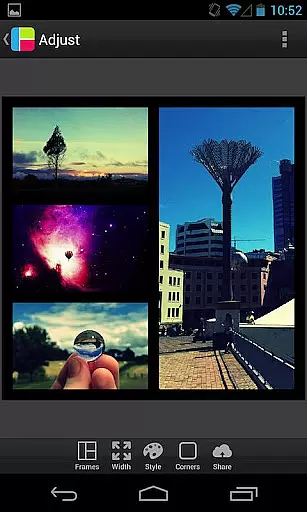
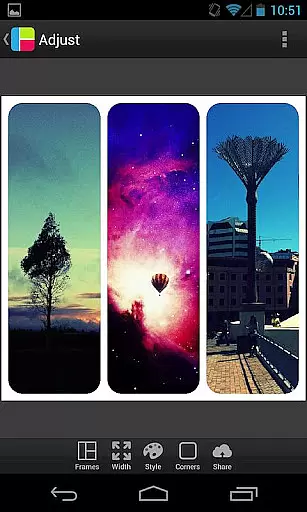

PicFrame is a versatile photography app that allows users to combine multiple photos into visually stunning frames. With 36 fully adjustable frames, users can customize their creations by adjusting borders, corners, and photo effects. The app supports up to 5 photos per frame, offering endless customization possibilities including rounded corners, adjustable border widths, and various shapes like circles and hearts.
Designed for both casual and professional photographers, PicFrame provides advanced editing features such as brightness, contrast, and saturation adjustments for each photo. Users can also rotate images, zoom using pinch gestures, and choose from six different aspect ratios. The app's intuitive interface makes it easy to create unique designs while the built-in sharing feature allows seamless posting to social media platforms.
Whether you're looking to create memorable family albums or eye-catching social media posts, PicFrame offers the tools needed to produce professional-quality collages. Its comprehensive feature set and user-friendly design make it an ideal choice for anyone interested in digital photography and creative expression.
PicFrame stands out with its extensive customization options and user-friendly interface. The app provides 36 adjustable frames that can hold up to 5 photos each, allowing users to create completely unique layouts. Advanced features include shape customization (circle, heart, hexagon), 52 background patterns, and precise control over border width and color through an intuitive color picker.
The app excels in image editing capabilities, offering individual adjustments for brightness, contrast, and saturation for each photo within a frame. Users can rotate images, apply zoom using pinch gestures, and select from six different aspect ratios including popular social media formats. These features ensure maximum creative freedom while maintaining professional-quality results.
PicFrame's value extends beyond basic photo editing. The app supports saving high-resolution images to the device gallery and offers multiple output resolutions for various use cases. With seamless integration to social media platforms like Instagram and Facebook, users can easily share their creations. This combination of powerful editing tools and convenient sharing options makes PicFrame an essential tool for digital photographers and social media enthusiasts alike.
PicFrame offers a unique real-time capture and preview feature that allows users to see their photos come to life as they are being framed. This functionality is crucial for photography apps as it enables users to visualize the end result before finalizing their creations.
The app provides adjustable frames with up to five photos, rounded corners, and various shapes which can be previewed in real time. Users can drag the inner frame borders for endless customization, ensuring each photo frame is unique and meets personal preferences.
With PicFrame's real-time editing capabilities, users can adjust the brightness, contrast, and saturation of each photo on the fly. The ability to rotate photos and pinch to zoom further enhances the user experience by allowing precise control over the final composition.
This immediate feedback loop not only saves time but also enhances creativity, letting users experiment with different looks until they achieve the perfect frame. Such features make PicFrame an invaluable tool for anyone looking to share beautifully arranged photos with friends and family.
PicFrame includes AI-powered beauty and enhancement features that elevate photo editing to the next level. In today's digital age, enhancing photos while maintaining their natural look is essential, especially for sharing on social media platforms like Instagram and Facebook.
The app offers 52 patterns for the frame backgrounds and an easy-to-use border color picker, adding depth and character to your photos without overwhelming the original image. These subtle enhancements ensure that the focus remains on the photos themselves.
Users can take advantage of multiple output resolutions and save their creations to the gallery or share them directly to other applications. PicFrameu2019s AI enhancements subtly improve each photo's appearance, making them pop without appearing over-processed.
Ultimately, PicFrame strikes a balance between enhancement and authenticity, providing tools that help users create stunning yet natural-looking photo frames. This approach not only satisfies aesthetic demands but also aligns with contemporary trends in digital photography.
User-friendly interface
Extensive customization options
Advanced photo editing tools
Multiple social media integrations
High-quality output resolution
Limited to 5 photos per frame
No advanced filter options
Basic shape selections
Occasional performance issues
Subscription required for full features

[3DSteroid Pro] is a stereoscopic application for Android.
 4.30
4.30
How old age camera Gender Swap App Face Shape Hairstyle App Hair Styler App fun!
4.00
Be your best in every shot! Fix, edit and retouch your face in selfies & photos.
3.70
Light-weight Media Gallery app for Android made with Jetpack Compose
4.60
The #1 app for B&W film developing featuring an advanced darkroom timer.
4.10
Easily create custom gifts, cards, photo books & more on the Shutterfly app!
4.60
Transform Photos: Edit, Beautify and Craft Memories & Make Collages!
4.10
A unique animation app. Powerful, easy to use, and lots of fun.
4.30
Solocator stamps photos you take with GPS location, Compass Direction, Date/Time
3.80
Enhance, upscale, and transform your images — on your device, without limits
4.70
1M influencer's special filter
4.60
AI photo editor with hair editor, retouch tools, hair color changer & filters!
4.50
Transform photos into videos! Create realistic or anime-style images easily!
4.50
Trendy TikTok time warp scan funny filter app brings you unique photos & videos.
4.40
live datamoshing
4.00
How would you look like with a differently shaped nose, chin or lips?
3.90
Gallery Slideshow is slideshow maker app for slideshow from your gallery photos.
3.90
Perfect photos with body shaping, BG changer and object remover.
3.70
Photo Album Watch Face shows your favorite pictures as a Watchface.
1.90


User Reviews