
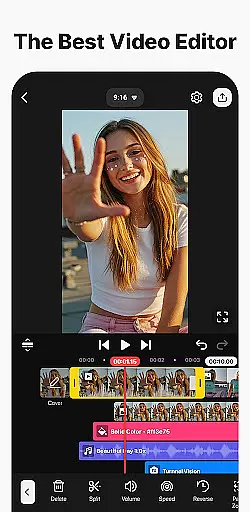
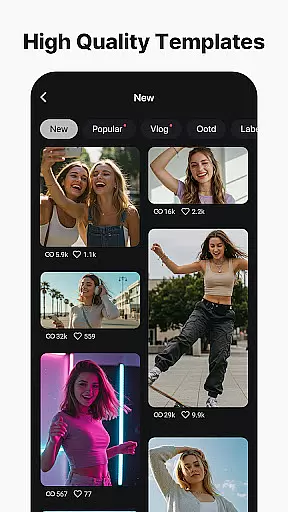


KineMaster is a powerful video editing app designed for both amateur and professional creators. It offers an extensive suite of AI-powered tools that simplify complex video production tasks, including auto captions, text-to-speech, and vocal separation. These features allow users to create high-quality content efficiently.
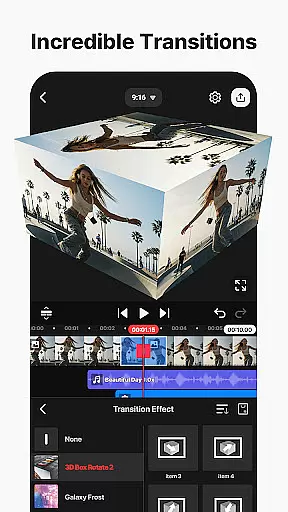
With professional-grade tools like keyframe animation, chroma key, and speed control, KineMaster makes advanced video editing accessible to everyone. The app also provides thousands of templates, effects, transitions, and stock assets, enabling users to enhance their videos with minimal effort. Whether you're editing vlogs, short films, or social media clips, KineMaster ensures your projects stand out.
The app supports 4K 60 FPS output and includes optimization options for various social media platforms. Its user-friendly interface, combined with cloud backup and cross-device syncing, ensures a seamless editing experience across smartphones and tablets.
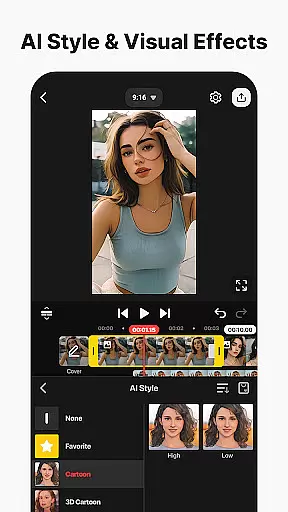
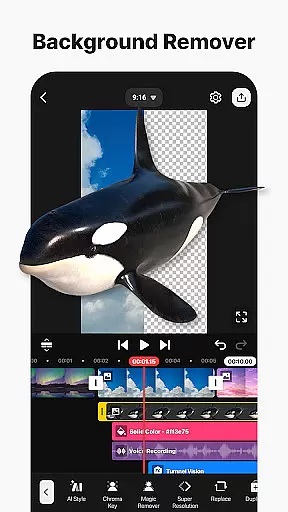
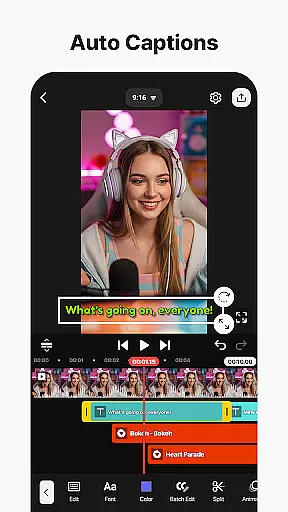
KineMaster stands out with its comprehensive set of AI-driven tools tailored for modern video creators. Features like AI Auto Captions and AI Noise Removal streamline the editing process by automating time-consuming tasks. Additionally, AI Style and Magic Removal provide creative flexibility, allowing users to apply artistic effects or remove unwanted backgrounds effortlessly.
For professionals, KineMaster offers advanced functionalities such as keyframe animation and green screen effects. These tools enable precise control over layer positioning, object tracking, and visual effects. The app's asset store further enhances creativity, offering thousands of stickers, transitions, music tracks, and fonts.
Another notable feature is its multi-layer support, which allows stacking videos, images, and graphics seamlessly. Magnetic guides and full-screen previews ensure accurate alignment and real-time feedback during edits. With export options supporting transparent backgrounds and optimized social media formats, KineMaster caters to diverse content creation needs.
Video format compatibility is a crucial feature for any video editing application, ensuring that users can work with a wide range of file types. KineMaster excels in this area by supporting an extensive array of video formats, allowing creators to import and export projects without worrying about conversion issues.
The app's advanced codec support enables seamless integration of various media elements, including high-resolution 4K videos at 60 FPS. This versatility ensures that content creators can maintain the highest quality throughout their editing process while preparing files for different platforms such as YouTube, TikTok, and Instagram.
Moreover, KineMaster offers optimized settings for social media sharing, automatically adjusting video parameters to meet specific platform requirements. This intelligent optimization helps users save time and storage space while ensuring their videos look professional across all devices and platforms.
For professionals who require transparency in their compositions, KineMaster provides background removal features and supports alpha channels. These capabilities make it possible to create complex visual effects and composite videos that integrate seamlessly with other media projects.
AI-powered editing features have revolutionized the way content creators approach video production, making complex tasks simpler and more efficient. KineMaster incorporates multiple artificial intelligence tools that significantly enhance the editing experience for both beginners and professionals.
The application's AI Auto Captions function automatically generates subtitles from audio tracks, saving editors countless hours of manual transcription work. Similarly, the AI Text-to-Speech feature enables users to quickly convert written content into professional-sounding voiceovers with just one tap.
KineMaster's suite of intelligent tools extends to audio processing, where AI Noise Removal effectively eliminates distracting background sounds. The AI Vocal Separator allows editors to isolate vocals from music tracks, opening up new possibilities for remixing and audio post-production work.
Furthermore, the AI Magic Removal tool demonstrates remarkable capability in removing backgrounds around subjects, while AI Tracking ensures that text and graphic elements follow moving objects precisely. These sophisticated features, combined with traditional editing tools, position KineMaster as a comprehensive solution for modern video creators.
User-friendly interface
Advanced AI tools
Extensive asset library
Professional editing features
Cross-device compatibility
Free version has watermarks
Subscription required for premium
High learning curve
Resource-intensive on older devices
Limited offline functionality

Fast, private downloading, video saving, social media
 4.50
4.50
IPTV-Smarters Player Pro M3U - Watch Live Stream TV Channels with Chromecast
4.00
Full HD Video mp3 Player, MP4 player play 1080p, File manager, Video Downloader
4.40
All format media Player, no need video converter any more!
4.00
KMPlayer Plus (Divx Codec) officially support Divx codec.
4.30
Browser for Sony TV to stream web videos, online movies and live tv
3.20
Watch IPTV on your Android device
4.60
Browser for Fire TV to stream webvideos, online movies, livestreams in HD
4.40
Capture the moment and Cut
3.40
HD Video player all format, HD Videos, Cast & Subtitle. No annoying ads.
4.60
Create photo video with music & template. AI video maker for stunning slideshow.
4.60
Fast & easy HD video downloader for all formats, support 4K playback & download.
4.60
Video Downloader, Multiple Resolution Options, Video Player
4.50
Add date and time watermark to photos and videos
4.50
Fast & Private HD Video Downloader with Built-in Proxy Browser and Video Player.
4.50
Live TV, anywhere in your home
3.80
Connect EasyCap or UVC devices for recording and broadcast video/audio stream
3.60
This app is an emulator of some specific IPTV boxes
3.50
Powerful HD video player with support for all formats & subtitles.
4.4


User Reviews