


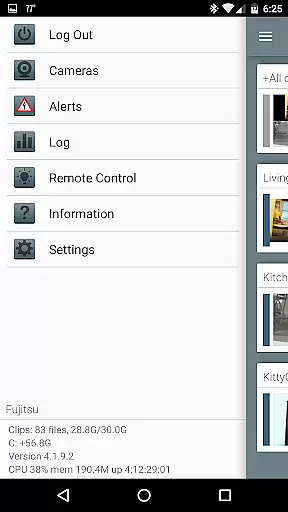
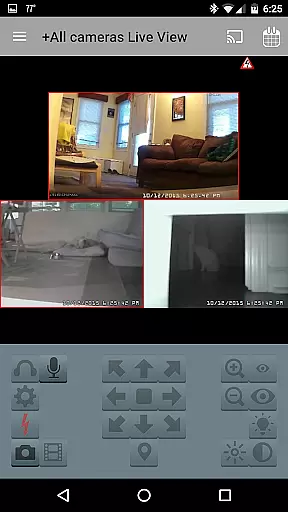

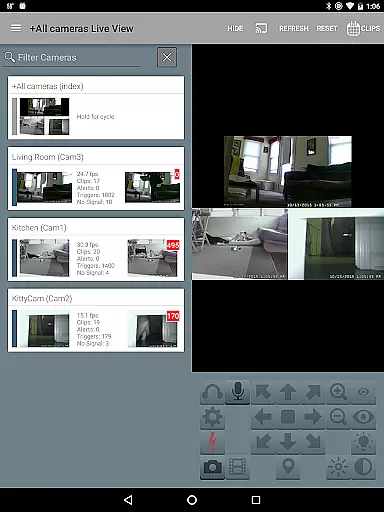
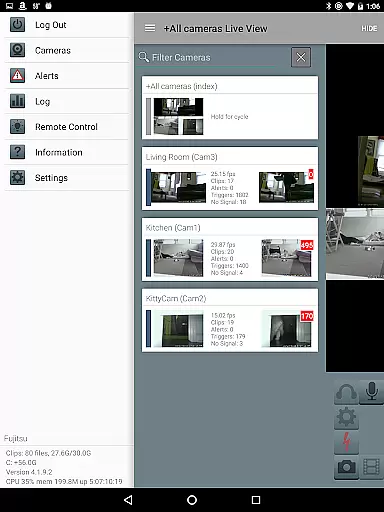
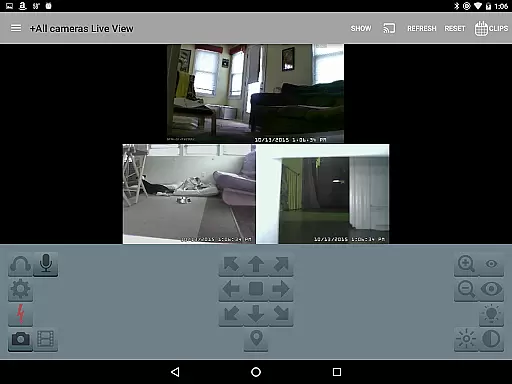
Blue Iris is a specialized client application designed to work in tandem with the Blue Iris Windows PC software, enabling users to remotely manage and monitor their home camera network. This app provides a secure connection protocol that eliminates the need for insecure individual camera exposure to the internet. With its session-based security features, users can safely access their entire camera network from a single point of contact.
The app supports multiple Blue Iris installations, allowing users to control various aspects such as traffic signal icons, scheduling, and profile selection. It also offers fast H.264 streaming, PTZ (pan-tilt-zoom) control, audio communication capabilities, and remote DIO output signal management. These features make it an essential tool for comprehensive home or office surveillance management.
Whether you're a homeowner looking to enhance your property's security or a business owner needing to monitor multiple locations, Blue Iris provides the tools necessary to maintain effective surveillance and ensure peace of mind.
Blue Iris stands out with its robust feature set tailored for advanced camera network management. One of its key strengths is the ability to manage multiple Blue Iris installations from a single app interface. Users can easily switch between different setups, making it ideal for those overseeing several properties or complex surveillance systems.
The app excels in providing real-time control over connected devices. Users can manipulate PTZ cameras, adjust IR settings, and even listen to or communicate through supported cameras. The inclusion of Android push alerts ensures immediate notification when cameras are triggered or critical status messages arise, enhancing situational awareness.
Additional notable features include fast H.264 streaming for efficient video transmission, intuitive camera navigation through tapping and swiping gestures, and comprehensive recording management. Users can review stored footage at up to 64x speed and selectively delete recordings directly from the Blue Iris PC storage. These capabilities demonstrate Blue Iris's commitment to delivering a professional-grade mobile surveillance solution.
Video format compatibility is a crucial feature for any video player or editor, ensuring that users can work with a wide range of video files without the need for conversion. Blue Iris supports an extensive array of video formats, making it versatile for different user needs.
The app leverages fast H.264 streaming to provide high-quality video playback. This ensures that whether you're reviewing recordings stored on your Blue Iris PC or live-streaming from your home camera network, the video quality remains consistently high.
Users benefit from this broad compatibility as they can manage and review recordings from multiple cameras seamlessly. The ability to handle various formats means no more worrying about whether a particular camera's footage will be accessible.
This flexibility not only enhances user experience but also simplifies the setup process, allowing users to focus on what matters mostu2014ensuring their property is secure.
AI-powered editing features are revolutionizing how users interact with video content by automating complex tasks and providing intelligent suggestions. While Blue Iris may not offer traditional AI-driven edits like some video editors, it incorporates smart functionalities that enhance its utility.
For instance, the app allows users to control PTZ (pan-tilt-zoom), IR, and other camera functions remotely. This level of control brings an element of automation and ease to managing your surveillance system, akin to automated video edits.
Additionally, Blue Iris supports two-way audio communication with supported cameras. Users can listen to and talk through their cameras, adding another layer of interaction and security management that benefits from advanced technology.
These smart features ensure that users have a streamlined and efficient experience when managing their home camera networks, ultimately saving time and improving overall system effectiveness.
User-friendly interface
Secure connection protocol
Multiple installation support
Real-time alerts
Comprehensive PTZ control
Requires Windows PC software
No standalone functionality
Limited to Blue Iris ecosystem
Complex initial setup
Dependent on network stability

Kodi media center, a free and open source cross-platform entertainment hub
 3.60
3.60
Video Player - Unlimited features, 30 days money back guarantee.
4.60
Video Downloader is an utility that can save videos and music from web sites
4.20
Tik & Story Saver-Download ALL social media videos, photos & reels no watermark.
4.80
Stream high quality video from your camera over NDI protocol
4.2
1)AirPlay/DLNA Mirroring/Streaming, up to 4 connections; 2)Samba/NAS/DMS Player.
4.00
Stream Web Videos to Chromecast, Samsung, LG, Sony, Roku, Fire TV, DLNA + more
4.00
Movie maker & video editing app with AI effects and green screen
4.30
Create, Publish & Maximize
4.70
Download Hub, easy and private way to download and enjoy your videos offline
4.80
A Quick and Pro Video Editor
4.70
Download videos and play them offline
4.70
Create photo video with music & template. AI video maker for stunning slideshow.
4.60
Full HD Video mp3 Player, MP4 player play 1080p, File manager, Video Downloader
4.40
Powerful Video Editor & Photo Editing App —— Quick Edits & Stunning Effects!
4.30
Browser for Sony TV to stream web videos, online movies and live tv
3.20
Client application for NextPVR software
3.00
You can play SWF format file!
2.50
Play and download HD videos from all sources — fast, simple, and all-in-one.
4.4


User Reviews