
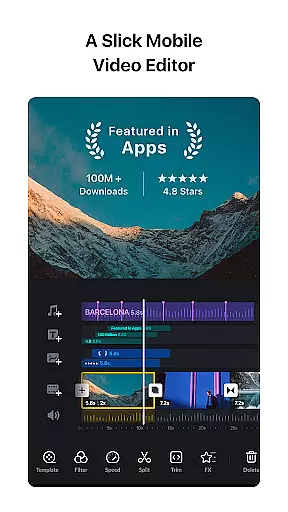
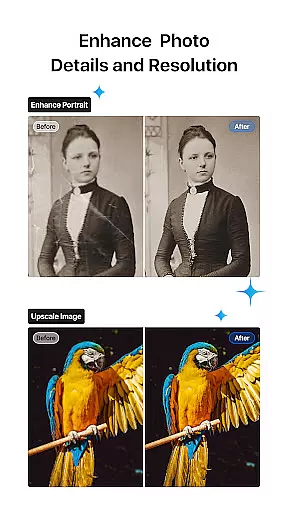

VN is a versatile video editing app designed for both professional and amateur creators. It offers an intuitive interface with no prior editing knowledge required, making it easy to create high-quality videos without watermarks. The app includes advanced features such as multi-track timelines, keyframe animations, and rich cinematic filters.
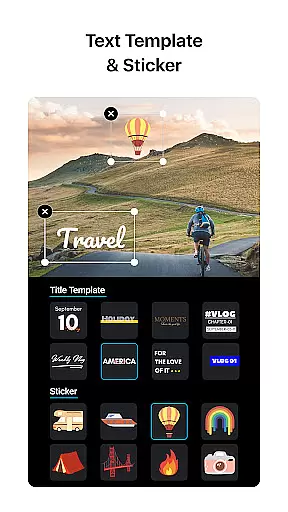
With VN, users can enjoy precise editing capabilities like quick rough cuts, speed curve adjustments, and creative transitions. The app also supports flexible material imports through Wi-Fi or messaging apps, and provides a robust library of stickers, fonts, and templates. These features ensure that users can personalize their content while maintaining professional standards.
The app's ability to save drafts and perform non-destructive edits allows for seamless project management. Whether you're creating short social media clips or longer cinematic pieces, VN's comprehensive toolset caters to diverse video editing needs across multiple platforms.
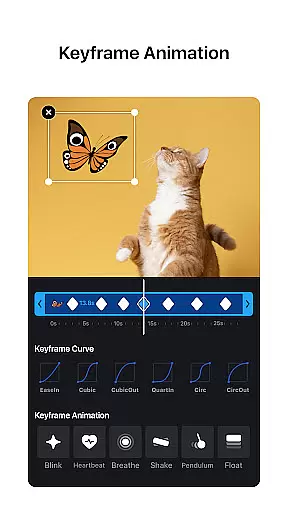
VN stands out with its comprehensive feature set tailored for video editors of all levels. The app's multi-track timeline allows users to layer videos, photos, stickers, and text with ease. Its keyframe animation feature lets creators customize effects using 19 built-in options, while the reverse and zoom tools add engaging visual elements to any project.
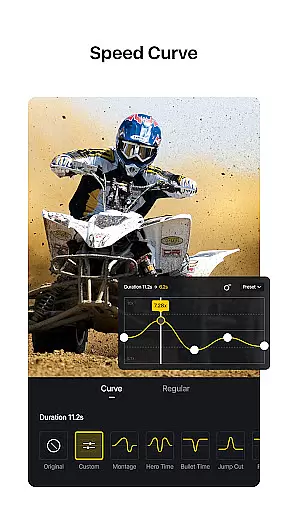
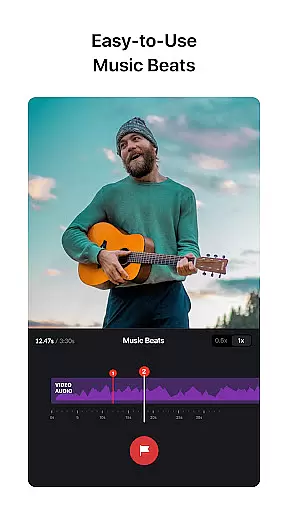
One of VN's notable strengths is its advanced audio editing capabilities. Users can synchronize video cuts with music beats and record high-quality voice-overs. The speed curve tool, similar to Time Remapping in Adobe Premiere Pro, provides six preset curves for dynamic playback adjustments. Additionally, the freeze frame feature creates dramatic time-stop effects effortlessly.
The app ensures secure and efficient project sharing through Google Drive or OneDrive integration. With customizable export settings supporting up to 4K resolution at 60 FPS, VN delivers professional-grade output. These features collectively make VN a powerful solution for mobile video editing, bridging the gap between accessibility and advanced functionality.
Video format compatibility is a crucial aspect of any video editing application, ensuring that users can work with a wide range of video files without the need for prior conversion. VN addresses this need by supporting an extensive array of video formats, allowing both amateur and professional editors to import and edit their footage seamlessly.
The app's intuitive multi-track video editor enhances the compatibility feature by enabling users to manipulate various video elements with ease. Whether it's adjusting the speed with Speed Curve or applying cinematic filters through LUT files, VN ensures that these effects apply smoothly across different formats.
For content creators who wish to share their videos on multiple platforms, VN's custom export options are a game-changer. Users can tailor their video resolution, frame rate, and bit rate to fit specific requirements, whether they're uploading to YouTube, Instagram, or other services. This flexibility in exporting ensures that the final product maintains its intended quality and compatibility.
Ultimately, VN's robust video format compatibility empowers creators to focus on the artistic aspects of video editing rather than technical limitations. By removing barriers related to file formats, VN facilitates a more creative and efficient editing process, resulting in professional-quality videos that meet the diverse needs of today's digital environment.
AI-powered editing features represent the cutting edge of video editing technology, automating complex tasks and enabling creators to produce high-quality content more efficiently. VN incorporates such intelligent tools to enhance the editing experience, making advanced techniques accessible even to beginners.
One standout AI feature within VN is the Music Beats tool, which automatically synchronizes video cuts with music rhythms. This allows users to create dynamic, rhythmically precise edits without manual calculations or adjustments, elevating the impact of their videos instantly.
VN also leverages AI for its Keyframe Animation and Speed Curve functionalities. These smart systems assist in generating smooth transitions and speed changes, learning from user inputs to predict and refine desired effects. As a result, creators can execute sophisticated animations and time remapping akin to professional software like Adobe Premiere Pro.
By integrating AI-powered solutions, VN not only simplifies the editing process but also bridges the gap between amateur and professional video production. The app's intelligent features ensure that users can achieve polished, visually engaging results while retaining creative control over their projects.
User-friendly interface
Professional-grade features
Flexible material import
Non-destructive editing
High-quality export options
Limited advanced tools
Occasional performance lag
Fewer third-party integrations
Basic color correction
Learning curve for beginners

Your media, on your terms.
 4.10
4.10
All format media Player, no need video converter any more!
4.00
Capture images & record videos for USB Camera, Webcam, Microscopes, Endoscopes
3.80
Explore the largest library of free GIFs, Stickers & Memes - or create your own!
3.90
An easy-to-use and all-round screen recorder with audio
4.80
Seamlessly connect and control your smart devices, anytime, anywhere with ease.
4.60
Download website videos fast&privacy
4.40
Fast & Private HD Video Downloader with Built-in Proxy Browser and Video Player.
4.50
VLC for Android is the best open source video and music player, fast and easy!
4.10
HD Video player all format, HD Videos, Cast & Subtitle. No annoying ads.
4.60
Watch a large amount of high-definition short drama content
4.60
IPTV Loader, loads your own Playlist. DOES NOT CONTAIN ANY LIST OR CHANNELS
4.60
Fast, private downloading, video saving, social media
4.50
Add date and time watermark to photos and videos
4.50
Full HD Video mp3 Player, MP4 player play 1080p, File manager, Video Downloader
4.40
Video player, file manager for all formats, 4K/HD media player supports subtitle
4.30
KMPlayer Plus (Divx Codec) officially support Divx codec.
4.30
Video Downloader is an utility that can save videos and music from web sites
4.20
AI Video Editor:AI Music, Text to Video,Text to Speech,Auto Caption,Video Effect
4.00


User Reviews