
Clean Sweep Plus is a comprehensive phone management tool designed to optimize device performance and simplify daily maintenance tasks. The app offers a suite of practical features including junk file cleaning, large file management, and battery status monitoring.
One of the standout capabilities is its intuitive interface that allows users to easily locate and manage various phone functions. Whether you need to uninstall unused apps, compress photos to save space, or check your battery health, Clean Sweep Plus provides a simple yet powerful solution for all these needs.
This application is particularly useful for users who want to maintain optimal phone performance without technical complexity. By providing essential tools in one place, it helps users streamline their phone management routine effectively.
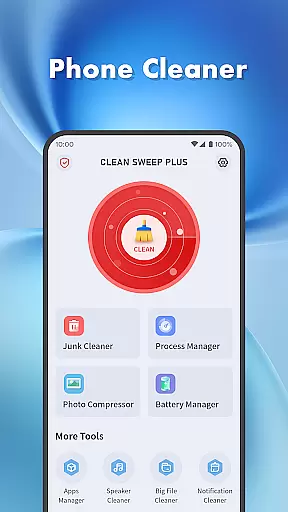
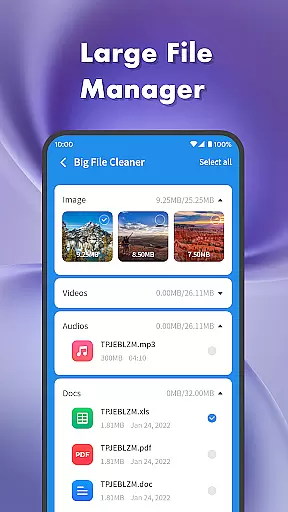
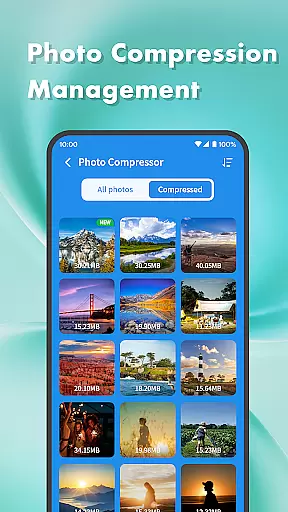
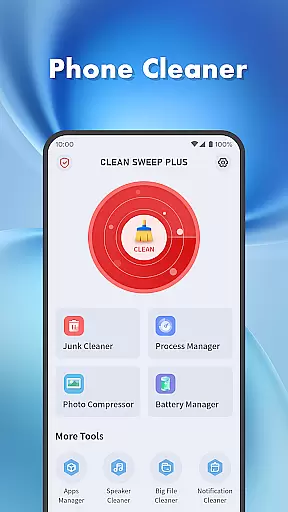
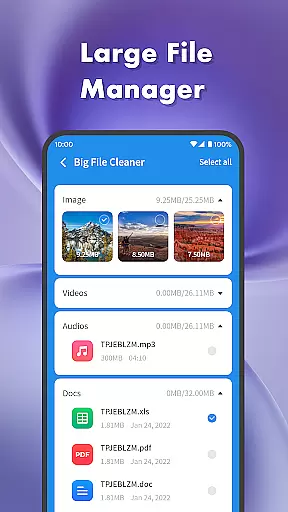
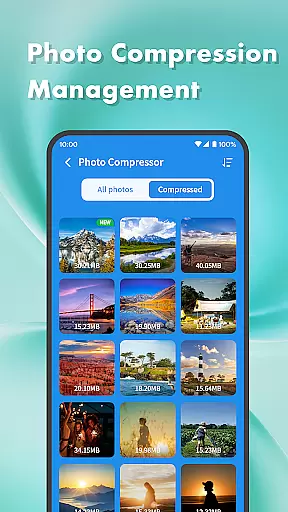
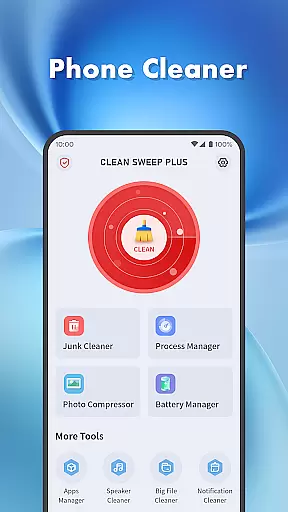
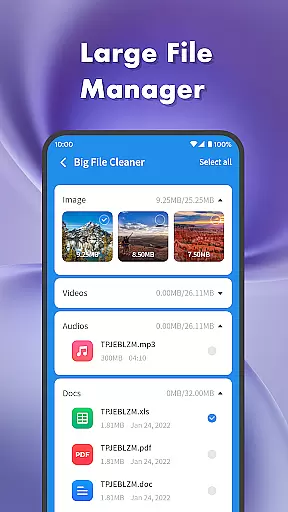
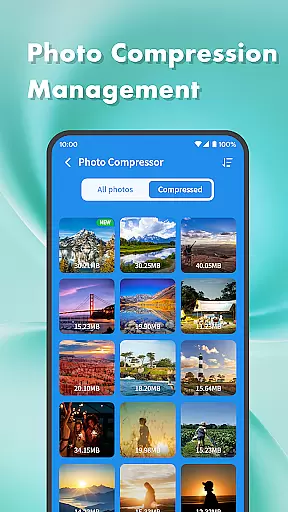
Clean Sweep Plus distinguishes itself through a diverse range of features tailored for efficient phone management. The app includes a Junk Cleaner to remove unnecessary files, a Large File Manager to handle bulky media files, and a Photo Compression tool to reduce image sizes without losing quality.
In addition to storage optimization, the app offers robust application management tools. The App Manager facilitates easy uninstallation of infrequently used applications, while the Process Manager allows users to monitor and control background processes, ensuring smoother device operation.
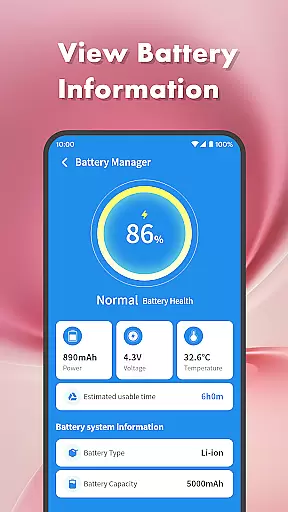
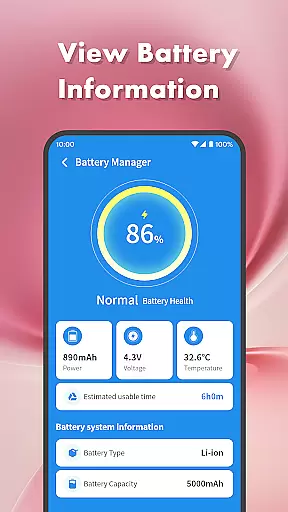
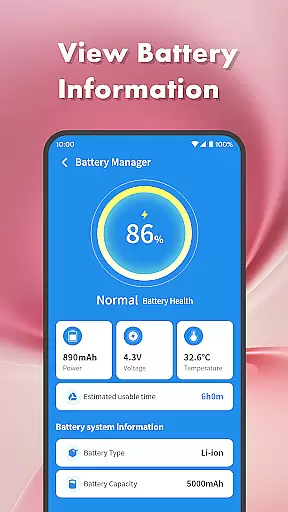
The Battery Management Center provides detailed insights into battery usage and estimated remaining time. Coupled with basic system information, this feature enables users to make informed decisions about their device's power consumption. These comprehensive tools collectively enhance the overall user experience.
When it comes to mobile device management tools, the accuracy and effectiveness of core functions are crucial for user satisfaction. Clean Sweep Plus excels in this aspect by offering a comprehensive suite of practical tools that address various phone management needs.
The app's Junk Cleaner precisely identifies unnecessary files, while the Large File Manager effectively locates space-consuming media files. Its Photo Compression feature smartly reduces file sizes without compromising quality, and the Notification Cleaner efficiently clears unwanted alerts. These well-implemented functions demonstrate the app's commitment to accurate and effective performance.
For users, this means reliable solutions for common phone issues. Whether it's freeing up storage space or managing app installations through the App Manager, each tool delivers tangible results. The Process Manager adds another layer of effectiveness by allowing users to monitor and control background processes.
The combination of these accurate and effective tools makes Clean Sweep Plus a valuable asset for maintaining optimal device performance. Users can trust that each feature will work as intended, providing peace of mind and saving valuable time in their daily phone management tasks.
A simple and intuitive interface is essential for productivity tools, and Clean Sweep Plus demonstrates excellent design principles in this area. The app's layout is carefully structured to ensure users can quickly locate and utilize its various functions without confusion or frustration.
Each tool is presented with clear labels and logical grouping, making navigation straightforward. The main categories like Basic Device Management and App and Process Management are distinctly separated, helping users find what they need efficiently. This thoughtful organization enhances the overall user experience significantly.
The app's designers have paid special attention to visual clarity and function accessibility. Important features such as the Battery Management Center and Speaker Cleaner are easy to identify and access. The consistent design language throughout the app creates a familiar environment that requires minimal learning curve.
This focus on interface simplicity translates into real user benefits. Even those who aren't tech-savvy can easily operate the app's features, from cleaning junk files to managing applications. The intuitive design ensures that users spend less time figuring out how to use the app and more time actually improving their device's performance.
User-friendly interface
Comprehensive toolset
Effective junk cleaning
Intuitive app management
Practical battery monitoring
Limited advanced features
Basic photo compression
No cloud backup option
Occasional slow performance
Ads in free version

Learn the vast amount of system information about device and monitor it's state
 4.70
4.70
Use your phone as a webcam on your computer over WiFi or USB.
4.40
Save any video in HD - paste the link, download fast and watch offline.
4.4
HD Video player and downloader for all formats, fast & smooth 4K video playback.
4.60
Forza Tuning Calculator App for Forza Horizon 5, Motorsport and Earlier Titles
4.40
Effortlessly run ADB commands directly on your device without a PC.
4.20
The one-and-only remote control for PC, Mac, and Linux
4.70
Play your X-Box games remotely in 1080p with any controller and zero latency
4.60
Game Booster, GFX Tool is now compatible with newer game update
4.50
Powerful collection of electronics tools and reference.A must for any enthusiast
4.90
Change your GPS location instantly. Simulate routes anywhere in the world.
4.90
The ultimate tool for network analysis, wifi scanning and problem detection.
4.90
Easily install aab(Android App Bundle) files on your Android device with our app
4.80
Bedrock Together: Join any bedrock server on Xbox/PS
4.80
FV File Manager Pro, Fast and powerful file manager for Android
4.60 4.50
4.50
pdf merge, word to pdf, jpg to pdf, edit pdf, convert to pdf and much more!
4.20
An open-source APK explorer for Android!
4.10
A convenient photo, video, and file recovery tool.
4.00


User Reviews