

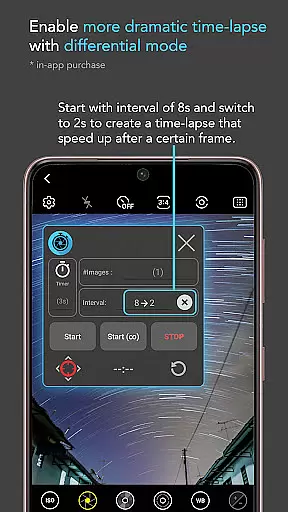
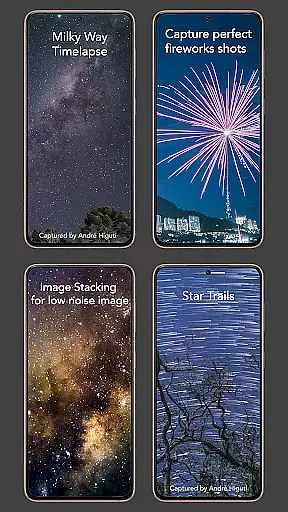
Intervalometer for TimeLapse is a powerful photography tool designed to automate the process of capturing time-lapse sequences. This app allows photographers to configure specific time intervals to trigger the camera shutter, enabling the capture of stunning time-lapse imagery with precision and ease.
One of the standout features of this app is its compatibility with various camera modes found in different camera applications. Whether you're using manual mode, HDR, night mode, or ultra-wide angle settings, Intervalometer seamlessly integrates to provide unparalleled control over your time-lapse projects. It supports advanced techniques such as low light time-lapse, long exposure time-lapse, and even the challenging Holy Grail of time-lapses (day to night transitions).
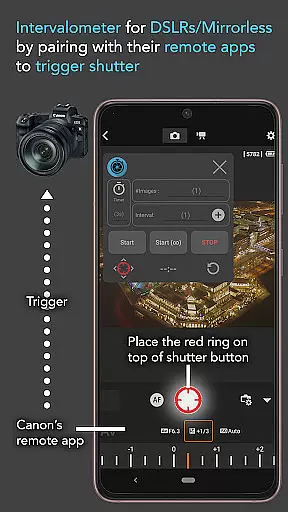
This app is not just limited to smartphone cameras; it can also be paired with dedicated camera remote apps from brands like Canon, Sony, and Nikon, effectively turning your smartphone into a versatile intervalometer device for professional-grade cameras.
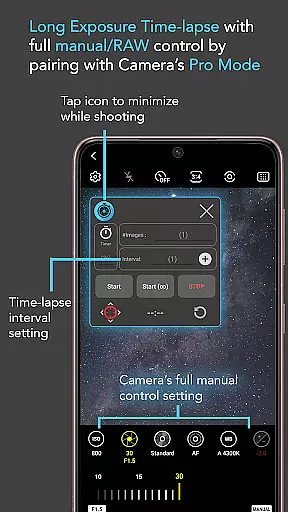
Intervalometer for TimeLapse offers an impressive array of features that cater to both amateur and professional photographers. The app provides full control over time-lapse configurations, allowing users to set delay timers, adjust interval times, and specify the number of shots needed for their project.
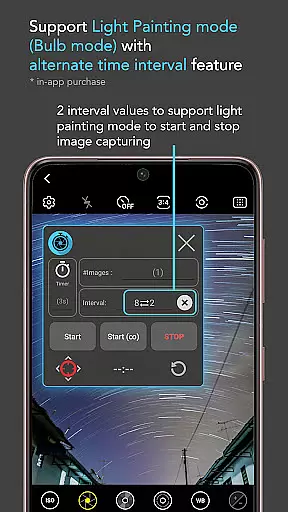
In addition to its customizable settings, the app includes an infinite mode for continuous shooting and a bulb mode for extended exposure photography. These features make it possible to explore creative avenues such as star trails, lightning stacking, and image stacking during post-processing.
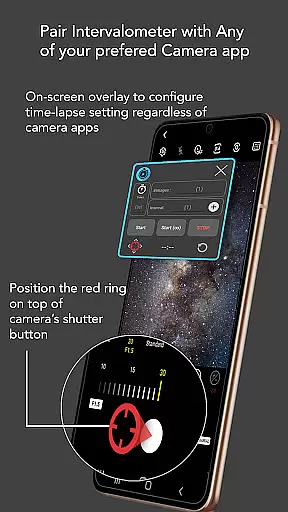
Another remarkable aspect of Intervalometer is its ability to work with any camera app. Users can reconfigure the shutter button position to match their preferred camera application, ensuring a seamless experience regardless of the chosen software. This flexibility empowers photographers to achieve higher quality images by leveraging the best features of their favorite camera apps while automating the photo-taking process.
Real-time capture and preview functionality is essential for ensuring that every moment of your time-lapse project is captured as intended. Intervalometer for TimeLapse offers a reliable solution by automating the camera shutter triggering process with precision timing.
This app leverages the AccessibilityService API to work seamlessly with any camera app on Android 7 and above, providing users with the flexibility to use advanced camera modes such as HDR, night mode, and manual settings. This ensures that each frame of the time-lapse is captured with the desired exposure and effects.
Users benefit from the ability to configure time-lapse settings including delay timer, interval time, and number of shots, allowing for creative control over projects like low light time-lapse or star trails. The real-time aspect ensures that adjustments can be made on the fly, optimizing the final output.
The value lies in its compatibility with dedicated camera remote apps from brands like Canon, Sony, and Nikon, making it an indispensable tool for both smartphone and professional camera users looking to create high-quality time-lapse videos.
While Intervalometer for TimeLapse does not focus on AI beauty or enhancement features, it excels in delivering natural and authentic captures through precise automation. The app's core function is to trigger the camera shutter at user-defined intervals, which is crucial for creating smooth and natural time-lapse sequences.
By supporting various camera modes, including manual and bulb modes, the app allows photographers to maintain full control over their image settings. This results in naturally enhanced images without relying on post-processing or artificial enhancements.
Photographers can explore diverse time-lapse techniques such as long exposure and HDR time-lapse, knowing that each frame will reflect true lighting and environmental conditions. This authenticity is key to producing compelling visual narratives.
Ultimately, the app empowers users to achieve professional-grade results with minimal interference, preserving the integrity and natural beauty of their photographic work while expanding creative possibilities.
User-friendly interface
Compatible with multiple camera apps
Supports advanced time-lapse techniques
Flexible configuration options
Works with dedicated camera remotes
Requires AccessibilityService API
Limited functionality on some devices
No built-in camera or image processing
May need device restart for certain models
Dependent on third-party camera apps

A collection of tools and reference tables for DPs, ACs, DITs and Operators.
 4.70
4.70
Photo editor: face & body editor, beauty cam, filters and quality enhancer.
4.00
Perfect photos with body shaping, BG changer and object remover.
3.70
Safe & smart flight with Go Fly drone controller for 40+ drone camera, zone map
4.50
Photobooth mini FULL app will allow you to add more fun to your parties
4.00
The #1 app for B&W film developing featuring an advanced darkroom timer.
4.10
Enhance, retouch & create your story - Share the moment with Photoshop Express.
4.60
Easily create custom gifts, cards, photo books & more on the Shutterfly app!
4.60
Discover How to Plan any Sun, Moon and Milky Way Photo You Imagine in Seconds
4.70
Take videos and pictures with the popular TikTok TIME WARP SCAN filter.
4.60
Cut and paste photo editor & eraser to customize photos easy and swap faces fun
4.50
Natural Beauty, Selfie Retouch
4.30
Turn your phone into a professional camera - full DSLR manual photography
4.30
All-in-One Editor & AI Photo Enhancer, Beautify & Retouch, Collage, Cartoonify
4.20
Transform Photos: Edit, Beautify and Craft Memories & Make Collages!
4.10
live datamoshing
4.00
Gallery Slideshow is slideshow maker app for slideshow from your gallery photos.
3.90
Raw Image Viewer. Gallery with support of raw images (.cr3, .cr2, .nef, .raf).
2.00
Over 800 film simulation recipes for Fujifilm. Black Friday Offer!
4.0


User Reviews