








Shazam is a powerful music recognition app designed specifically for Android Wear devices, allowing users to instantly identify songs playing around them. With over 2 billion installs and 300 million users worldwide, this app has become an essential tool for music lovers. Shazam not only recognizes tracks but also provides additional features such as time-synced lyrics, artist information, and concert details.
The app offers seamless integration with popular music streaming services like Apple Music, Spotify, and YouTube Music, making it easy to save and listen to identified songs. Its offline functionality ensures that users can Shazam songs even without an internet connection. Whether you're discovering new music or revisiting old favorites, Shazam enhances the listening experience by offering curated playlists, song charts, and recommendations tailored to your preferences.
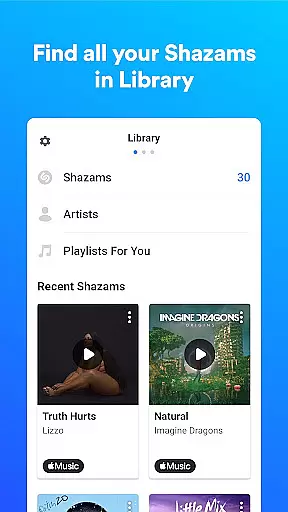
Shazam stands out with its advanced music recognition technology that works in seconds, even with headphones on. The app's Auto Shazam feature allows continuous song identification, ensuring no track goes unrecognized. Users can access their complete song history, which is automatically saved and stored within the app, providing a personalized archive of discovered music.
Beyond music identification, Shazam offers a comprehensive music discovery platform. It displays real-time song charts based on global and local popularity, recommends new artists, and provides time-synced lyrics for karaoke-style singing. Integration with wearable devices through Android Wear extends its usability, while the Dark theme option caters to user interface preferences. The app also facilitates social sharing across platforms like Snapchat, Facebook, and Instagram, making music discovery a more interactive experience.
Shazam offers seamless companion app integration, allowing users to identify songs across various platforms and devices effortlessly. This feature is crucial for those who want to capture music moments without switching apps or disrupting their current activity.
The app enables song recognition directly from the notification bar or within other applications like Instagram, YouTube, and TikTok. This cross-platform functionality ensures that users can Shazam a song wherever they encounter it, maintaining continuity in their digital experience.
Users benefit from this integration by having a centralized location for all identified songs, which can then be explored further through linked services such as Apple Music, Spotify, and YouTube Music. This interconnected ecosystem enriches the user's ability to discover and engage with music content.
By integrating with Wear OS, Shazam extends its utility beyond smartphones, making it accessible on smartwatches and ensuring that users never miss an opportunity to identify a captivating tune, regardless of their current context or device in use.
Device compatibility is a significant aspect of Shazam's appeal, particularly for users of Wear OS devices. The ability to run smoothly on different hardware ensures that the app's music identification capabilities are available to a broader audience, enhancing accessibility and convenience.
Shazam supports offline functionality, Auto Shazam, and quick access via widgets, all optimized for Wear OS. These features allow users to identify songs even without their phones nearby, providing freedom and flexibility in how and where they interact with the app.
For users, this means they can enjoy uninterrupted music discovery whether they're commuting, exercising, or in situations where carrying a smartphone is impractical. The app's optimization for wearable technology guarantees timely and accurate song identification.
This compatibility not only demonstrates Shazam's commitment to embracing diverse technologies but also reinforces its position as a versatile tool in the realm of music discovery, adapting to various user lifestyles and preferences.
Instant song recognition
Offline functionality
Auto Shazam feature
Integration with streaming services
Comprehensive music discovery
Limited offline features
Requires microphone access
Some features need location
Notifications can be intrusive
Varies by country

Gym Log & Workout Tracker | Fitness Journal, Training & Weight Lifting Planner
 4.90
4.90
Christmas watch face. For Wear OS devices.
4.30
Artistic Digital Watchface
4.1
A modern premium sporty hybrid watch face for Wear OS by Ballozi
4.70
Stylish digital watch face for Wear OS devices with customizable features
4.1
Fitness interactive virtual pet super fighter boy watch face
4.0
Animated video-game inspired “secret agent” simulation, right on your wrist!
4.20
A realistic hybrid watch face with many customization options.
4.60
Spam call blocker and caller ID for automatic call protection!
4.40
Gym & home workout plans with strength training, exercise tracking, HIIT & more.
4.60
Kia Access makes getting your vehicle information easier than ever
4.60
MyNISSAN® lets you remotely control your car from your phone.*
4.50
Premium hybrid watch face with many customizations for Wear OS devices.
4.40
Calming & relaxing sounds for sleeping and stress relief. Stay focused all day!
4.20
Elegant animated Christmas tree with multiple customization options
4.20
sleep, alarm, snoring, stress, healing, focus, sound therapy, circadian rhythm
4.10
Wear Os Watch Face - Animated Snow Effect & Christmas Lights
4.2
Christmas is near, let's count together the days left until Santa comes
4.4
3 Complications. All shadow on/off. 30 Themes color palette...
4.1


User Reviews