



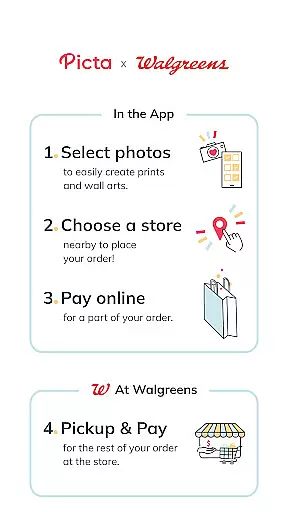
Picta is a photo printing app that allows users to print their mobile photos at Walgreens stores. With this app, you can easily select your photos, choose the print size and quantity, and pick up your prints in just one hour. Picta offers professional-quality photo printing services on Kodak paper in multiple sizes, including 4x6, 5x7, and 8x10 enlargements. You can also create personalized photo gifts such as magnets, posters, canvas, photobooks, greeting cards, and more.
One of the key features of Picta is its fast and safe photo transfer capability. The app organizes your mobile photos by date taken, making it easy to find and select the photos you want to print. Picta is available exclusively in the United States and offers special deals and coupons for app users. Whether you need to print photos for personal use or create unique gifts for special occasions, Picta provides a convenient and reliable solution.
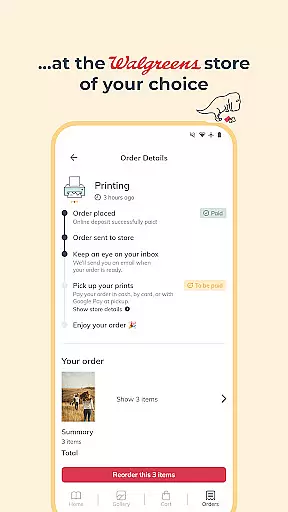
Picta offers a range of features that make photo printing quick and convenient. One standout feature is the ability to crop and zoom each picture easily within the app, allowing you to customize your prints to your liking. Additionally, Picta provides real-time order status updates, so you can track your prints and pick them up at your selected Walgreens store in less than an hour. The app also includes a store locator function, helping you find the nearest Walgreens location for easy pickup.
Another notable feature of Picta is its selection of personalized photo products. Users can create custom magnets, cards, photobooks, and more using their favorite photos. Picta also offers square prints in 4x4 or 8x8 sizes, perfect for showcasing Instagram photos. With its user-friendly interface and high-quality printing options, Picta stands out as a top choice for photo printing services among Walgreens customers.
Real-time capture and preview functionality is essential for ensuring that users can accurately select and edit their photos before printing. With the Picta app, this feature allows users to instantly view their selected images in high resolution, providing a clear representation of how the final print will appear.
The app ensures that every photo taken or selected from the gallery is displayed with true-to-life colors and sharpness. This immediate feedback enables users to make necessary adjustments, such as cropping or zooming, directly within the app interface, thus enhancing the overall quality of the printed photos.
By offering real-time previews, Picta significantly reduces the chances of user dissatisfaction with the final product. Users can confidently proceed with their orders, knowing exactly what to expect when they pick up their prints at the nearest Walgreens store.
This feature not only streamlines the photo selection process but also adds a layer of convenience and assurance, making it an indispensable tool for anyone looking to print high-quality photos quickly and efficiently.
AI beauty and enhancement features are increasingly becoming a standard in photography apps, allowing users to improve their photos with natural-looking effects. The Picta app incorporates advanced AI algorithms that automatically enhance skin tones, adjust lighting, and apply subtle filters to create stunning yet authentic images.
These enhancements are designed to maintain the original essence of the photograph while elevating its aesthetic appeal. Users can choose from various enhancement levels, ensuring that the final output aligns with their personal preferences without appearing overly processed or artificial.
One of the standout benefits of using AI for photo enhancement is the consistency it provides across different images. Whether you're printing single photos or creating a collage, the AI ensures uniformity in quality and style, resulting in professional-grade prints every time.
Ultimately, the AI beauty and enhancement capabilities of Picta empower users to transform ordinary snapshots into extraordinary keepsakes, all while preserving the natural beauty of the original moments captured.
User-friendly interface
Fast photo printing service
Wide range of print sizes
Personalized photo gifts
Exclusive deals for app users
Limited to Walgreens stores
Availability only in the US
No instant digital downloads
Requires store pickup
Occasional delays in printing

Effortlessly organize, view and share your photos & videos with Gallery app!
 4.40
4.40
Create collages easily! Nice pic collage maker & background eraser for Instagram
4.50
A must-have app for landscape photographers
4.60
A reflected light meter with spot metering and incident light metering.
4.40
GCamera allows all GCam features on all phone models! Better photos with GCamera
3.30
Smart, light, and fast photo and video gallery
4.30
Easily create custom gifts, cards, photo books & more on the Shutterfly app!
4.60
Your personal guide to the sun and moon. Plan ahead, visualize and predict!
4.70
Catch sunlight, sunrise sunset times and sun phases with the AR sun tracker.
4.10
Cartoon and artistic effects for your photos and videos
4.70
Easily view, share, delete photos with Gallery.
4.70
Add Watermark - Sign your pictures with a text or logo. Effective, quick, easy!
4.50
Cut and paste photo editor & eraser to customize photos easy and swap faces fun
4.50
Photo Exif Editor allows to view, add and modify EXIF data of multiple photos
4.50
AI portrait generator and polaroid AI selfie, fun AI generated AI photo creator!
4.30
Create AI Photos, Improve and restore quality of blurry, old or damaged pics.
4.20
What celebrity do you look like? Celebs will find your celebrity match!
4.10
How would you look like with a differently shaped nose, chin or lips?
3.90
Add a dreamy vibe to your selfies and videos with soft style filters
4.0


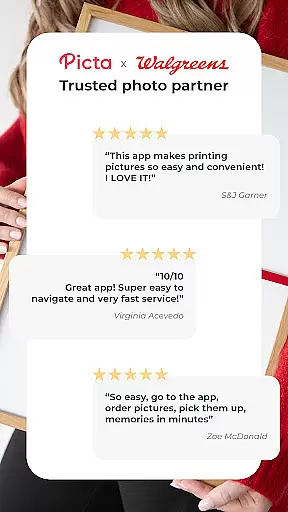
User Reviews