


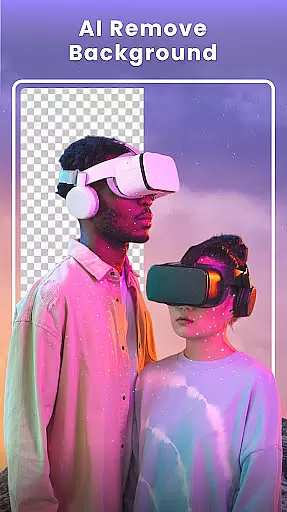





Photo Collage Maker - FunPic is a versatile photography app designed to help users create stunning photo collages and video stories. With over 300 layouts, it allows you to combine photos into eye-catching designs while offering unique shapes and grid options for more creative freedom. The app also provides advanced AI tools for background removal and object erasing, ensuring professional-quality edits.
In addition to its collage features, FunPic supports video editing, letting you merge videos and photos with music, stickers, and text overlays. Whether you're crafting an Instagram post or a personalized slideshow, this app offers rich customization options including filters, doodles, and themed templates. It's perfect for capturing memories in a visually appealing way.
This app is ideal for social media enthusiasts, content creators, and anyone who wants to enhance their photos with minimal effort. By providing intuitive tools and weekly updates of new materials, Photo Collage Maker empowers users to express their creativity effortlessly.
Photo Collage Maker - FunPic stands out with its extensive set of features tailored for both casual users and design enthusiasts. One key highlight is the inclusion of over 300 customizable layouts, ranging from standard grids to intricate shapes, enabling limitless creativity when arranging your photos. Additionally, the app incorporates AI-powered tools like automatic background removal and object cleanup, which simplify complex editing tasks without requiring professional skills.
Beyond static collages, FunPic offers dynamic video collage capabilities. Users can blend videos and images seamlessly, adding music tracks or voice recordings directly from their device. The app also includes a library of 1,000+ stickers, artistic filters, and decorative fonts that are updated weekly, keeping your creations fresh and engaging. These features collectively ensure that every project reflects your personal style.
For those seeking convenience, the app provides pre-designed templates optimized for platforms like Instagram and WhatsApp. From adjusting aspect ratios to applying animations, FunPic streamlines the process of creating visually cohesive feeds. This combination of powerful tools and user-friendly functionality makes it a top choice for anyone looking to elevate their digital storytelling.
Real-time capture and preview functionality is essential for any photography app as it allows users to see exactly what their photo will look like before taking the shot. This feature ensures that users can make necessary adjustments on the fly, thus improving the quality of their photos.
Photo Collage Maker - FunPic offers an intuitive real-time preview system that lets you experiment with different collage layouts, filters, stickers, and text overlays. As you apply these elements, the changes are reflected instantly, giving you a clear idea of how your final creation will appear.
The benefit of this real-time interaction is significant; it empowers users to fine-tune every aspect of their collages without delay. Whether adjusting the layout or experimenting with various artistic effects, the immediate visual feedback enhances creativity and saves time during the editing process.
This seamless integration of real-time capture and preview within Photo Collage Maker not only elevates user experience but also sets a high standard for mobile photography tools by providing professional-grade features in an accessible format.
AI beauty and enhancement features have become increasingly popular in photography apps, offering users the ability to refine and beautify their images with minimal effort. The challenge lies in maintaining the naturalness of the enhancements so that edited photos still appear authentic.
FunPic's AI photo editor excels in this area by providing tools such as automatic background removal, object removal, and avatar creation that preserve the original essence of the image while enhancing its aesthetic appeal. These advanced AI capabilities ensure that edits are subtle yet effective, keeping the focus on the subject matter.
Users benefit from having powerful editing options at their fingertips that do not compromise the genuineness of their photos. With weekly updates to filters, stickers, and templates, thereu2019s always a fresh way to enhance images naturally without over-processing them.
By prioritizing natural-looking enhancements, Photo Collage Maker - FunPic delivers a sophisticated suite of editing tools that cater to both amateur photographers looking for quick fixes and professionals seeking more nuanced control over their work.
User-friendly interface
Extensive layout options
AI-powered editing tools
Weekly material updates
Versatile video support
Ads may interrupt workflow
Premium features locked
Occasional bugs reported
Large file size
Limited free templates

A collection of tools and reference tables for DPs, ACs, DITs and Operators.
 4.70
4.70
Gallery show photo, video, slideshow, is perfect 3D effect private photo albums.
4.80
Add Watermark - Sign your pictures with a text or logo. Effective, quick, easy!
4.50
Android Native system HD camera app. Never been so simple and faster.
4.70
A must-have app for landscape photographers
4.60
Future baby face generator: AI kids generator, kid face! What my baby look like?
4.40
live datamoshing
4.00
Catch sunlight, sunrise sunset times and sun phases with the AR sun tracker.
4.10
Edit photos with the picture generator: PS2 & AI Clay filters, cartoon effects.
4.50
Photo prints, cards, & gifts at Walgreens. Easy ordering & fast local pickup !
4.80
Light-weight Media Gallery app for Android made with Jetpack Compose
4.60
Easily create custom gifts, cards, photo books & more on the Shutterfly app!
4.60
Unblur, enhance & restore photos with powerful AI photo enhancer tools.
4.60
Cut and paste photo editor & eraser to customize photos easy and swap faces fun
4.50
Effortlessly organize, view and share your photos & videos with Gallery app!
4.40
Professional camera app that brings DSLR manual photography controls to Android.
4.20
Gallery Slideshow is slideshow maker app for slideshow from your gallery photos.
3.90
Pet Camera
3.70
An interval timer to automate photo taking process for timelapse
2.90


User Reviews