
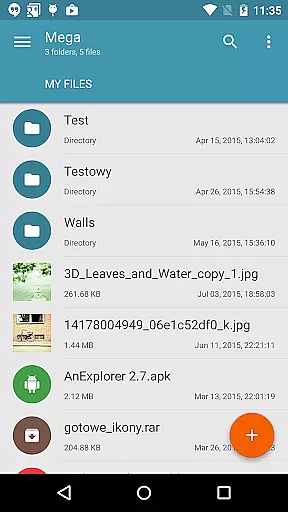
Mega Plugin for Solid Explorer is a productivity-enhancing application designed to seamlessly integrate your Mega cloud storage with the Solid Explorer file manager. This plugin allows users to perform a wide range of operations directly from their mobile device, including copying, moving, renaming, and viewing files, as well as downloading and uploading content. Additionally, it supports streaming music and videos, making it an all-in-one solution for managing your cloud-based files efficiently.
With its intuitive interface, this app ensures that you can easily connect to your Mega account by following simple steps. After establishing the connection, users can access their cloud drive effortlessly, which significantly boosts productivity by streamlining file management tasks. Whether you are a professional needing quick access to important documents or someone who enjoys media on the go, Mega Plugin for Solid Explorer offers practical value by simplifying cloud interactions.
The Mega Plugin for Solid Explorer boasts a variety of features that cater to efficient cloud storage management. One of its standout capabilities is the comprehensive file operation support, allowing users to copy, move, rename, and view files without any hassle. The plugin also facilitates downloading and uploading files, ensuring that your data is always accessible wherever you are.
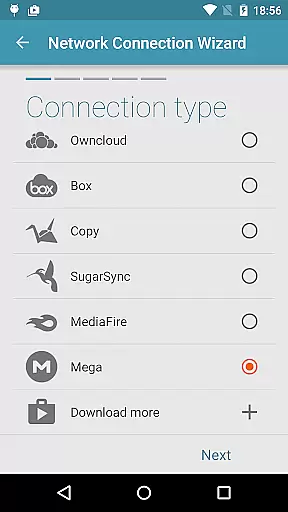
Another remarkable feature is the ability to stream music and videos directly from your Mega cloud storage. This functionality not only saves local storage space but also provides instant access to your media library. By following a straightforward setup process—tapping the + button, choosing 'Cloud connection,' selecting the Mega option, and entering login credentials—users can quickly establish a secure connection. These robust features collectively enhance user experience by offering seamless integration and management of cloud resources.
Task management is a crucial aspect of productivity applications, enabling users to organize and prioritize their work efficiently. The Mega Plugin for Solid Explorer excels in this area by providing robust tools for managing files within your Mega account.
This plugin allows you to perform a wide array of file operations including copying, moving, renaming, and viewing files directly from the Solid Explorer interface. These capabilities ensure that you can handle your cloud storage with the same ease as local files, streamlining your workflow significantly.
Additionally, the ability to download and upload files adds another layer of convenience. Whether you need to access important documents on the go or share large media files, this plugin ensures that your tasks are completed swiftly and without hassle.
By integrating seamlessly with Mega's services, the plugin enhances your productivity by allowing you to focus on what matters mostu2014your worku2014without getting bogged down by cumbersome file management processes.
Cross-device synchronization is essential for maintaining consistency and accessibility across multiple devices. The Mega Plugin for Solid Explorer offers reliable synchronization features that keep your files up-to-date no matter where you access them.
With this plugin, any changes made to your Mega account through Solid Explorer are reflected instantly. This means whether you're editing documents at home or streaming videos while traveling, your data remains current and accessible from any device connected to your account.
The plugin also supports real-time updates, ensuring that all your devices have the latest version of your files. This feature is particularly beneficial for users who rely on cloud storage for collaborative projects or personal backups.
Moreover, the secure connection processu2014where you simply tap the + button, choose 'Cloud connection,' select Mega, enter your credentials, and tap connectu2014ensures that your data remains protected during transfer. This reliable and straightforward setup guarantees peace of mind when managing your digital assets across different platforms.
User-friendly interface
Comprehensive file management
Secure cloud connection
Efficient media streaming
Seamless integration with Solid Explorer
Limited to Mega users
Requires Solid Explorer
No standalone functionality
Potential connectivity issues
Subscription may be needed

Secure, fast, open-source, VNC and SSH Remote Desktop for Windows, Linux and Mac
 4.70
4.70
A Revolutionary All-in-One Artificial Intelligence Tools
3.80
A customizable calendar for your Wear OS watch
4.20
All in one sketching tool. Technical and General drawing. Online Maps support.
3.70
Smart PDF reader & editor to view, organize and manage PDF documents easily.
3.70
Secure, fast, open-source, Remote Desktop Client for Windows and Linux with SSH
4.60
Best Tool for the professionals Electrician, Electrical contractors, etc.
4.90
Access your phone's notifications, calls, apps, photos & texts on your PC
3.90
AI Chatbot and AI writing assistant powered by ChatGPT.
4.60
Multilingual translator for text, voice, and image translation!
4.90
We're working to become the best machining app on the market! www.cncdirt.com
4.80
App Lock with fingerprint, password: Lock apps & hide photos with lock screens
4.60
Calendar 2023 widget for Android. Appointment scheduler, planner, and reminder
4.60
Make apps & sites with natural language prompts
4.10
Wake up & get tasks done! Add alarms & reminders on the Clock Launcher.
4.00
ID.me Authenticator is a simple and free Two Factor Authentication solution
3.50
Code on-the-go with VScode for Android. Edit,debug and collaborate from mobile!!
3.10
Experience and share your SolidWorks designs on your Android® phone and tablet.
2.50
A comprehensive suite of tools designed specifically for Lactation Consultants
4.1


User Reviews