





Open Browser is a comprehensive mobile web browser designed for fast, secure, and convenient browsing. It combines multiple functionalities into one app, eliminating the need to switch between different applications. With its lightweight design, it ensures quick page loading even on slower networks, while offering features like private browsing, video downloading, real-time news updates, and integrated weather forecasts.
The browser also includes practical tools such as a built-in file manager for organizing downloads and an incognito mode that protects user privacy by not saving history, cookies, or cache. Whether you're streaming videos, reading news, or managing files, Open Browser provides a seamless experience tailored for efficiency and ease of use.
For users seeking a versatile browsing tool, Open Browser serves as an all-in-one solution that prioritizes speed, security, and accessibility, making daily internet tasks simpler and more efficient.
Open Browser stands out with its diverse range of features designed to enhance the mobile browsing experience. Its Fast & Smooth Browsing capability ensures pages load quickly, even in low-network conditions, providing users with minimal wait times and efficient navigation. The inclusion of Private Browsing Mode allows users to browse without leaving traces such as history or cached data, ensuring enhanced privacy during online activities.
Another notable feature is the ability to Watch & Download Videos directly within the app. Supporting various formats, this functionality lets users stream content online or save videos for offline viewing through the built-in player. Additionally, the Real-Time News Feed keeps users informed about global events across categories like technology, entertainment, and lifestyle, while the Instant Weather Updates provide live weather information including forecasts and air quality details.
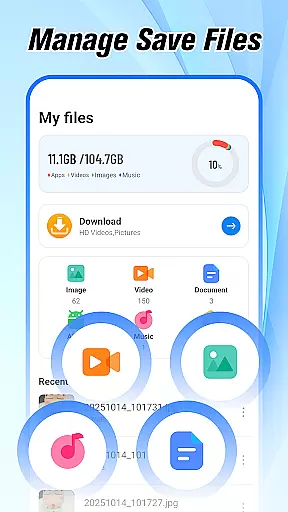
Lastly, the Simple File Management system helps organize downloaded files efficiently, keeping images, documents, and videos easily accessible in one place. These features collectively make Open Browser a powerful tool for both everyday browsing and advanced usability needs.
At the heart of Open Browser lies its commitment to providing users with fast, accurate, and effective browsing capabilities. This mobile browser is engineered to load web pages swiftly, even on slower networks, ensuring that users can access information without unnecessary delays.
The app's lightweight design contributes to its efficiency, allowing for smooth navigation through websites. Its optimization for mobile ensures that every interaction, from entering a URL to scrolling through content, is seamless and responsive.
For users, this means less time waiting and more time engaging with the content they seek. Whether it's for casual browsing or focused research, Open Browser delivers an experience that values speed and precision.
Moreover, features like private browsing mode enhance user security by not saving history, cookies, or cache, thus protecting privacy while maintaining performance standards.
Open Browser excels in offering an interface that is both simple and intuitive, making it accessible to users of all technical backgrounds. The layout is designed to be straightforward, ensuring that even first-time users can navigate with ease.
Key functionalities are strategically placed for quick access, streamlining tasks such as searching, downloading, and managing files. With integrated tools like a video player and file manager, the app minimizes the need to switch between different applications.
This cohesive design approach enhances user engagement by reducing complexity. Users can enjoy a seamless transition from one task to another, whether they're reading news, watching videos, or organizing their downloads.
By prioritizing clarity and ease-of-use, Open Browser ensures that its powerful features are matched by an equally robust yet friendly user experience.
Fast page loading
Private browsing
Video download
News integration
File management
Limited extensions
No desktop sync
Ads present
Occasional bugs
Heavy on RAM

 4.50
4.50
Extremely fast, secure, and protects your privacy
4.80
Keep track of your Palia friendships, tasks, and inventory with Palia Notebook
4.60
Forza Tuning Calculator App for Forza Horizon 5, Motorsport and Earlier Titles
4.40
Excellent scientific calculator with symbolic algebra, integrals, derivatives
4.80
Signal Strength, Mobile, Wifi, Speed Test, Bad Signals, Cellular, 5G, LTE, 4G
4.20
Making emulation easy for everyone!
4.30
Undelete and recover your lost or deleted files with DiskDigger!
3.40
Fast VPN USA for any country. Super secure VPN for calls, streaming, games, TV.
4.40
The ultimate tool for network analysis, wifi scanning and problem detection.
4.90
WiFi Signal Strength Meter help you detect WiFi Signal Strength in real time.
4.80
The Ultimate Flex Drivers Utility App - Convenient Tapping & Block Filters
4.70
Play your X-Box games remotely in 1080p with any controller and zero latency
4.60 4.50
4.50
pdf merge, word to pdf, jpg to pdf, edit pdf, convert to pdf and much more!
4.20
App that Recover your pictures, videos or files after you delete them.
4.20
MS-DOS in your pocket. Play old DOS games anywhere you are ;)
4.10
PDF Reader - Document Viewer: Read, Manage & Organize Your Documents
3.10
Transfer Files, APK from Phone to Watch & Install.
4.0


User Reviews