
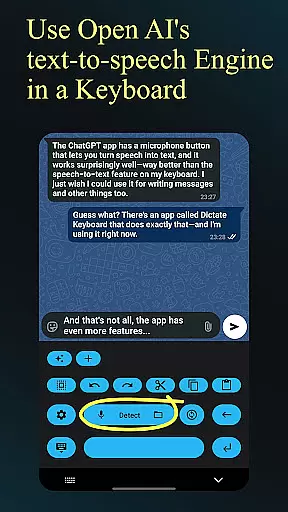
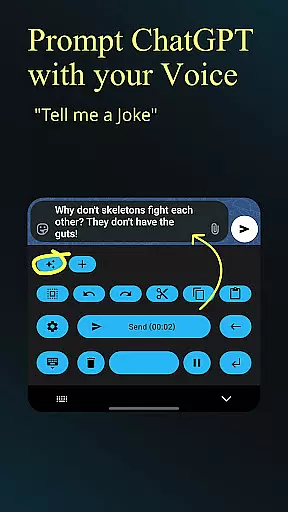
Dictate Keyboard is a cutting-edge productivity tool designed to streamline text input through advanced speech recognition technology. This innovative keyboard app converts spoken words into written text with remarkable accuracy, supporting all major languages. Its AI-driven transcription engine not only recognizes speech but also intelligently adds punctuation and formatting.
The application extends beyond basic dictation by offering professional-grade features such as custom rewording using GPT-5, multiple transcription models, and support for various API providers. Users can seamlessly switch between different recognition modes, record audio through various microphones, and even transcribe existing media files. The comprehensive feature set makes it particularly valuable for professionals who need efficient document creation and content production on mobile devices.
Dictate Keyboard distinguishes itself through its sophisticated feature set that caters to diverse productivity needs. The app's core functionality lies in its powerful speech-to-text conversion capabilities, powered by advanced AI models like Whisper and GPT-4o-transcribe. These technologies enable accurate transcription of both live speech and pre-recorded audio content across multiple languages.
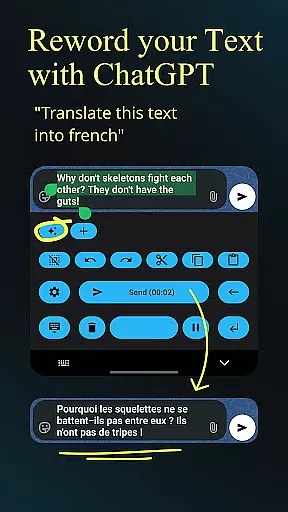
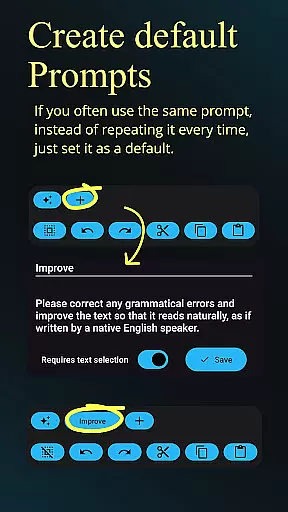
Beyond basic transcription, the app offers advanced customization options including system prompt settings for style guidance, automatic formatting of spoken commands, and integration with various API providers. Professional users will appreciate the ability to implement custom rewording instructions using GPT-5 and other models, enabling functions such as translation, summarization, and style modification. Additional productivity-enhancing features include seamless theme customization, haptic feedback, and quick keyboard switching, all contributing to an optimized user experience.
Dictate Keyboard revolutionizes core task management by integrating advanced speech recognition technology into a user-friendly keyboard interface. This innovative approach allows users to convert spoken language into text with remarkable accuracy, supporting all common national languages.
The app's AI-driven transcription system goes beyond basic dictation by intelligently adding punctuation and formatting commands automatically. Users can create new paragraphs, insert specific wordings, and even dictate complex instructions without manual editing.
What sets Dictate apart in task management is its seamless integration with various transcription models and providers, including OpenAI and Groq. This flexibility enables users to choose the most suitable recognition engine for their specific needs while maintaining consistent performance across different platforms.
The practical benefit for users lies in the significant time savings and increased productivity when managing daily tasks through voice commands. The ability to switch between different recognition models ensures optimal accuracy for various professional and personal use cases.
Cross-device synchronization is where Dictate Keyboard truly shines, offering users unparalleled reliability across multiple platforms. The application maintains consistent performance whether used on smartphones or paired with Bluetooth devices, ensuring that work started on one device can be seamlessly continued on another.
The app's robust architecture supports real-time synchronization of custom settings, including rewording instructions, system prompts, and theme preferences. This means that users' personalized configurations are always up-to-date across all their devices, eliminating the need for repetitive setup processes.
Dictate's implementation of API server and proxy support further enhances synchronization reliability. By allowing users to connect through their preferred servers or even self-hosted solutions, the app ensures minimal downtime and maximum data consistency during transfers between devices.
This reliable cross-device functionality particularly benefits professionals who frequently switch between workstations or need to maintain productivity while traveling. The ability to access identical functionality and settings across devices streamlines workflow and reduces technical barriers to efficient task completion.
Advanced speech recognition
Multi-language support
Customizable rewording
Professional formatting tools
Open-source flexibility
Requires API setup
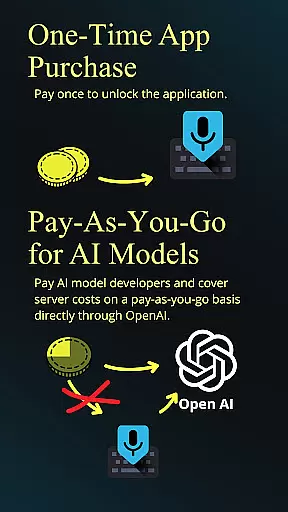
Incurs usage fees
Complex initial configuration
Dependent on third-party services
May have learning curve

Unlock AutoNotification
 4.00
4.00
Send files, sync SMS, notifications & clipboard across devices via local network
4.40
We're working to become the best machining app on the market! www.cncdirt.com
4.80
IP Camera Viewer - Android TV : RTSP Surveillance camera viewer for Android TV
4.2
Multilingual translator for text, voice, and image translation!
4.90
Subscribe to Webcal & .ics calendars and keep them up-to-date!
4.50
A comprehensive suite of tools designed specifically for Lactation Consultants
4.1
QuickEdit is a fast, stable and full featured text and code editor.
4.20
Note taking, handwriting, record audio, PDF annotation, planner & journal
4.20
Android Wallet Password Manager
4.80
Mind Map and brainstorm, note taking and idea collection
4.80
App Lock with fingerprint, password: Lock apps & hide photos with lock screens
4.60
To do list widget with a notebook organizer, checklist, simple shopping list
4.60
CalenGoo is a very flexible and feature-rich calendar app
4.40
Enjoy classic gameplay with customizable features and retro-style graphics.
4.30
Professional calendar app for Google Calendar, MS Outlook & Exchange
4.20
Ultimate Virtual AI Character for immersive Roleplay Chat. Perfect Companion
3.90
Auto-shutoff Alarm with Sunrise, Sunset & Fixed Options.
3.50
A simple, portable logger for POTA, SOTA, Field Day, and more
4.1


User Reviews