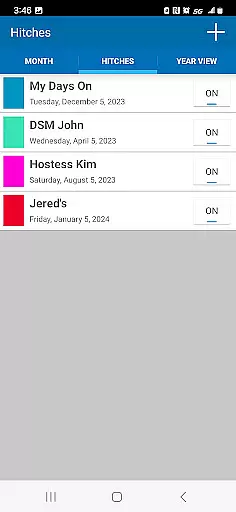
Oilfield Calendar is a productivity app designed specifically for oilfield workers, helping them manage their demanding schedules with ease. The app offers a user-friendly interface to customize work hitches for drilling, production, and facility workers, while also allowing users to plan their time off. With features like multiple schedule creation, PDF exporting, and holiday tracking, it ensures that both work and personal life are well-organized.
The app stands out by addressing the unique scheduling challenges faced in the oilfield industry. Users can compare different work schedules, mark important dates, and share their plans effortlessly. Whether you're coordinating with your team or planning family events during days off, Oilfield Calendar provides the tools necessary to keep your life on track.
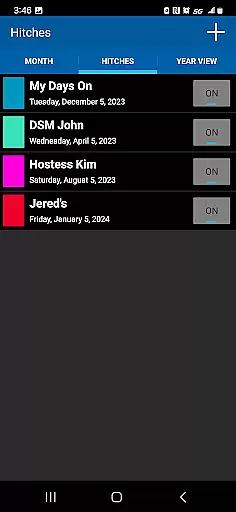
Oilfield Calendar boasts several key features that cater to the specific needs of oilfield professionals. One standout functionality is the ability to create and modify custom hitches using the intuitive hitch editor. This allows users to tailor their work schedules according to their unique requirements in the oil and gas sector.
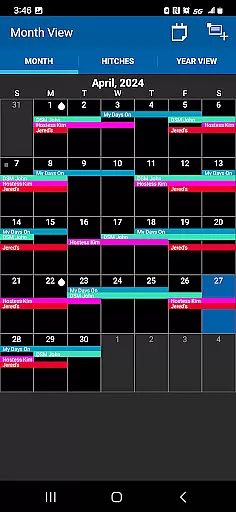
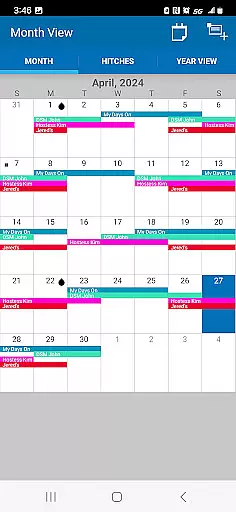
In addition to its scheduling capabilities, the app provides practical views such as month and year overviews, where holidays are marked with oil drops for easy identification. Users can also generate PDFs of their schedules for printing or sharing. These innovative features ensure that oilfield workers can efficiently manage their professional responsibilities while also planning personal events without hassle.
Oilfield Calendar excels in core task management by offering a comprehensive suite of tools tailored for oilfield workers. The app allows users to create and modify work schedules using an intuitive hitch editor, ensuring that every shift is accounted for.
The ability to customize hitches for oil and natural gas operations through a user-friendly interface makes planning straightforward. This feature is crucial for drilling, production, and facility workers who need to balance their demanding work schedules with personal time.
Moreover, the app supports the creation and comparison of multiple schedules, which can be exported and shared as PDFs. This functionality not only enhances productivity but also facilitates better communication among team members and families, ensuring everyone is on the same page.
Cross-device synchronization is a standout feature of Oilfield Calendar, providing reliable access to schedules across various devices. Whether you're at home or on-site, your calendar updates in real-time, ensuring you always have the most current information at your fingertips.
This seamless integration means that changes made on one device are instantly reflected on all others, promoting consistency and reducing the risk of scheduling conflicts. For vendors needing to coordinate with DSMs on tour, this reliability is indispensable.
Additionally, the app's robust synchronization capabilities allow users to plan ahead using month and year views, marking important dates such as holidays with oil drops. This ensures that critical events like Christmas or birthdays don't clash with work commitments, enhancing work-life balance.
User-friendly interface
Customizable work hitches
Multiple schedule comparison
Holiday tracking feature
PDF export and sharing
Limited to oilfield workers
No automatic syncing
Premium features may cost extra
Requires manual updates
Interface could feel outdated

Client for Nextcloud Deck
 4.60
4.60
Planet Free VPN - The best Fast Unlimited and Secure VPN Without Logs
4.50
Mind Map and brainstorm, note taking and idea collection
4.80
aCalendar+ makes your day, week and month
4.70
Find and delete junk files & block unwanted notifications & manage files
3.70
Create and edit presentations with Google Slides, part of Google Workspace.
4.00
Use powerful, industry-leading AI tools to generate visual charts from any data
4.80
AI Chatbot and AI writing assistant powered by ChatGPT.
4.60
Seamlessly read, manage, and organize all your PDF files solution in one place
4.40
Best Tool for the professionals Electrician, Electrical contractors, etc.
4.90
Multilingual translator for text, voice, and image translation!
4.90
Protect and view your important info on your phone and tablet with eWallet®
4.80
The long-awaited modern gallery app for your Nextcloud server
4.70
Absolutely the best CNC machinist speed and feed calculator around. fswizard.com
4.60
The AI assistant that thinks with you - write, code, and solve complex tasks
4.60
Todo reminder
4.10
Access your phone's notifications, calls, apps, photos & texts on your PC
3.90
A Revolutionary All-in-One Artificial Intelligence Tools
3.80
Create study competitions, track your hours, and stay consistent with friends
4.3


User Reviews