
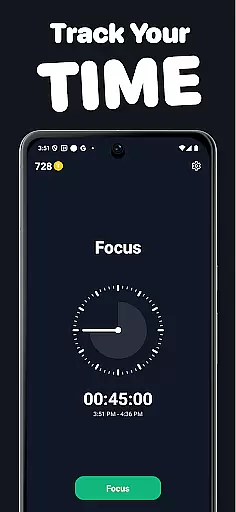
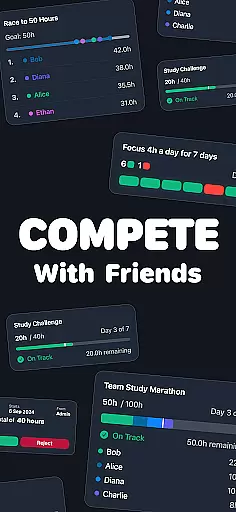
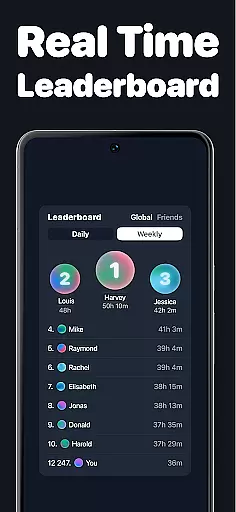
Timero is a productivity app designed to help users build better habits and boost their efficiency through friendly competition. The app allows you to track your focus time while participating in various challenges, making productivity a social endeavor. Whether you're studying, working, or training, Timero helps you stay consistent by turning your goals into engaging activities.
With features like real-time progress tracking, weekly stats visualization, and streak maintenance, Timero ensures that you remain accountable for your daily tasks. You can join solo challenges, race against others, collaborate with friends on team goals, or maintain streaks to keep your momentum going. This makes it ideal for anyone looking to enhance their productivity while having fun.
The true value of Timero lies in its ability to combine productivity with social accountability. By allowing users to create or join challenges with friends, everyone can see each other's progress live, fostering motivation and consistency. It’s the perfect tool for those who thrive on competition and need an extra push to achieve their personal or professional goals.
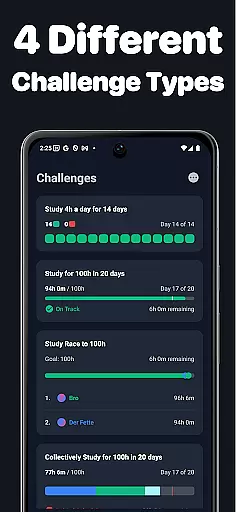
Timero offers a variety of features that make productivity both competitive and enjoyable. One standout feature is the ability to participate in different types of challenges, including solo goals, races, team goals, and streaks. These challenges allow users to either work individually or collaborate with friends, creating a dynamic environment where everyone pushes each other to succeed.
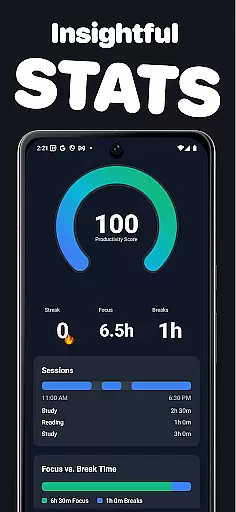
In addition to challenges, Timero provides clear progress tracking tools. Users can log their time in real-time, visualize their weekly statistics, and monitor streaks to ensure they are staying consistent. The app also lets you categorize how you spend your time, helping you identify areas where you can improve. This level of detail ensures that users have full control over their productivity journey.
Another key aspect of Timero is its focus on social accountability. The app allows you to create or join groups with friends, view live progress updates, and stay motivated by seeing others actively participating. With no unnecessary distractions or gimmicks, Timero delivers a clean, straightforward experience focused purely on helping you achieve your goals through real motivation from real people.
Task management is at the heart of productivity applications, and Timero excels in this area by offering a variety of challenge types to suit different needs. Whether you're aiming for personal goals, racing against others, working as a team, or maintaining streaks, Timero provides the framework to keep you on track.
The app allows users to log their time in real-time, ensuring that every moment spent on tasks is accurately recorded. This feature not only helps in tracking progress but also motivates users to stay consistent with their efforts. By visualizing weekly stats and streaks, Timero makes it easy to see how much time is dedicated to various activities, fostering better habits and increased productivity.
Moreover, Timero's ability to let users create or join challenges with friends adds a layer of accountability and friendly competition. Seeing everyone's progress live can be incredibly motivating, pushing users to achieve more than they would alone. With its clean interface and focus on real motivation from real people, Timero ensures that task management is both effective and engaging.
In today's interconnected world, reliable cross-device synchronization is crucial for any productivity tool. Timero understands this need and offers seamless integration across multiple devices, ensuring that your data is always up-to-date and accessible wherever you are. This means whether you're studying, working, reading, or training, your progress is continuously synced.
The app's synchronization capabilities allow users to log time in real-time, providing an accurate reflection of their activities regardless of the device used. This ensures that all tracked hours, challenges joined, and streaks maintained are consistently updated across platforms. Such reliability enhances the user experience by eliminating the frustration of lost data or discrepancies between devices.
Furthermore, Timero's focus on no distractions and no gimmicks extends to its synchronization process. Users can trust that their information is securely and efficiently transferred, allowing them to concentrate on their tasks without worrying about technical issues. By prioritizing robust cross-device synchronization, Timero supports a seamless and uninterrupted productivity journey.
User-friendly interface
Real-time progress tracking
Engaging challenge formats
Social accountability features
Customizable productivity goals
Limited free features
Requires constant internet
Premium subscription costly
Notifications can be intrusive
Steep learning curve

Android Wallet Password Manager
 4.80
4.80
Secure, fast, open-source, Remote Desktop Client for Windows and Linux with SSH
4.60
Multilingual translator for text, voice, and image translation!
4.90
A comprehensive suite of tools designed specifically for Lactation Consultants
4.5
Best Tool for the professionals Electrician, Electrical contractors, etc.
4.90
Experience and share your SolidWorks designs on your Android® phone and tablet.
2.50
Scientific calculator for Android - looks and operates like the real thing!
4.90
QuickEdit is a fast, stable and full featured text and code editor.
4.20
Note taking, handwriting, record audio, PDF annotation, planner & journal
4.20
Protect and view your important info on your phone and tablet with eWallet®
4.80
Simple notepad & memo. Take notes, to-do list, shopping list with reminders.
4.80
A simple Whisper AI keyboard for reliable speech transcription and rewording
4.60
To do list widget with a notebook organizer, checklist, simple shopping list
4.60
A Pixel Art watchface inspired by other iconic 90s designs for Wear OS devices!
4.40
When you Focus, so will your Bean in this cozy focus timer
4.30
Access, manage and transfer files on Android, PC, Mac, NAS and cloud storages.
4.30
All in One PDF Reader: Manage, Read and Edit your Documents
4.20
A Revolutionary All-in-One Artificial Intelligence Tools
3.80
Make your handwriting beautiful, even more than pen on paper.
3.60


User Reviews