
QuickBend is a highly specialized conduit bending calculator app designed for precision and efficiency. It caters to electricians, DIY enthusiasts, and professionals working with conduits, offering accurate measurements by considering the radius of the shoe and bender, conduit type, and size diameter. The app employs a centerline radius algorithm to ensure rigorous and field-tested calculations, making it an essential tool for avoiding simple mistakes and saving both time and money.
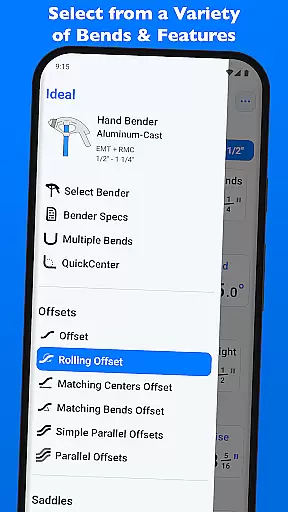
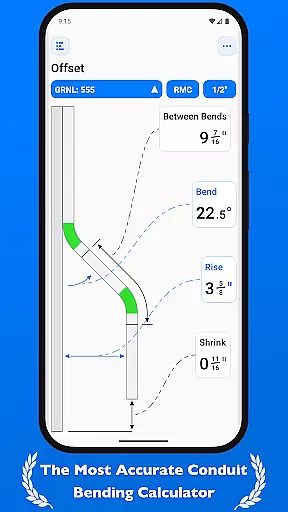
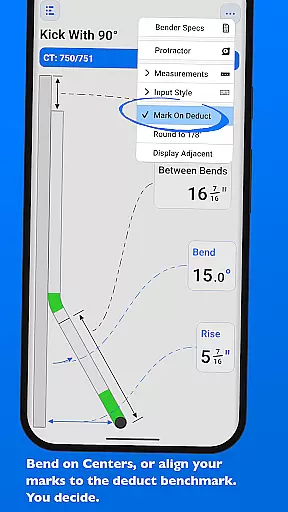
Beyond its calculation capabilities, QuickBend provides extensive documentation for individual bends and supports a wide range of bend types including Offset, Rolling Offset, Three-Point Saddle, and more. Its intuitive interface allows users to toggle between inches and centimeters, switch input styles, and visualize bend possibilities before finalizing calculations. With features like QuickCheck, users receive instant feedback on bend feasibility through color-coded text alerts.
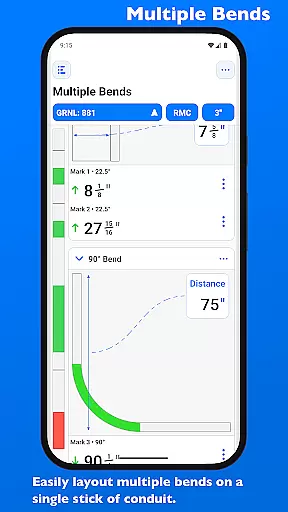
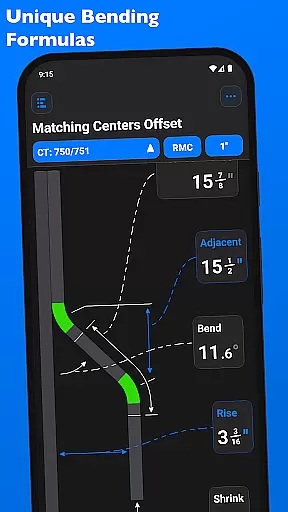
QuickBend stands out with its innovative features tailored for productivity and accuracy. One of its core strengths is the ability to calculate conduit bends using the centerline radius algorithm, ensuring precise measurements that have been rigorously tested in real-world scenarios. The app supports over 15 bend types, such as Offset, Parallel Kick, and Compound 90° bends, while enabling users to layout multiple bends on a single conduit with exact measurements for each mark.
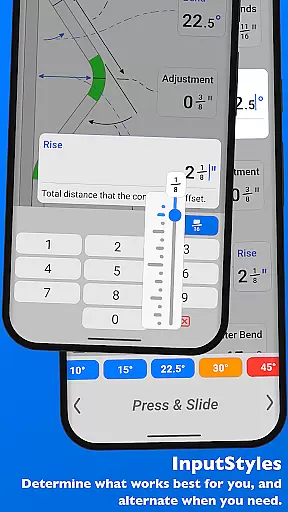
The app's input flexibility is another key feature, allowing users to choose between number pads or slider bars (Press & Slide) for data entry. QuickCheck adds a layer of convenience by providing real-time feedback through color changes, indicating whether a bend is impossible (red) or unlikely (orange). Additionally, QuickBend lets users customize their workflow by pinning frequently used benders, editing detailed bender specifications, and switching between metric and imperial units seamlessly.
For professionals relying on precise calculations, QuickBend offers an advanced conduit bending calculator that stands out in the realm of productivity tools. This app is engineered to ensure electricians and other tradespeople can manage their bending tasks with utmost accuracy and efficiency.
The core task management feature of QuickBend takes into account critical factors such as the radius of the shoe and bender, conduit type, and size diameter. By integrating a centerline radius algorithm, it generates measurements that have been rigorously tested in the field, ensuring reliable and repeatable results for every project.
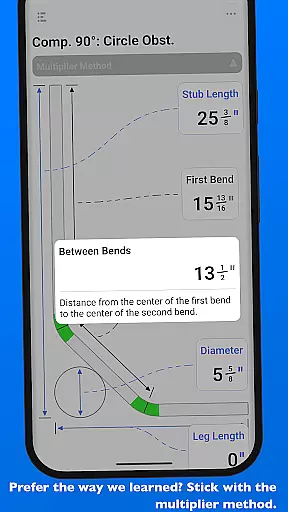
QuickBend's innovative design supports a wide array of bends, from simple offsets to complex compound 90u00b0 bends around obstructions. Users can layout multiple bends on a single conduit and receive precise measurements for each mark, streamlining their workflow and allowing them to focus on the craftsmanship.
With its intuitive interface, users can toggle between different input styles and measurement units, making it adaptable to individual preferences and project requirements. The ability to quickly switch between benders and view detailed specifications enhances task management, saving time and reducing errors in the process.
In today's fast-paced work environments, having reliable cross-device synchronization is crucial for maintaining productivity. QuickBend addresses this need by offering seamless access to detailed bender specifications and bend calculations across various devices.
Electricians using QuickBend can easily select between different types of benders and adjust settings for shoe size and conduit type all from within the same screen they are working on. This unified workspace ensures that whether you're in the office or on-site, your data remains consistent and up-to-date.
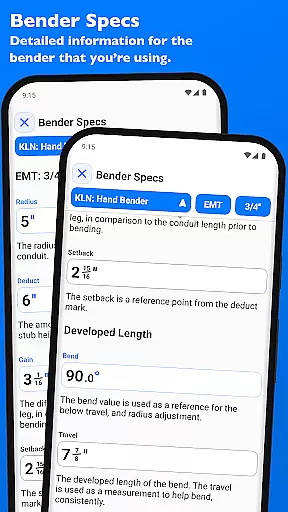
The app allows users to pin frequently used benders for quick selection without the need for constant scrolling. Detailed information like centerline radius, deduct, gain, setback, travel, and radius adjustments for any degree bend up to 90u00b0 are visualized and editable within 'Bender Specs', providing a reliable reference no matter where you are.
By incorporating features such as QuickCheck, which provides immediate feedback through text color changes indicating potential issues with a bend, QuickBend ensures that users have real-time updates at their fingertips. This level of synchronization reliability empowers professionals to make informed decisions swiftly, enhancing overall job performance.
Highly accurate calculations
User-friendly interface
Wide range of supported bends
Real-time bend feasibility checks
Customizable bender settings
Steep learning curve for beginners
Premium price point
Limited appeal outside electrical work
No offline support mentioned
Requires device compatibility

Experience Reading - Night Mode for Documents
 4.40
4.40
Seamlessly integrate data and reports to build your presentation to impress
4.80
Experience real multitasking on your Android!
4.00
Native client for Forgejo and Gitea
5.00
Android Wallet Password Manager
4.80
Pwnagotchi companion app
4.20
Activate Two Factor Authentication (2FA or Multi OTP), Password manager and more
4.10
Access, manage and transfer files on Android, PC, Mac, NAS and cloud storages.
4.30
The ultimate file manager for rooted devices. The original and still the best.
4.00
Scientific calculator for Android - looks and operates like the real thing!
4.90
Multilingual translator for text, voice, and image translation!
4.90
Understand anything with a personalized AI research assistant
4.80
Secure, fast, open-source, VNC and SSH Remote Desktop for Windows, Linux and Mac
4.70
Quickly and easily keep track of your work shifts
4.70
Translate text/voice/photos in 150+ languages. Offline & fast translator app.
4.50
A lightweight JSON & XML files creator, editor and viewer (Premium Version)
4.40
* block pre-roll ads, pop-up and forced redirect ads * Samsung certification app
4.00
Mega cloud explorer plugin for Solid Explorer
3.80
Find and delete junk files & block unwanted notifications & manage files
3.70


User Reviews