
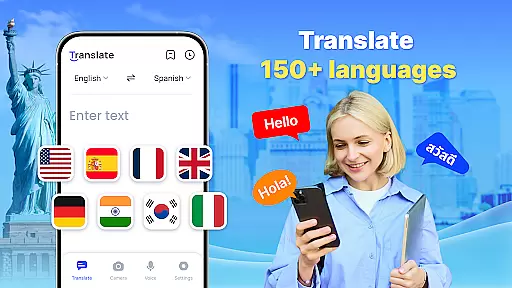







Translate - Translator is a versatile productivity app designed to break language barriers through its comprehensive translation capabilities. Supporting over 150 languages, this free translator app offers text, voice, and photo translation, making it an essential tool for travelers, students, and professionals alike.
The app's standout feature is its offline functionality, allowing users to translate without an internet connection. Whether you're traveling abroad, communicating with foreign colleagues, or learning new languages, Translate - Translator ensures seamless communication across different scenarios. Its intuitive interface and accurate translations provide significant value to users who need quick and reliable multilingual support.
Translate - Translator stands out in the productivity category due to its diverse features that cater to various translation needs. The app supports instant text translation across 150+ languages, making it ideal for travel, business, and study purposes. Users can simply input text to receive fast and accurate translations.
One of the key innovations is the real-time voice translation feature. Using advanced voice recognition technology, the app allows users to speak naturally while translating conversations on the go. Additionally, the AI-powered photo translation function lets users capture images of foreign language materials, menus, or signs, extracting text for immediate translation.
The app also includes practical tools like offline translation, full-screen translation via floating ball, auto-detect language input, reverse translation, and the ability to save and share results. These features collectively create a powerful translation ecosystem that enhances cross-cultural communication.
Core task management in a productivity app like Translate ensures that users can efficiently handle various translation tasks. This feature is crucial as it allows users to organize, prioritize, and execute translation activities seamlessly.
The Translate app implements core task management by offering multiple translation modes including text, voice, and photo translation. Users can easily switch between these modes depending on their current needs, ensuring that each translation task is handled optimally. The app also supports offline translation, which means users can complete tasks without needing an active internet connection.
For users, this comprehensive task management translates into significant time savings and increased reliability. Whether traveling, conducting business, or learning new languages, individuals can depend on the app to deliver quick and accurate translations across 150+ languages.
Ultimately, the value of robust task management in Translate lies in its ability to make cross-cultural interactions effortless. By providing features such as auto-detect input language, reverse translation, and saving translation results, the app empowers users to communicate effectively and confidently in diverse linguistic environments.
Cross-device synchronization reliability is essential for users who rely on the Translate app across multiple devices. This functionality ensures that user data, preferences, and translation history are consistently updated and accessible, regardless of the device being used.
In Translate, synchronization is achieved through cloud-based storage solutions that automatically save user inputs and settings. Whether switching from a smartphone to a tablet or vice versa, users can expect their saved translations, preferred languages, and customized settings to be readily available. This seamless transition enhances the overall user experience by maintaining continuity and coherence across devices.
Users benefit greatly from reliable synchronization as it eliminates the need to manually transfer data or reconfigure settings. This convenience is particularly valuable for those who frequently use the app on different devices throughout the day, ensuring they have uninterrupted access to their translation resources.
The true advantage of dependable cross-device synchronization in Translate is the peace of mind it offers. Knowing that their information is securely stored and always up-to-date allows users to focus on their primary tasksu2014communicating and understanding across language barriersu2014without worrying about technical inconsistencies or data loss.
Fast and accurate
Supports 150+ languages
Offline functionality
User-friendly interface
Versatile translation modes
Limited advanced grammar
Occasional OCR errors
Ads in free version
Large file size
Some features require premium

 4.20
4.20
QuickBooks Workforce lets teams view pay info and track time in one place.
4.70
Auto-shutoff Alarm with Sunrise, Sunset & Fixed Options.
3.50
Direct Chat without saving contacts & Dual WA Account on Single Device
4.70
We're working to become the best machining app on the market! www.cncdirt.com
4.80
All document reader, all in one file viewer read PDF, DOCX, XLS, PPT, TXT files.
4.60
Quickly and easily keep track of your work shifts
4.70
Set up, print, and get support—in one place
4.20
Note taking, handwriting, record audio, PDF annotation, planner & journal
4.20
Native client for Forgejo and Gitea
5.00
Great calculator for Android named one of USA TODAY's "25 Essential Apps".
4.90
Seamlessly integrate data and reports to build your presentation to impress
4.80
Absolutely the best CNC machinist speed and feed calculator around. fswizard.com
4.60
Secure, fast, open-source, Remote Desktop Client for Windows and Linux with SSH
4.60
A simple Whisper AI keyboard for reliable speech transcription and rewording
4.60
Unlock AutoNotification
4.00
* block pre-roll ads, pop-up and forced redirect ads * Samsung certification app
4.00
A Revolutionary All-in-One Artificial Intelligence Tools
3.80
Code on-the-go with VScode for Android. Edit,debug and collaborate from mobile!!
3.10


User Reviews