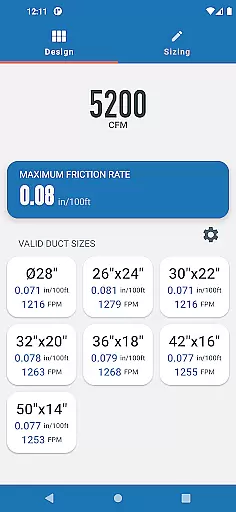
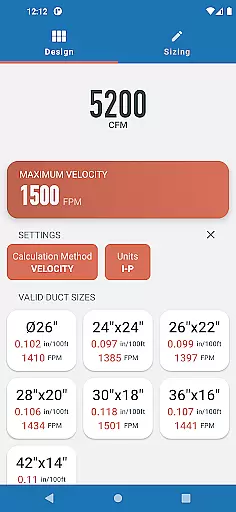
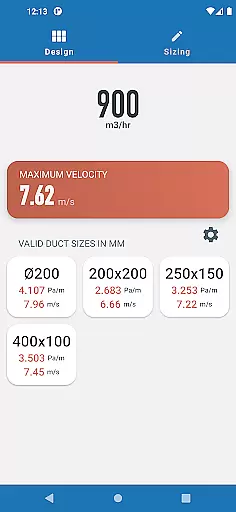
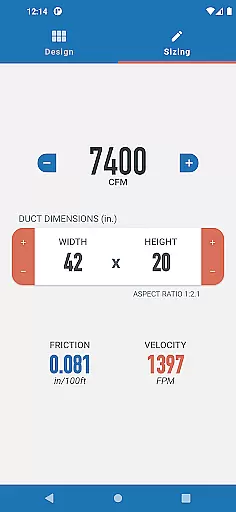
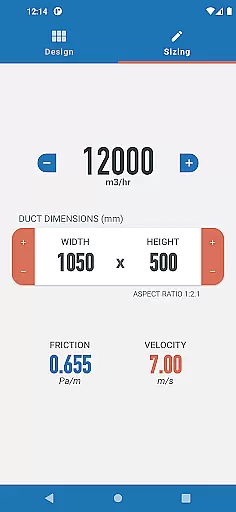
Ductulator is a productivity-focused app designed to streamline the duct sizing process for HVAC engineers. This innovative tool replaces traditional duct sizing charts, offering both Design Mode and Sizing Mode functionalities. In Design Mode, users can input parameters such as maximum friction rate or velocity to receive a list of suitable rectangular and circular duct sizes. The Sizing Mode allows real-time adjustments to duct dimensions and airflow rates, providing automatic updates on resulting friction and velocity values.
The app supports both Imperial and SI units, making it versatile for international use. Calculations are based on standard air properties in clean galvanized steel ducts, ensuring accuracy and reliability. Ductulator's intuitive interface and advanced features make it an essential tool for both designing new duct systems and analyzing existing ones.
Ductulator stands out with its dual-mode functionality that caters to different engineering needs. The Design Mode provides a range of suitable duct sizes by simply entering either the maximum friction rate or velocity. This feature saves valuable time compared to traditional manual calculations. The app then generates comprehensive lists of appropriate duct dimensions while displaying resulting friction rates and velocities.
In Sizing Mode, engineers can dynamically adjust duct dimensions and airflow rates while observing real-time updates of friction and velocity values. This interactive feature was implemented based on user feedback and proves particularly useful when analyzing existing duct systems. The ability to switch between Imperial and SI units adds another layer of versatility, accommodating engineers worldwide. All calculations are based on industry-standard air properties, ensuring consistent and reliable results.
In the realm of productivity applications, core task management is pivotal for organizing and prioritizing tasks efficiently. Ductulator excels in this area by offering two distinct modes tailored to the needs of HVAC engineers.
In Design Mode, users can input either the maximum friction rate or velocity to receive a comprehensive list of suitable duct sizes. This feature streamlines the design process by providing quick access to essential data, allowing engineers to make informed decisions without sifting through traditional sizing charts.
Switching to Sizing Mode, the app mimics a ductulator's functionality, enabling real-time adjustments to duct dimensions and airflow rates. As users modify these parameters, the resulting friction rate and velocity update automatically, facilitating the analysis of existing duct systems with precision and ease.
This dual-mode approach ensures that whether you're designing new systems or evaluating current ones, Ductulator's task management capabilities are robust and versatile, significantly enhancing workflow efficiency for HVAC professionals.
Cross-device synchronization is crucial for maintaining consistency and reliability across different platforms, ensuring that all your data is up-to-date and accessible wherever you are. While Ductulator focuses primarily on HVAC duct sizing, it incorporates features that support reliable data access and updates.
Engineers using Ductulator can seamlessly switch between Imperial and SI units, which is vital for international projects or teams working across different regions. This flexibility ensures that calculations and designs remain consistent, regardless of the unit system preferred or required.
Moreover, the app's ability to provide automatic updates on friction rates and velocities in Sizing Mode means that any changes made are instantly reflected. This real-time synchronization allows users to collaborate effectively, as everyone has access to the most current data without manual recalculations or updates.
While not a traditional synchronization feature, Ductulator's dynamic updating and unit conversion capabilities ensure that all project stakeholders work with the same accurate information, promoting efficient and error-free collaboration across devices and teams.
Time-saving design
User-friendly interface
Real-time calculations
Dual measurement systems
Comprehensive analysis tools
Limited to standard air
Requires technical knowledge
No offline functionality
Single material calculation
Premium feature pricing

Secure, fast, open-source, VNC and SSH Remote Desktop for Windows, Linux and Mac
 4.70
4.70
Experience real multitasking on your Android!
4.00
Native client for Forgejo and Gitea
5.00
Simple and reliable communication between inmates, friends and family
3.20
Secure, open-source, SPICE and SSH Remote Desktop for QEMU KVM virtual machines
4.00
Scientific calculator for Android - looks and operates like the real thing!
4.90
Share files & memories safely. Keep your photos and videos secure.
4.40
Ultimate Virtual AI Character for immersive Roleplay Chat. Perfect Companion
3.90
Put a lock on your cloud: Take the security of your data into your own hands
3.70
We're working to become the best machining app on the market! www.cncdirt.com
4.80
Quickly and easily keep track of your work shifts
4.70
Translate text/voice/photos in 150+ languages. Offline & fast translator app.
4.50
A Pixel Art watchface inspired by other iconic 90s designs for Wear OS devices!
4.40
* block pre-roll ads, pop-up and forced redirect ads * Samsung certification app
4.00
The ultimate file manager for rooted devices. The original and still the best.
4.00
Smart PDF reader & editor to view, organize and manage PDF documents easily.
3.70
Easiest event planning, volunteer signups & parent teacher conference scheduling
2.20
Ads Free App! Editor, Hide File, Copy, Move, Delete and Rename.. all facility av
1.70
IP Camera Viewer - Android TV : RTSP Surveillance camera viewer for Android TV
4.3


User Reviews