




Microsoft Copilot is an advanced AI-powered productivity application designed to assist users in accomplishing a wide range of tasks through smart chat and voice interactions. The app integrates cutting-edge OpenAI and Microsoft AI models, offering features such as AI-driven text generation, image creation, and multilingual support. With its ability to summarize complex information, generate creative content, and provide personalized assistance, Copilot serves as both a personal assistant and a professional tool.
The app's standout feature is its versatility, allowing users to draft emails, create shopping lists, design visuals, and even develop storyboards for creative projects. Whether you're looking to enhance your workflow or spark inspiration, Microsoft Copilot provides the tools necessary to achieve more with less effort. Its intuitive interface ensures that users can easily access these powerful capabilities without needing extensive technical expertise.
For professionals, students, and creatives alike, Microsoft Copilot offers a seamless way to boost productivity while fostering creativity. By combining AI reasoning with conversational models, it delivers a cohesive experience that adapts to various needs, making it an indispensable companion for modern-day challenges.
Microsoft Copilot stands out due to its robust set of features tailored to improve efficiency and creativity. One of its core functionalities is the AI chat assistant, which allows users to engage in meaningful conversations to solve problems, brainstorm ideas, or receive quick answers to complex questions. This feature supports multiple languages, including regional dialects, making it accessible to a global audience.
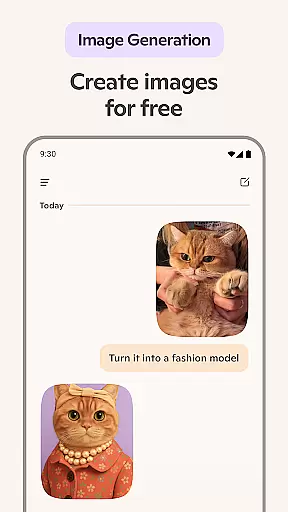
In addition to text-based interactions, Copilot includes an innovative AI photo generator. This tool enables users to transform textual descriptions into high-quality images, ranging from abstract designs to photorealistic visuals. Whether creating illustrations for children’s books or developing brand logos, this functionality empowers users to bring their concepts to life effortlessly.
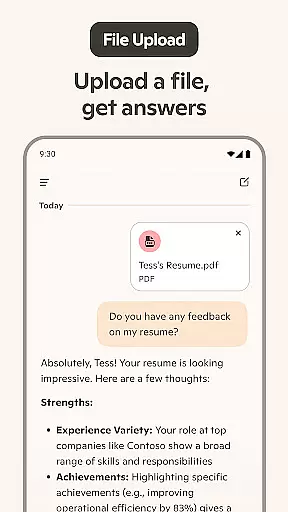
Another notable aspect is its ability to streamline everyday tasks. For instance, users can simplify grocery planning by generating AI-powered shopping lists or drafting professional documents like resumes and cover letters. These practical applications highlight how Microsoft Copilot not only enhances productivity but also adds value across diverse scenarios, positioning itself as a versatile AI companion.
Microsoft Copilot excels in core task management by integrating advanced AI capabilities to streamline daily activities. The application leverages the latest OpenAI and Microsoft AI models to offer users an intuitive platform for organizing tasks efficiently.
Through its AI chat assistant, Copilot simplifies complex task management processes into straightforward interactions. Users can effortlessly create to-do lists, manage schedules, and set reminders through simple conversations with the AI, enhancing productivity without the usual learning curve associated with traditional task management tools.
The app's ability to generate instant sharp summaries and helpful rewrites ensures that users can quickly grasp essential information and take necessary actions. This feature is particularly beneficial when handling large volumes of data or when preparing documents such as emails, cover letters, and resumes, allowing users to focus on their primary objectives without getting bogged down by details.
Cross-device synchronization is a cornerstone of Microsoft Copilot's design, ensuring that users have seamless access to their data and tasks across multiple platforms. By leveraging Microsoftu2019s robust cloud infrastructure, Copilot guarantees reliable and consistent synchronization, enabling users to transition smoothly between devices without losing any information.
This reliability extends to various functionalities within the app, including AI-generated content, task lists, and personalized settings. Whether you're switching from a desktop to a mobile device or vice versa, Copilot maintains the integrity and continuity of your work, providing a cohesive user experience that adapts to your dynamic lifestyle.
Moreover, Copilot's synchronization capabilities are enhanced by real-time updates, ensuring that any changes made on one device are immediately reflected on all others. This feature not only boosts productivity but also provides peace of mind, knowing that your data is always up-to-date and accessible wherever you go.
User-friendly interface
Advanced AI capabilities
Multilingual support
Versatile functionality
High-quality outputs
Limited offline functionality
Premium features require subscription
Occasional response delays
Dependent on internet connectivity
Learning curve for new users

Secure, fast, open-source, VNC and SSH Remote Desktop for Windows, Linux and Mac
 4.70
4.70
A customizable calendar for your Wear OS watch
4.20
Mega cloud explorer plugin for Solid Explorer
3.80
Remotely view listen control and record cameras.
3.70
Customizable calendar widget for seamless event sync, planning & scheduling.
4.00
Activate Two Factor Authentication (2FA or Multi OTP), Password manager and more
4.10
Code on-the-go with VScode for Android. Edit,debug and collaborate from mobile!!
3.10
Scientific calculator for Android - looks and operates like the real thing!
4.90
Intelligent AI Assistant
4.10
Absolutely the best CNC machinist speed and feed calculator around. fswizard.com
4.60
Tally and goal counter for Wear OS & mobile
4.50
Device's storage information in a simple and clear graphical form (infographics)
4.10
Experience real multitasking on your Android!
4.00
The ultimate file manager for rooted devices. The original and still the best.
4.00
⏰ Finally a timer app which can run multiple timers simultaneously on your watch
3.90
All in one sketching tool. Technical and General drawing. Online Maps support.
3.70
Easiest event planning, volunteer signups & parent teacher conference scheduling
2.20
The upgraded version of Name Wheel with AI and the power to add your own wheels.
4.0
IP Camera Viewer - Android TV : RTSP Surveillance camera viewer for Android TV
4.5


User Reviews